

XML technologies / CSS / Advanced websites with CSS / Using fonts with CSS / Standard and nonstandard fonts / Using nonstandard and downloadable fonts
(Excerpt from “CSS − Advanced websites with Cascading Stylesheets” by Rachel Andrew & Dan Shafer)
Whatever values you specify for font-family, your text will always appear in the user’s browser—at worst in a default font.
Suppose you prefer a particular font that is not normally installed on Windows computers and has no suitable Windows equivalent. Put it first in the list, then specify additional fonts to progressively adjust your content’s appearance if the preferred font is unavailable.
The following example shows what happens when we use a nonstandard font. We choose Chicago, which is very rare on Windows systems but is a system font in Mac OS.
h1 {
  font-family : Chicago, sans-serif;
}
The following figure shows how the style rule renders on Macintosh and Windows.
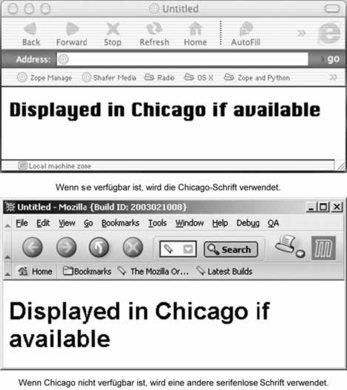
Figure: Using the Chicago font in Mac OS and Windows.
While Mac OS displays the font, the Windows browser uses its default sans-serif font. Some of the detailed appearance is lost, but the basic design is preserved.
Copyright © 2006 of the German translation, dpunkt.verlag GmbH
You may print the online version for your private use.
Otherwise, this chapter from “CSS − Anspruchsvolle Websites mit Cascading Stylesheets” is subject to the same conditions as the bound edition: the work, including all its parts, is protected by copyright. All rights reserved, including reproduction, translation, microfilming, and storage and processing in electronic systems.
dpunkt.verlag GmbH, Ringstraße 19, 69115 Heidelberg
back to top