

XML technologies / CSS / Advanced websites with CSS / A three-column layout / Adding a third column / The HTML code
(Excerpt from “CSS − Advanced websites with Cascading Stylesheets” by Rachel Andrew & Dan Shafer)
The HTML code for this column is inserted directly after the sidebar’s closing <div> tag and inside #wrapper and #main.
              <h3>Move of the Month</h3>
              <h4>The Outer Stall</h4>
              <img src="img/sidebar-player.gif" alt="player demonstrating the outer stall move" height="110" width="60" class="motm-image" />
              <p>Eti bibendum mauris nec nulla. Nullam cursus ullamcorper quam. Sed cursus vestibulum leo.</p>
              <p class="more"><a href="">more</a></p>
            </div>
          </div> <!-- sidebar -->
          <div id="sidebar2">
            <div class="inner">
              <ul id="nav">
                <li><a href="">Freestyle</a></li>
                <li><a href="">Tournaments</a></li>
                <li><a href="">Results</a></li>
                <li><a href="">Rules</a></li>
                <li><a href="">Blog</a></li>
                <li><a href="">FAQ</a></li>
                <li><a href="">Forums</a></li>
                <li><a href="">Organisations</a></li>
              </ul>
              <h3>The BagBlog</h3>
              <div id="bloglatest">
                <h4>10 Apr 06</h4>
                <p><a href="">A New Season: On the Road Again</a></p>
                <p>Vestibulum ante ipsum primis in faucibus orci luctus et ultrices posuere cubilia Curae; Praesent henrerit iaculis arcu.</p>
              </div>
              <ul id="blog">
                <li>5 Apr: <a href="">Ouch... That Really Hurt</a></li>
                <li>3 Apr: <a href="">Experimental Moves From Spain</a></li>
                <li>29 Mar: <a href="">5 Ways to Lighten Up Training</a></li>
              </ul>
              <h3>Newsletter</h3>
              <p>To get all the latest news, tips, results and new footbag products sign up to our free newsletter.</p>
              <form method="post" action="" id="newsletterform">
              <div>
                <input type="text" name="email" id="newsletter-email" value="email@here" class="text" />
              </div>
              <div class="searchbutton">
                <input type="submit" name="btnSubmit" id="newsletter-submit" value="SUBSCRIBE" class="btn" />
              </div>
            </form>
          </div>
        </div> <!-- sidebar2 -->
      </div> <!-- main -->
    </div> <!-- wrapper -->
  </body>
</html>
As you can see, I embedded this section in a div container named sidebar2. Another div element named inner is nested inside this container. There are also a few new classes for the various elements, to which we now need to assign CSS rules. After this HTML code is inserted into the file, the browser displays the column’s contents below the main section, as shown in the following figure.
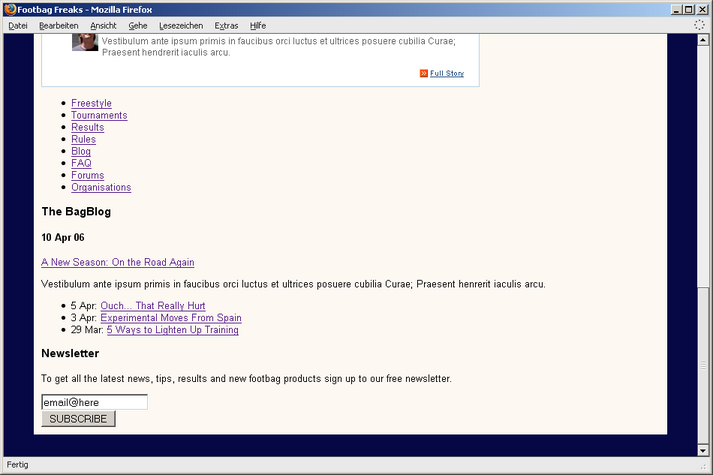
Figure: The page after inserting the div element sidebar2.
Copyright © 2006 of the German translation, dpunkt.verlag GmbH
You may print the online version for your private use.
Otherwise, this chapter from “CSS − Anspruchsvolle Websites mit Cascading Stylesheets” is subject to the same conditions as the bound edition: the work, including all its parts, is protected by copyright. All rights reserved, including reproduction, translation, microfilming, and storage and processing in electronic systems.
dpunkt.verlag GmbH, Ringstraße 19, 69115 Heidelberg
back to top