

XML technologies / ePUB / ePub für (In)Designer / Images, boxes and other design elements / Completing boxes and colored highlights / Boxes in HTML and CSS design
(Excerpt from “ePub für (In)Designer — Mit InDesign Schritt für Schritt zum E-Book” by Sascha Heck & Yves Apel)
Keep the file open or open it in an editor. With correct preparation, its end contains a div class named after your InDesign object style.
div.Kasten {
}
Now add the correct code. CSS offers many box-design options; we explain the most common, starting with spacing.
The CSS box model
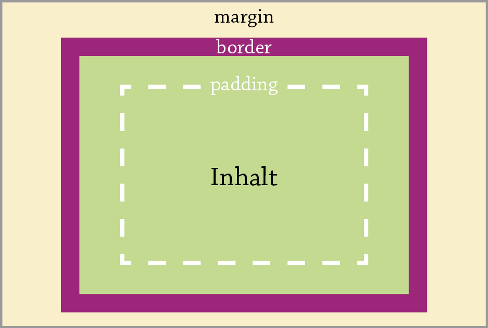
Figure: The CSS box model.
Content: Element content, such as text or an image.
padding: Space between content and border, adopting the content’s background color.
border: Element border.
margin: Transparent outer spacing, or adopting the surrounding element’s background, such as body or div.
Think of div.Kasten as a virtual, initially invisible area between text sections. Its distances to text and page edges, corresponding to InDesign wrapping, are specified by (A) margin: [Abstand oben] [Abstand rechts] [Abstand unten] [Abstand links];. Other combinations are possible: (B) margin: [Abstand alle Seiten]; | (C) margin: [Abstand oben/unten] [Abstand links/rechts]; | (D) margin: [Abstand oben] [Abstand links/rechts] [Abstand unten];. Combinations are not restricted to margin.
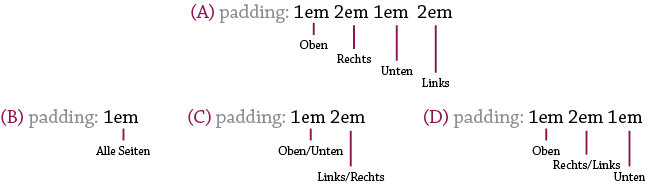
Figure: CSS padding settings.
div.Kasten {
  margin: 1em 2em 1em 2em;
}
The internal spacing is controlled by padding: [Abstand oben] [Abstand rechts] [Abstand unten] [Abstand links];.
div.Kasten {
  padding: 1em;
}
With inner and outer spacing defined, assign a background color to make the box visible using background-color: #991614;.
div.Kasten {
  background-color: #991614;
}
Finally, define the border, comprising width, color and style.
div.Kasten {
   border-width: 2px; /*Konturstärke*/
   border-style: solid; /*Konturstil*/
   border-color: black; /*Konturfarbe*/
}
Eight border styles are possible: border-style: solid; | border-style: dotted; | border-style: dashed; | border-style: double; | border-style: groove; | border-style: ridge; | border-style: inset; | border-style: outset;; most devices support only solid, dotted and dashed.

Figure: solid box border.

Figure: dotted box border.

Figure: dashed box border.
Six CSS lines define the box:
div.Kasten {
  margin: 1em 2em 1em 2em;
  padding: 1em;
  border-width: 2px; /*Konturstärke*/
  border-style: solid; /*Konturstil*/
  border-color: black; /*Konturfarbe*/
  background-color: #991614;
}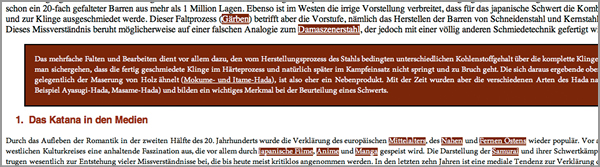
Figure: Display of the example box.
Copyright © dpunkt.verlag GmbH 2012
You may print the online version for your private use.
Otherwise, this chapter from “ePub für (In)Designer” is subject to the same terms as the printed edition: the work and all its parts are protected by copyright. All rights reserved, including reproduction, translation, microfilming, and storage and processing in electronic systems.
dpunkt.verlag GmbH, Wieblinger Weg 17, 69123 Heidelberg, fon 06221-14830, fax 06221-148399, hallo(at)dpunkt.de