

XML technologies / XML / Perl & XML / Introduction to XML / Markup, elements and structure
(Excerpt from “Perl & XML” by Erik T. Ray & Jason McIntosh)
A markup language lets you add descriptions to data so a computer can process it. Most markup languages are optimized for a particular purpose. For example, troff, TeX and HTML focus on outputting documents to printers or screens. These languages provide a presentation-oriented description of data. They control font, size, color and similar properties. They produce an attractive document, but can be a prison for its data: extracting the raw data for another purpose may require considerable effort.
This is where XML comes in. It is a generic markup language describing data by structure and purpose rather than giving instructions for a particular task. Presentation information is normally stored elsewhere, for example in a stylesheet. What remains is a functional description of your document suitable for many different tasks. Used sensibly, XML opens up a practically unlimited range of possibilities and programs.
Let us examine XML’s basic components. Its most important building block is the element. Elements are nested document parts enclosing the data they contain. Consider a typical book: it has a preface, chapters, appendices and an index. In XML, each section would occupy exactly one element. Elements can contain other elements. In a book, further elements can represent book and chapter titles, paragraphs, examples and subsections. This division can continue as far as desired: a subsection may contain smaller parts, or a paragraph may contain elements marking emphasized text, quotations or hypertext links.
Besides dividing text into hierarchical regions, elements let you give a document region a descriptive label and properties. Every element has a name or element type, normally explaining its role within the parent element or document. A chapter element might be called “chapter”, “kapitel” or “ch”, as you prefer. Besides its type, an element may have properties expressed as name/value pairs. These properties are called attributes. An element’s type and attributes distinguish it from other elements in the same document.
The following example shows a typical piece of XML.
Example: An XML fragment
<list id="eriks-aufgaben-47">
  <title>Dinge, die ich diese Woche erledigen sollte</title>
  <item>Das Aquarium reinigen</item>
  <item>Staubsaugen</item>
  <item priority="wichtig">Die Wale retten</item>
</list>
As you guessed, this is a list of three tasks with a title. Even a little HTML knowledge makes its markup structure understandable. The words enclosed in less-than and greater-than signs (< and >) are called tags. They serve as bookends for elements. Every nonempty element has a start-tag and an end-tag, both named after its element type. Start-tags may contain attributes, pairs of attribute name and value such as priority="wichtig" ). The markup is thus clear and unambiguous—even a human can read it.
A human can read it, but more importantly, a computer program can read it especially easily. XML’s designers worked hard to make life easier for XML parsers so any XML processor can read a document as easily as possible, regardless of tag names or context. If your markup obeys the syntax rules, the XML document is unambiguous. This greatly simplifies processing, saving code for exotic special cases.
For comparison, consider HTML as originally defined, an application of XML’s predecessor SGML. (Note: HTML authors are already encouraged to write not classic HTML but XHTML, an XML-adapted, upward-compatible version of HTML. Newer browsers already support XHTML. Many tools—editors, syntax checkers and formatters—will follow in the foreseeable future. XML simplifies processing by different programs. The web will probably soon feature more DocBook and MathML alongside HTML as other XML-derived languages.) For certain elements, omitting end-tags was acceptable. Context often made the endpoint clear. Resolving these ambiguous situations still required enormous effort and occasionally failed. Now imagine a processor handling every possible element type, not just HTML elements: all sense of context disappears. XML processors cannot guess how elements should be arranged. An ambiguity such as a missing end-tag could be disastrous.
XML fragments like the one above can be drawn in a diagram called a tree. Most programmers know this structure. At the top—computer-science trees grow downward—is the root element. Elements one level lower branch from the root. Each may contain further elements, and so on. Eventually one reaches childless elements, the leaves at the tree’s bottom. Leaves contain text data or may be empty. Every element, wherever located, is the trunk of its own tree or subtree. The next figure shows a tree diagram of the preceding example.
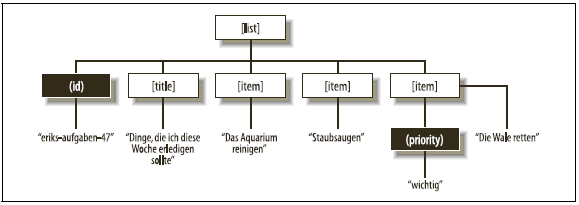
Figure: The task list as a tree structure
Besides the tree analogy, XML documents also use genealogical terms. Data and elements within an element are its children. The containing element is their parent, the parent element. More distant levels are called descendants or ancestors. In our example, the <item> elements are children of the same parent, the <list> element. They are siblings of each other. (We shall leave it there: referring to the grandson of a third cousin would be confusing.) This book uses both tree and family terminology to describe relationships between elements.
Copyright © 2003 O'Reilly Verlag GmbH & Co. KG
You may print the online version for your private use.
Otherwise, this chapter from “Perl & XML” is subject to the same conditions as the bound edition: the work, including all its parts, is protected by copyright. All rights reserved, including reproduction, translation, microfilming, and storage and processing in electronic systems.
O’Reilly Verlag GmbH & Co. KG, Balthasarstraße 81, 50670 Köln, kommentar(at)oreilly.de
back to top