

XML technologies / SVG / Creating simple SVG graphics / The structure of SVG graphics / Contents of the svg tag
(Excerpt from “Das Einsteigerseminar SVG — Webgrafiken mit XML” by Helma Spona)
Inside the <svg> tag, the following child tags are allowed:
| | | | |
| | | | |
| | | | |
| | | | |
| | | | |
| | | | |
| | | | |
| | | | |
The table explains the main tags.
Table: Important SVG tags allowed inside the <svg> tag.
Tag name | Meaning |
|---|---|
| Defines a filter or combination of filters assignable to individual or all elements of the SVG graphic. |
| Groups elements enclosed between |
| Defines a text element. |
| Defines a rectangle. |
| Creates a path, visible as a line or invisible for animation. |
| Defines a hyperlink. |
| Defines a line. |
All these tags have formatting attributes and different uses. They and their attributes are explained in SVG tag syntax.
To test embedding SVG in HTML, create a first example file with the following contents. It defines simple text displayed as the graphic’s content.
With the template, simply insert the <text> tag between <svg> and </svg>. With WebDraw, start it from the Start menu and select File / New. Select the toolbar’s Text tool and enter the text in the Text field. Then click where you want to place it.
Save the SVG file under a name of your choice.
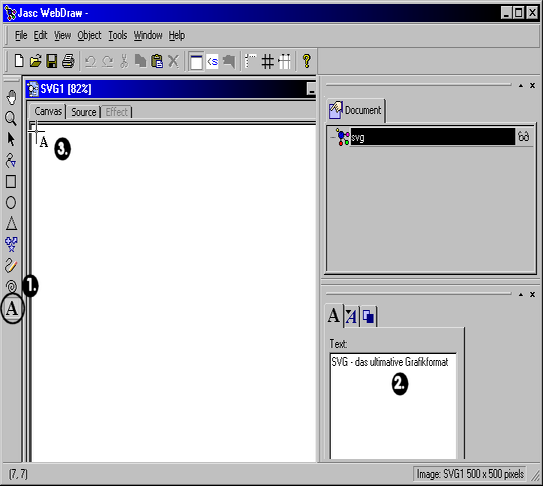
Figure: Inserting text into an SVG file with WebDraw.
Note:
WebDraw also generates formatting that is unnecessary but harmless for this test. Its source code therefore differs slightly from the code shown here.
<?xml version="1.0" standalone="no"?>
<!DOCTYPE svg PUBLIC "-//W3C//DTD SVG 20010719//EN" "http://www.w3.org/TR/2001/PR-SVG-20010719/DTD/svg10.dtd">
<svg width="500" height="500">
  <text x="0" y="10">SVG - das ultimative Grafikformat</text>
</svg>
Copyright © verlag moderne industrie GmbH 2001
You may print the online version for your private use.
Otherwise, this chapter from “Das Einsteigerseminar SVG — Webgrafiken mit XML” is subject to the same conditions as the bound edition. The work, including all its parts, is protected by copyright. All rights reserved, including reproduction, translation, microfilming, and storage and processing in electronic systems.
verlag moderne industrie GmbH, Justus-von-Liebig-Straße 1, D-86899 Landsberg/Lech, fon ++49 (0) 81 91 / 125 – 0, leserservice(at)mi-verlag.de
back to top