

XML technologies / SVG / SVG basics and possible applications / What is SVG? / Zooming without loss of quality
(Excerpt from “Das Einsteigerseminar SVG — Webgrafiken mit XML” by Helma Spona)
Another SVG advantage over raster formats is that users can enlarge or reduce graphics, for example to inspect details. This is especially useful for maps and other graphics showing large areas with many details.
The display plug-in provides this capability. In Adobe SVG Viewer, activate zoom through the graphic’s context menu. Because it is vector graphics, no quality is lost. The following figure shows the same graphic at original size and twice that size.
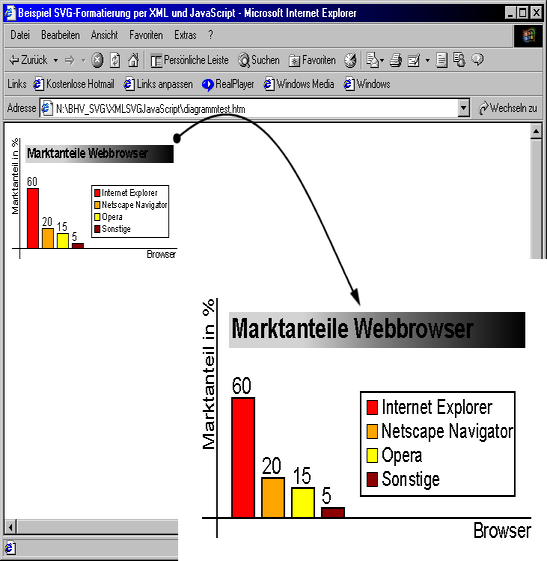
Figure: SVG graphics zoom without loss of quality
Raster graphics can also be “zoomed”. Either display a reduced image linking to the full image, or enlarge its display with the height and width attributes of the <IMG> tag. This causes substantial quality loss, shown in the next figure where a JPG image is enlarged to twice its size.
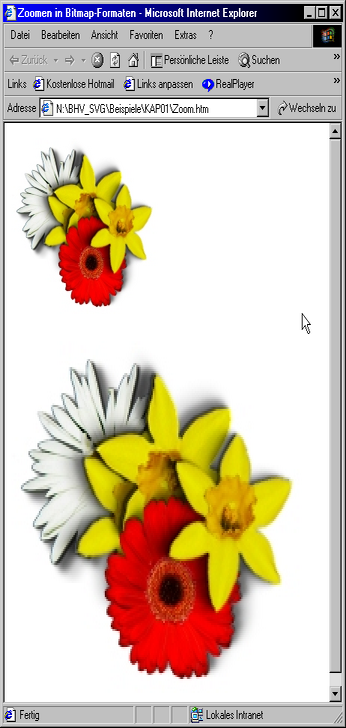
Figure: Clear quality loss when zooming raster graphics
Copyright © verlag moderne industrie GmbH 2001
You may print the online version for your private use.
Otherwise, this chapter from “Das Einsteigerseminar SVG — Webgrafiken mit XML” is subject to the same conditions as the bound edition. The work, including all its parts, is protected by copyright. All rights reserved, including reproduction, translation, microfilming, and storage and processing in electronic systems.
verlag moderne industrie GmbH, Justus-von-Liebig-Straße 1, D-86899 Landsberg/Lech, fon ++49 (0) 81 91 / 125 – 0, leserservice(at)mi-verlag.de
back to top