

XML technologies / XML / XML in a Nutshell / The Document Object Model (DOM) / Specialized node types
(Excerpt from “XML in a Nutshell” by Elliotte Rusty Harold & W. Scott Means)
Although the Node interface already provides access to individual XML document parts, the DOM core offers more specialized interfaces to simplify common programming tasks. These fall broadly into structural and content-oriented node types.
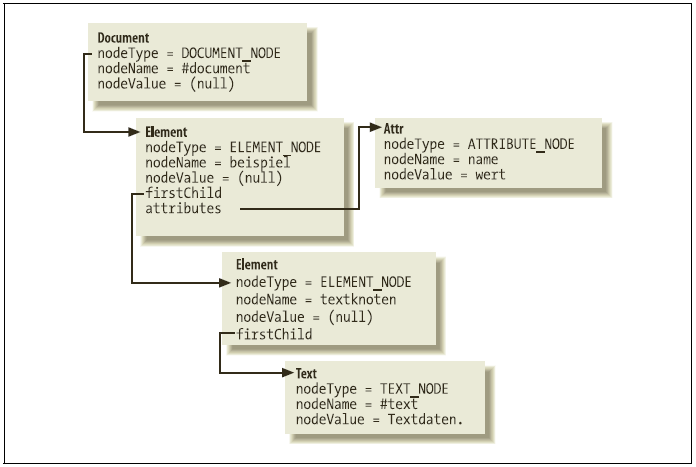
Figure: The document in memory with links
Structural node types
XML contains syntactic structures not formally considered content. These interfaces represent document parts containing no element data.
DocumentType
The interface DocumentType provides access to the notations introduced in the document type definition, to entities, PUBLIC and SYSTEM identifiers, and local grammar rules. Only one !DOCTYPE declaration is allowed per document, so each DOM document may contain just one DocumentType object. Obtain it through the attribute doctype in the interface Document. The following table defines the DocumentType interface.
Table: The DocumentType interface derived from Node
Name | Type | Read-only? |
|---|---|---|
| ||
|
|
|
|
|
|
|
|
|
|
|
|
|
|
|
|
|
|
With the extra fields available since DOM Level 2, a parsed document can now be fully reconstructed from DOM framework information alone. Currently there is no programmatic way to modify the content of DocumentType nodes.
ProcessingInstruction
The node type ProcessingInstruction directly accesses the content of a processing instruction. Although processing instructions usually appear in document text, they may also occur before or after the root element and in DTDs. The following table describes the attributes of the ProcessingInstruction.
Table: The ProcessingInstruction interface derived from Node
Name | Type | Read-only? |
|---|---|---|
| ||
|
| |
|
|
|
Remember that only the target has a specified syntax, that of an XML token. The remaining data may take almost any form up to the closing >. For more on using and potentially misusing processing instructions, see Programming models.
Notation
XML notations formalize format declarations for external parsed entities and processing instructions. The document’s notation list is a NamedNodeMap object in the DOCTYPE declaration, accessible through the interface Document. The following table defines the Notation interface.
Table: The Notation interface derived from Node
Name | Type | Read-only? |
|---|---|---|
| ||
|
|
|
|
|
|
Entity
The name of the interface Entity initially seems ambiguous, but becomes clearer when you know the DOM core also includes an EntityReference interface. The interface Entity accesses the notation name and PUBLIC and SYSTEM identifiers of the entity declaration. Parsed entity nodes have childNodes, while unparsed entities have a notationName. The following table defines this interface.
Table: The Entity interface derived from Node
Name | Type | Read-only? | 2.0 | 3.0 |
|---|---|---|---|---|
| ||||
|
|
| ||
|
|
| ||
|
|
| ||
|
|
| ||
|
|
|
| |
|
|
|
|
DOM Level 3 adds three attributes for external parsed entities: inputEncoding, xmlEncoding and xmlVersion. This information permits proper enforcement of well-formedness constraints based on the xmlVersion attribute’s value. The two encoding attributes permit accurate reconstruction of external parsed entity files from the DOM tree.
All attributes are read-only and cannot change at runtime.
Content-oriented node types
Actual XML data lies within the document element. These node types represent nonstructural parts such as character data, elements and attribute values.
Document
After parsing an XML document, the result in memory is one instance of Document. Empty Document nodes can be created through the DOMImplementation interface. It accesses the document type definition and the single top-level Element node containing the parsed document’s actual data, the documentElement. It also offers methods for applications to create new nodes not generated during parsing. The following table describes all attributes and methods of the Document.
Table: The Document interface derived from Node
Name | Type | Read-only? | 2.0 | 3.0 |
|---|---|---|---|---|
| ||||
|
|
| ||
|
|
| ||
|
|
| ||
|
|
|
| |
|
|
| ||
|
|
|
| |
|
|
| ||
|
|
|
| |
|
|
|
| |
|
|
| ||
| ||||
|
|
| ||
|
| |||
|
|
| ||
|
| |||
|
| |||
|
| |||
|
| |||
|
|
| ||
|
| |||
|
| |||
|
| |||
|
|
| ||
|
| |||
|
|
| ||
|
|
| ||
|
|
| ||
|
|
|
The various create...( ) methods matter when applications extend or modify a parsed document’s structure. Nodes created by one Document instance can only be inserted into the tree of the Document that created them. DOM Level 2 therefore introduced importNode( ) to copy a node’s content from one Document to another, optionally including children. DOM Level 3 introduced adoptNode() to move an entire subtree between documents.
Besides creation methods, there are methods for finding XML elements or lists. The methods getElementsByTagName( ) and getElementsByTagNameNS( ) list all XML elements with a particular name; the latter also restricts searches to a specified namespace. The method getElementById( ) finds the element with an XML attribute ID matching the supplied value.
DOM Level 3 also added attributes helping applications reconstruct XML as it existed before parsing. The attributes inputEncoding, xmlEncoding and xmlStandalone record values from the original document’s XML declaration and its character encoding before parsing and conversion to Unicode.
A major DOM Level 3 addition was document validation within the DOM tree itself. The method normalizeDocument( ) effectively lets developers reparse the XML document from the in-memory tree. The attribute domConfig exposes parameters controlling normalization. Changing the attribute xmlVersion beforehand can also change the target XML version, causing DOM to enforce the corresponding rules for XML names. For differences between XML 1.0 and 1.1, see the XML reference.
DocumentFragment
Applications editing existing documents sometimes need to keep nodes outside the parsed document hierarchy. For example, an XML editor may provide a clipboard. Cut nodes can temporarily move to a DocumentFragment node rather than remain in the source document, without being deleted. To paste them back, a method such as Node.appendChild() moves them back. The interface Node is the base of DocumentFragment, which has no specific attributes or methods.
Element
Nodes of type Element are the most commonly used parts of typical XML documents. They serve as parents for instances of Text, Comment, EntityReference, ProcessingInstruction, CDATASection and for child nodes of type Element forming the actual document content. They also access the Attr instances holding the element’s XML attributes. The following table lists all attributes and methods supported by the Element interface.
Table: The Element interface derived from Node
Name | Type | Read-only? | 2.0 | 3.0 |
|---|---|---|---|---|
| ||||
|
|
|
| |
|
|
| ||
| ||||
|
| |||
|
| |||
|
|
| ||
|
|
| ||
|
| |||
|
|
| ||
|
|
| ||
|
|
| ||
|
| |||
|
| |||
|
|
| ||
|
| |||
|
| |||
|
| |||
|
|
| ||
|
|
|
| |
|
|
|
| |
|
|
|
|
Attr
Since XML attributes may contain text values or entity references, DOM stores attributes in their own tree structure. This XML fragment contains one element with two attributes:
<!ENTITY bookcase_pic SYSTEM "bookcase.gif" NDATA gif>
<!ELEMENT picture EMPTY>
<!ATTLIST picture
   src ENTITY #REQUIRED
   alt CDATA #IMPLIED>
. . .
<picture src="bookcase_pic" alt="3/4 view of bookcase"/>
The first contains an unparsed entity reference, the second a simple string. Since DOM stores attributes as instances of Attr, some parsers represent their contents as subtrees of Node objects. Here, the attribute src would contain an instance of EntityReference. Note that the nodeValue of the Attr node contains the text representation of its children, the children of the Attr node. The following table lists the attributes and methods of the Attr.
Table: The Attr interface derived from Node
Name | Type | Read-only? | 2.0 | 3.0 |
|---|---|---|---|---|
| ||||
|
|
| ||
|
|
|
| |
|
|
| ||
|
| |||
|
|
|
| |
|
|
|
|
Besides the attribute name and text value, the interface Attr contains a flag named specified showing whether the value was explicit in the XML or implicit through a !ATTLIST-declaration in the DTD. It also has a back-reference to the Element node containing the Attr instance.
CharacterData
Some data types in a DOM tree represent blocks of character data without markup. CharacterData is an abstract interface supporting common text-manipulation methods. The concrete interfaces Comment, Text and CDATASection use these methods. The following table lists attributes and methods supported by the CharacterData interface.
Table: The CharacterData interface derived from Node
Name | Type | Read-only? | DOM 2.0 |
|---|---|---|---|
| |||
|
| ||
|
|
| |
| |||
|
| ||
|
| ||
|
| ||
|
|
Comment
DOM parsers need not expose XML comments after parsing. Depending on comment data is therefore poor programming practice at best. For metadata outside the underlying XML document’s actual content, consider processing instructions instead. The interface Comment derives from CharacterData and has only inherited attributes and methods, none specific to the interface.
EntityReference
A DOM parser may expose general entity references within XML elements as EntityReference nodes. This is not guaranteed: the parser can instead replace entities or character references with the Unicode strings they represent. The interface EntityReference derives from Node and has no specific attributes or methods.
Text
Character data from XML is stored in Text nodes. Text nodes are children of Element or Attr nodes. Immediately after parsing, every contiguous block of character data in the source becomes one Text node. The receiving application can still insert, delete or split Text nodes after parsing, allowing Text nodes to appear side by side in the tree. The following table describes the Text interface.
Table: The Text interface derived from CharacterData
Name | Type | Read-only? | 2.0 | 3.0 |
|---|---|---|---|---|
| ||||
|
|
| ||
|
|
|
| |
| ||||
|
|
| ||
|
|
The method splitText splits an existing Text node into two at a specified position. This helps when inserting markup into existing character data: new nodes can be inserted into the resulting gap.
Level 3 also added the attribute wholeText, which returns all text, in document order, from the selected Text node and all neighboring Text nodes. Before Level 3, applications had to enumerate all children and concatenate them manually to obtain a node’s full text.
CDATASection
CDATA sections conveniently embed characters normally interpreted as markup in XML. The DOM hierarchy represents them as CDATASection nodes. The interface CDATASection derives from Text and has no specific attributes or methods.
Copyright © 2005 O'Reilly Verlag GmbH & Co. KG
You may print the online version for your private use.
Otherwise, this chapter from “XML in a Nutshell” is subject to the same conditions as the bound edition: the work, including all its parts, is protected by copyright. All rights reserved, including reproduction, translation, microfilming, and storage and processing in electronic systems.
O’Reilly Verlag GmbH & Co. KG, Balthasarstraße 81, 50670 Köln, kommentar(at)oreilly.de