

XML technologies / SVG / Using animations / Changing object attributes
(Excerpt from “Das Einsteigerseminar SVG — Webgrafiken mit XML” by Helma Spona)
The tag <animate> adjusts arbitrary formatting and attributes of an element. For example, change the circle’s size during animation, as the next example shows.
Using this tag is simple and very similar to <animateColor>. Again, the attribute dur sets duration, while from and to set starting and final values. For the parameter attributeName, specify the attribute name to change, here r. The line
<animate dur="6s" from="3" to="6" attributeName="r" />gives the circle its maximum diameter of 12 pixels at the endpoint. More interestingly, it could reach its largest diameter at the crescent’s widest part and return to its initial size at the endpoint. This too is easy to implement.
Run two animations in sequence: the first increases the radius, the second decreases it. Together they must last six seconds, with the second starting when the first ends. The following listing sets their durations to four and two seconds respectively.
To start the second after the first finishes, set the attribute begin to "4s" as shown in the listing.
<circle cx="130" cy="80" r="3" style="fill:red;stroke:none">
  <animateMotion  dur="6s" path="M0 0 Q203 16 85 55" />
  <animateColor  dur="6s" from="red" to="yellow" attributeName="fill" />
  <animate dur="4s" from="3" to="6" attributeName="r" />
  <animate dur="2s" begin="4s" from="6" to="3" attributeName="r" />
</circle>
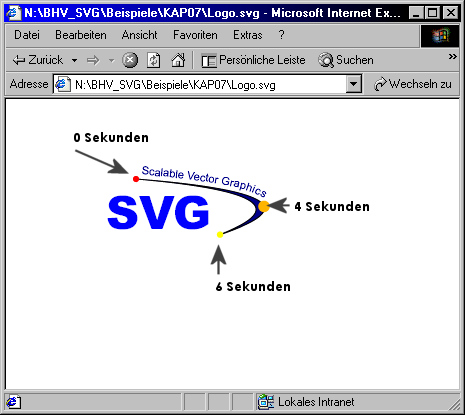
Figure: Main phases of the animation.
Copyright © verlag moderne industrie GmbH 2001
You may print the online version for your private use.
Otherwise, this chapter from “Das Einsteigerseminar SVG — Webgrafiken mit XML” is subject to the same conditions as the bound edition. The work, including all its parts, is protected by copyright. All rights reserved, including reproduction, translation, microfilming, and storage and processing in electronic systems.
verlag moderne industrie GmbH, Justus-von-Liebig-Straße 1, D-86899 Landsberg/Lech, fon ++49 (0) 81 91 / 125 – 0, leserservice(at)mi-verlag.de
back to top