

XML technologies / CSS / Advanced websites with CSS / Validation and backward compatibility / CSS page validation
(Excerpt from “CSS − Advanced websites with Cascading Stylesheets” by Rachel Andrew & Dan Shafer)
Test stylesheets in browsers and validate them too. It is easy and free: submit pages to W3C, and error-free ones may display the icon below.
Figure: Official W3C icon for CSS compliance.
Visit W3C: CSS Validation Service and follow instructions. Automatic redirection to German is normal; the site detects language. The figure shows its German start page.
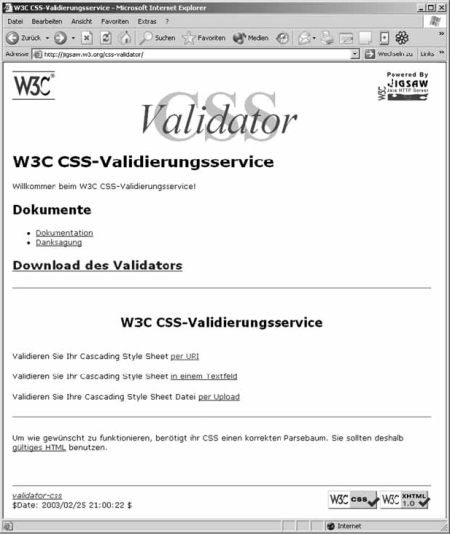
Figure: The W3C CSS validator.
Three methods are offered: URL, uploaded CSS file or CSS pasted into a text field.
A CSS or HTML URL is easiest. For HTML, all linked sheets and embedded CSS are checked. Upload local files and linked resources to a server for access.
Our URI example leads to the page below. These forms use default options, adjustable at any time.
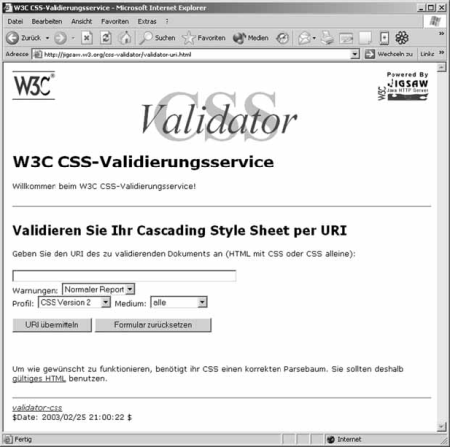
Figure: A W3C CSS validator variant.
There are three drop-down menus:
“Warnings” has four severity-reporting settings:
All warnings
Normal report
Most important warnings
No warnings
Warnings are not CSS errors. Errors prevent proper operation, but valid code may still use deprecated or misapplied markup. Equal text and background colors trigger a warning: valid CSS, potentially problematic rendering.
Keep the default “Normal report” unless experience and a specific reason justify changing it.
“Profile” selects the CSS standard to validate against, with eleven options:
No special profile
CSS version 1
CSS version 2
CSS version 2.1
CSS version 3
SVG basic
SVG tiny
Mobile
ATSC-TV profile
TV profile
Only the first four matter here, selecting CSS versions. SVG, mobile and TV profiles belong elsewhere and can be ignored.
The default is CSS 2; I recommend CSS 2.1 as the latest broadly supported version.
“Medium” selects the stylesheet’s output medium.
Click “Submit URI” to send the CSS or HTML file. The validator loads and checks it, then reports validity with an icon link (see Official W3C icon for CSS compliance) or lists syntax violations.
CSS validation requires valid HTML, especially the “document parse tree.” Otherwise it cannot work correctly.
The CSS site links to W3C’s HTML validator through “valid HTML.” Validate HTML first, including its prolog, DOCTYPE and correct display parameters. Without these, validation cannot begin and immediately reports an error.
Copyright © 2006 of the German translation, dpunkt.verlag GmbH
You may print the online version for your private use.
Otherwise, this chapter from “CSS − Anspruchsvolle Websites mit Cascading Stylesheets” is subject to the same conditions as the bound edition: the work, including all its parts, is protected by copyright. All rights reserved, including reproduction, translation, microfilming, and storage and processing in electronic systems.
dpunkt.verlag GmbH, Ringstraße 19, 69115 Heidelberg
back to top