

XML technologies / SVG / Creating simple SVG graphics / Creating and formatting simple text / Adding page banner text
(Excerpt from “Das Einsteigerseminar SVG — Webgrafiken mit XML” by Helma Spona)
The page banner needs two texts, created with the <text> tag. To put them on top of the graphic, append them at the end before the </svg> tag. The first contains “SVG”, the second “Scalable Vector Graphic”. Their source code and formatting are:
<text id="ueberschrift" x="536" y="90" style="font-family:Arial Black;font-size:100;stroke-width:1;stroke:rgb(0,0,0);fill:rgb(255,255,255);">SVG</text>
<text id="unterschrift" x="244" y="90" style="font-family:Arial Black;font-size:39;stroke-width:1;stroke:rgb(0,0,0);fill-opacity:0.5;fill:rgb(0,0,0);">Scalable Vector Graphic</text>
The table explains the formatting specifications used.
Table: Important formatting settings for the text tag.
Formatting | Description |
|---|---|
| Sets the font, which displays correctly only if installed on the viewer’s computer. As in HTML stylesheets, list alternatives separated by commas, enclosing names with spaces in single quotes. For example, specify Helvetica as an alternative with |
| Sets font size in pixels. |
| Sets outline width. |
| Sets outline color. |
| Sets fill opacity from 0 (fully transparent) to 1 (fully opaque). The example gives the subtitle 50% transparency. |
| Sets the text’s fill color. |
Note:
Wherever colors are accepted, use color names or RGB values. For example, fill:red or fill:rgb(255,0,0) fills an element red. More information on colors, gradients and patterns appears in Filters, transformations and gradients.
Internet Explorer displays these additions as follows:
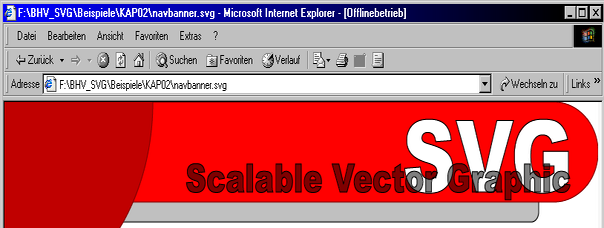
Figure: Result of the page banner’s first text elements.
Copyright © verlag moderne industrie GmbH 2001
You may print the online version for your private use.
Otherwise, this chapter from “Das Einsteigerseminar SVG — Webgrafiken mit XML” is subject to the same conditions as the bound edition. The work, including all its parts, is protected by copyright. All rights reserved, including reproduction, translation, microfilming, and storage and processing in electronic systems.
verlag moderne industrie GmbH, Justus-von-Liebig-Straße 1, D-86899 Landsberg/Lech, fon ++49 (0) 81 91 / 125 – 0, leserservice(at)mi-verlag.de
back to top