

XML technologies / ePUB / ePub für (In)Designer / Text / Typography for e-books / Dashes and symbols
(Excerpt from “ePub für (In)Designer — Mit InDesign Schritt für Schritt zum E-Book” by Sascha Heck & Yves Apel)
Typography offers several dash types in InDesign’s menu Type → Insert Special Character → Hyphens and Dashes. Not all transfer, but the two most important always work: the hyphen and en dash. Insert the en dash through the menu or Alt + -, or Alt + 0150 on Windows. In HTML it appears as –
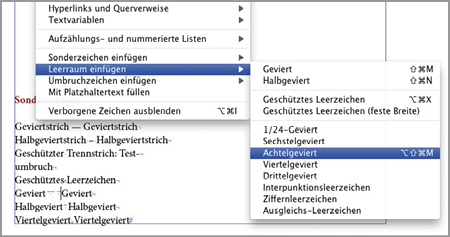
Figure: Fine typographic spaces available in InDesign
become ordinary spaces in ePub.
Mathematical symbols sometimes occur in text or tables. Mathematical typesetting in ePub is not yet feasible; use an image instead. Most fonts contain a multiplication symbol, usually unavailable from the keyboard, so use InDesign’s Glyphs panel. Correctly inserted, it transfers correctly to ePub. For later HTML editing, its code is × and the minus symbol is −.
Insert the ellipsis, three omission dots, with Alt + period in InDesign; in HTML use …

Figure: Displaying an ellipsis.
Copyright © dpunkt.verlag GmbH 2012
You may print the online version for your private use.
Otherwise, this chapter from “ePub für (In)Designer” is subject to the same terms as the printed edition: the work and all its parts are protected by copyright. All rights reserved, including reproduction, translation, microfilming, and storage and processing in electronic systems.
dpunkt.verlag GmbH, Wieblinger Weg 17, 69123 Heidelberg, fon 06221-14830, fax 06221-148399, hallo(at)dpunkt.de
back to top