

XML technologies / XML / XML in a Nutshell / Resource Directory Description Language (RDDL) / RDDL syntax
(Excerpt from “XML in a Nutshell” by Elliotte Rusty Harold & W. Scott Means)
An RDDL document is an rddl:resource-extended document based on XHTML Basic. XHTML Basic is a subset of XHTML including its structure, text, hypertext, lists, basic forms and tables, images, objects, metadata, links and basic modules. It has no frames or deprecated layout elements such as font and bold. Nevertheless, XHTML Basic has enough functionality to describe almost anything reasonable about an XML application.
RDDL adds one new element, resource, in the namespace "http://www.rddl.org/". This URL is normally bound to the rddl namespace prefix. The prefix can change while the URL remains the same. However, the RDDL DTD defines the element resource with the name rddl:resource, so valid RDDL documents must use the prefix rddl.
An element rddl:resource is a simple XLink. Its attribute xlink:href points to the referenced resource; its attributes xlink:role and xlink:arcrole specify the resource’s type and purpose. The element rddl:resource may appear wherever an element p may appear and contain anything that element div may contain. Browsers usually ignore the opening and closing tags of rddl:resource while displaying its contents. Resource-searching software only examines the element rddl:resource and its attributes, ignoring the other XHTML.
Recall the people vocabulary used earlier. Every element in the next example is now in the default namespace "http://www.oreilly.de/catalog/xmlnut2ger/namensraum/leute".
<?xml version="1.0"?>
<leute xmlns="http://www.oreilly.de/catalog/xmlnut2ger/namensraum/leute">
  <person geboren="1912" gestorben="1954">
    <name>
      <vorname>Alan</vorname>
      <nachname>Turing</nachname>
    </name>
    <beruf>Informatiker</beruf>
    <beruf>Mathematiker</beruf>
    <beruf>Kryptograph</beruf>
  </person>
  <person geboren="1918" gestorben="1988">
    <name>
      <vorname>Richard</vorname>
      <mittelinitial>P</mittelinitial>
      <nachname>Feynman</nachname>
    </name>
    <beruf>Physiker</beruf>
    <hobby>Spielt Bongos</hobby>
  </person>
</leute>
Code example: Two people described using a default namespace
This document should be at the application’s namespace URL, "http://www.oreilly.de/catalog/xmlnut2ger/namensraum/leute". The declaration DOCTYPE loads the RDDL DTD rather than XHTML Basic’s. The only difference is the additional element rddl:resource. The document is valid and well-formed. Below it appears in Mozilla like any HTML document.
<!DOCTYPE html PUBLIC "-//XML-DEV//DTD XHTML RDDL 1.0//EN" "http://www.rddl.org/rddl-xhtml.dtd">
<html xmlns="http://www.w3.org/1999/xhtml" xmlns:xlink="http://www.w3.org/1999/xlink" xmlns:rddl="http://www.rddl.org/">
<head>
  <title>Eine XML-Anwendung, die Leute beschreibt</title>
</head>
<body>
  <h1>Eine XML-Anwendung, die Leute beschreibt</h1>
  <rddl:resource xlink:type="simple" xlink:href="urn:isbn:1565922247"###isbn anpassen### xlink:role="http://dublincore.org/documents/dcmi-type-vocabulary/#text" xlink:arcrole="http://www.rddl.org/purposes#normative-reference">
    <p>http://www.oreilly.de/catalog/xmlnut2ger/namensraum/leute ist die Namensraum-URL für eine XML-Anwendung, die Leute auf datensatzähnliche Weise beschreibt und als Beispiel in <cite>XML in a Nutshell</cite>, dritte Auflage, von Elliotte Rusty Harold und W. Scott Means (O'Reilly Media, 2004) verwendet wird.</p>
  </rddl:resource>
  <h2>Referenzierte Ressourcen</h2>
    <p>Mehrere Beispiele in diesem Buch sprechen diese Anwendung auf die eine oder andere Weise an. Dazu gehören zum Beispiel:</p>
    <ul>
      <li>
        <rddl:resource xlink:type="simple" xlink:href="http://www.cafeconleche.org/books/xian3/examples/03/3-5.dtd" xlink:role="http://www.isi.edu/in-notes/iana/assignments/media-types/application/xml-dtd" xlink:arcrole="http://www.rddl.org/purposes#validation"><a href="http://www.cafeconleche.org/books/xian3/examples/03/3-5.dtd">Beispiel 3-5</a>: Eine datenorientierte DTD zur Beschreibung von Personen</rddl:resource>
     </li>
     <li>
       <rddl:resource xlink:type="simple" xlink:href="http://www.cafeconleche.org/books/xian3/examples/08/8-15.xsl" xlink:role="http://www.w3.org/1999/XSL/Transform" xlink:arcrole="http://www.isi.edu/in-notes/iana/assignments/media-types/text/html"><a href="http://www.cafeconleche.org/books/xian3/examples/08/8-15.xsl">Beispiel 8-15</a>: Ein XSLT-Stylesheet für Dokumente, die Personen beschreiben</rddl:resource>
     </li>
   </ul>
   <p>Dieses Dokument ist selbst <a href="http://www.cafeconleche.org/books/xian3/examples/15/15-2.html">Beispiel 15-2</a> aus dem RDDL-Kapitel.</p>
</body>
</html>
Code example: An RDDL document
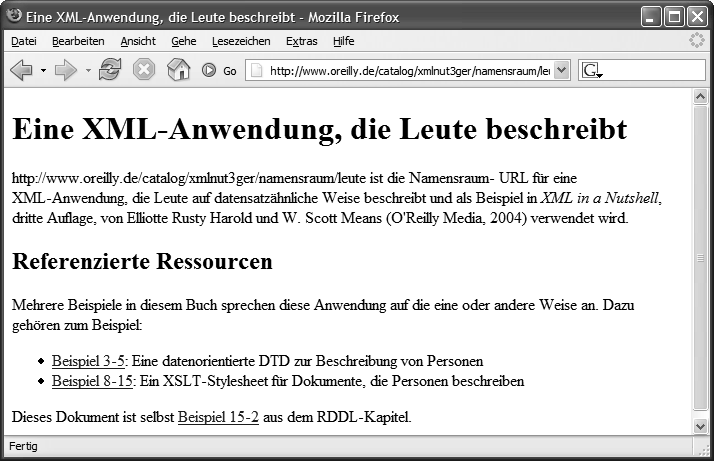
Figure: A browser sees RDDL as just another HTML document.
There are three elements rddl:resource referencing resources: two in a list, one enclosing a section higher up. The first references the people application’s unofficial specification, this book. Its attribute xlink:href contains an isbn URI identifying the book. The attribute xlink:role contains a URL from Dublin Core indicating textual content. Finally, the attribute xlink:arcrole contains a well-known RDDL URL indicating a normative reference.
The second element rddl:resource references the DTD first defined under Document type definitions (DTDs). A MIME media-type URL gives its type; validation is its purpose. The attribute xlink:href links to the DTD’s actual location, invisible to ordinary browsers. Therefore, the element rddl:resource also includes a normal HTML link using a, which browsers color blue for users to click. Such duplicate markup is common in RDDL: one pair of tags for machines, another for people, both saying much the same thing.
The final element rddl:resource references an XSLT stylesheet. Its attribute xlink:role contains the XSLT namespace URI, identifying the resource as XSLT. The attribute xlink:arcrole contains HTML’s MIME-type URL, indicating that the stylesheet transforms documents to HTML.
This is a simple example. Real RDDL would include much more explanatory HTML. Machines ignore HTML and examine only the attributes xlink:role and xlink:arcrole to determine each referenced resource’s exact use.
Copyright © 2005 O'Reilly Verlag GmbH & Co. KG
You may print the online version for your private use.
Otherwise, this chapter from “XML in a Nutshell” is subject to the same conditions as the bound edition: the work, including all its parts, is protected by copyright. All rights reserved, including reproduction, translation, microfilming, and storage and processing in electronic systems.
O’Reilly Verlag GmbH & Co. KG, Balthasarstraße 81, 50670 Köln, kommentar(at)oreilly.de
back to top