

XML technologies / SVG / Filters, transformations and gradients / Using and combining filters and lighting effectively / Lighting effects / Defining a spotlight
(Excerpt from “Das Einsteigerseminar SVG — Webgrafiken mit XML” by Helma Spona)
To create a spotlight, use the element <feSpotLight>. It has these attributes:
x,yandzhave the same meaning as for the element<fePointLight>. They determine the light source’s position (x/y) and height (z). If omitted, their default value is 0.pointsAtX,pointsAtYandpointsAtZset the spotlight’s target position, where it should shine.specularExponentsets the light’s hardness. Together with the attributelimitingConeAngle, this precisely controls whether the spotlight is soft or hard.limitingConeAnglesets the light cone’s opening angle in degrees.
<filter id="FLicht03">
  <feDiffuseLighting in="SourceGraphic" diffuseConstant="1" surfaceScale="10" style="lighting-color:white">
    <feSpotLight x="0" y="0" z="25" pointsAtX="40" pointsAtY="40" pointsAtZ="0" specularExponent="0.01" limitingConeAngle="30"/>
  </feDiffuseLighting>
</filter>
<filter id="FLicht04">
  <feDiffuseLighting in="SourceGraphic" diffuseConstant="1" surfaceScale="10" style="lighting-color:white">
    <feSpotLight x="0" y="0" z="25" pointsAtX="40" pointsAtY="40" pointsAtZ="0" specularExponent="0.01"/>
  </feDiffuseLighting>
</filter>
The bottom two squares in the following graphic show the effects defined above. They differ only in the specification of the attribute limitingConeAngle (in FLicht03), which prevents light from appearing outside this angle.
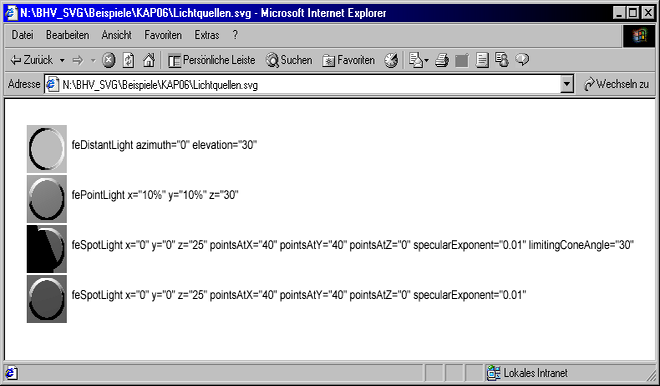
Figure: Effects created with feDistantLight, fePointLight and feSpotLight.
Copyright © verlag moderne industrie GmbH 2001
You may print the online version for your private use.
Otherwise, this chapter from “Das Einsteigerseminar SVG — Webgrafiken mit XML” is subject to the same conditions as the bound edition. The work, including all its parts, is protected by copyright. All rights reserved, including reproduction, translation, microfilming, and storage and processing in electronic systems.
verlag moderne industrie GmbH, Justus-von-Liebig-Straße 1, D-86899 Landsberg/Lech, fon ++49 (0) 81 91 / 125 – 0, leserservice(at)mi-verlag.de
back to top