

XML technologies / SVG / Filters, transformations and gradients / Gradient and pattern settings / Using colors in SVG graphics
(Excerpt from “Das Einsteigerseminar SVG — Webgrafiken mit XML” by Helma Spona)
There are several ways to specify colors in SVG graphics. Use the hexadecimal color codes familiar from HTML, color names, or RGB codes.
Hexadecimal color specifications always begin with #, indicating a hexadecimal number. It contains six “digits”, each either 0–9 or A–F; the letters represent 10–15. For example, #FF0000 defines red. The first two digits represent red, the next two green and the final two blue.
RGB specifications work similarly, with comma-separated integer decimal values for red, green and blue. Higher components give purer colors. Each ranges from 0 to 255.
Begin with the keyword rgb, followed by parenthesized, comma-separated values in red, green, blue order. Lower values produce darker colors.
Black, for example, is rgb(0,0,0), and white is rgb(255,255,255). Equal values produce pure gray. A dominant component gives the color a corresponding tint. Pure red, for example, is rgb(255,0,0), pure green is rgb(0,255,0), and pure blue is rgb(0,0,255).
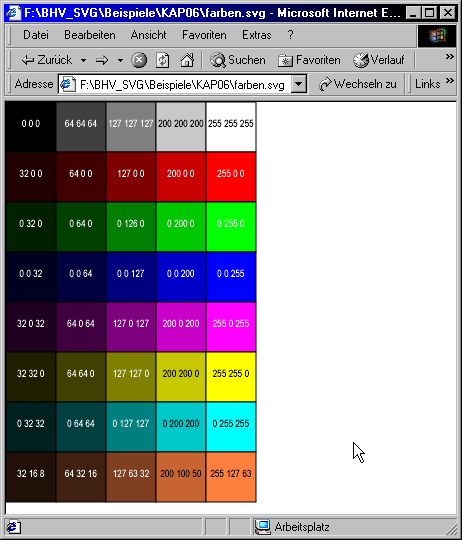
Figure: RGB values for important colors.
Copyright © verlag moderne industrie GmbH 2001
You may print the online version for your private use.
Otherwise, this chapter from “Das Einsteigerseminar SVG — Webgrafiken mit XML” is subject to the same conditions as the bound edition. The work, including all its parts, is protected by copyright. All rights reserved, including reproduction, translation, microfilming, and storage and processing in electronic systems.
verlag moderne industrie GmbH, Justus-von-Liebig-Straße 1, D-86899 Landsberg/Lech, fon ++49 (0) 81 91 / 125 – 0, leserservice(at)mi-verlag.de
back to top