

XML technologies / XSL-FO / XSL-FO introduction / The float concept
In practice the float concept is used for two layout goals which seem to have not much in common at first sight. One goal is the generation of texts which flow around other objects (usually images). The other goal is the placing of marginalia, meaning texts which are not included in the text flow but at the margin. The float concept is only minimally suitable for this last purpose which is nonetheless used because there is no appropriate marginalia concept in XSL-FO.
The floating element is inserted into the block in which it shall flow. For this purpose it is embedded in a <fo:float> element. The float attribute specifies where the float object shall flow in the surrounding block. The attribute value:
start sets the float object at the start margin, to the left when using the common writing direction.
end sets the float object at the end margin, to the right when using the common writing direction.
left sets the float object at the left margin.
right sets the float object at the right margin.
When using the Antenna House Formatter the attribute has two further, proprietary values:
inside sets the float object at the inner margin (at the left side to the right, at the right side to the left).
outside sets the float object at the outer margin (at the left side to the left, at the right side to the right).
The float object needs appropriate room in the surrounding block. This is controlled by the surrounding block element with the intrusion-displace attribute.
The attribute may contain the following values:
line flows around the content of the <fo:float> element having regard to start-indent.
indent flows around the content of the <fo:float> element having regard to text-indent and start-indent.
block generates a block next to the content of the <fo:float> element having regard to text-indent. So the surrounding block is indented at the top margin of the float object.
One example for floating text (line):
<fo:block intrusion-displace="line">
   TEXT TEXT TEXT TEXT ... TEXT TEXT TEXT
   <fo:float float="left">
      <fo:block>
         <fo:external-graphic src="hellas.bmp" content-width="30mm"/>
      </fo:block>
   </fo:float>
   TEXT TEXT TEXT ... TEXT TEXT TEXT
   <fo:float float="right">
      <fo:block >
         <fo:external-graphic src="hellas.bmp"content-width="30mm"/>
      </fo:block>
   </fo:float>
   TEXT TEXT TEXT ... TEXT TEXT TEXT
</fo:block>
Formatter view

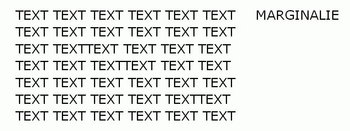
One example for an indented block:
<fo:block intrusion-displace="block">
   <fo:float float="right">
      <fo:block margin-left="3mm">
         MARGINALIE
         <!-- en: MARGINALIA -->
      </fo:block>
   </fo:float>
   TEXT TEXT TEXT ... TEXT TEXT TEXT
</fo:block>
Formatter view
Copyright © dpunkt.verlag GmbH 2004
Printing of the online version is permitted exclusively for private use. Otherwise this chapter from the book "XSL-FO in der Praxis" ("XSL-FO in practice") is subject to the same provisions as those applicable for the hardcover edition: The work including all its components is protected by copyright. All rights reserved, including reproduction, translation, microfilming as well as storage and processing in electronic systems.
dpunkt.verlag GmbH, Ringstraße 19B, 69115 Heidelberg, fon 06221-14830, fax 06221-148399, hallo@dpunkt.de