

XML technologies / XML / Python & XML / Querying XML with XPath / XPath functions
(Excerpt from “Python & XML” by Christopher A. Jones & Fred L. Drake, Jr.)
XPath offers many functions for numbers and strings, letting you complete transformations and search XML data without constantly bridging to other APIs or technologies for simple string and arithmetic operations. Addition, simple division, multiplication and string searching are built into XPath.
Working with numbers
Several XPath functions are available. The example products.xsl uses multiplication to apply a 20 percent product discount. If you need a total across the entire product list, use the function sum and continue working with the same product data:
<?xml version="1.0" encoding="UTF-8"?>
<products>
  <item name="Schale" price="19.95"/>
  <item name="Spaten" price="4.95"/>
  <item name="Kraftmixer" price="149.95"/>
  <item name="Kochhut" price="39.95"/>
</products>
In the next example, a single XPath expression can calculate a grand total. The expression sum(//@price) returns the sum of the values of all price elements in the product document. Go back and modify the stylesheet you created to discount products, adding an element xsl:value-of to calculate a grand total.
Example: products-2.xsl
<?xml version="1.0" encoding="iso-8859-1"?>
<xsl:stylesheet version="1.0" xmlns:xsl="http://www.w3.org/1999/XSL/Transform">
  <xsl:template match="/">
    <html>
      <body>
        <table>
          <xsl:apply-templates/>
        </table>
        <p>Gesamtsumme: <xsl:value-of select="sum(//@price)"/></p>
      </body>
    </html>
  </xsl:template>
  <xsl:template match="item">
    <tr><td><b>Artikel:</b> <xsl:value-of select="@name"/></td><td><b>Preis:</b> <xsl:value-of select="@price"/></td></tr>
  </xsl:template>
</xsl:stylesheet>
The following figure shows the transformation result (HTML) in a browser.
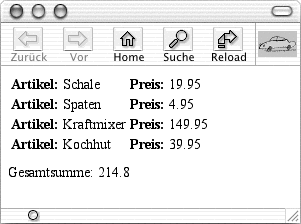
Figure: Using the XPath function sum( )
Besides sum, several other functions handle numbers. The function floor returns the greatest integer no larger than its argument. In other words, floor(3.4) returns 3. The function ceiling, the counterpart of floor, returns the smallest integer greater than the argument; for example, ceiling(3.4) returns 4. The function round does exactly what you expect: rounds your decimal number to the nearest integer. Thus, round(3.4) returns 3, while round(3.8) returns 4.
Working with strings
Besides numeric functions, XPath supports text processing. Most such functions are useful for testing conditions. Earlier, you checked character data in child attributes using syntax like this:
ship[class="Intrepid"] This expression returns every ship element with a child class element containing the character data Intrepid. This works well for exact text comparisons, but sometimes finer control is needed.
The function starts-with, for example, takes two arguments. The first is what you seek: the letters the string should begin with. The second is the node to evaluate. The function returns true or false. For example, to obtain a true or false in XSL depending on whether a ship element has a registration code beginning with NCC, try this expression:
<xsl:value-of select="starts-with('NCC', ./registry-code/text())"/> For every ship in ships.xml true is returned by this expression. Such Boolean return values may be most useful in XSLT, where you can use its if-then-else statements to process conditions. A variation is the function contains, which returns true when the second argument contains the first.
When you know you have the desired string and want to take it apart, the functions substring and string-length are useful. The function substring takes up to three arguments: the string to process, the starting index, and the ending index. If the third argument is omitted, the end of the string is assumed. The function string-length simply returns the string’s total length as a number.
The function translate takes a string parameter, a list of characters to replace, and a corresponding list of replacement characters. Each character in the second argument is replaced by the character at the same position in the third. For example, the expression translate("Wee Willy Winky", "eily", "oaps") returns the string Woo Wapps Wanks. The function concat returns the concatenation of its two arguments.
Working with nodes
Some XPath functions handle and traverse elements. They provide information about the current XPath position and other positional information, such as the first and last matching elements. Node functions are fairly easy to understand.
The function position returns a number corresponding to the context position in the expression’s evaluation context. To create a numbered list of ships in ships.xml, for example, use the function position as in this stylesheet:
<?xml version="1.0" encoding="iso-8859-1"?>
<xsl:stylesheet version="1.0" xmlns:xsl="http://www.w3.org/1999/XSL/Transform">
  <xsl:template match="shiptypes">
    <html>
      <body>
        <xsl:apply-templates select="ship"/>
      </body>
    </html>
  </xsl:template>
  <xsl:template match="ship">
    <p>
      <xsl:value-of select="position( )"/>.
      <xsl:value-of select="@name"/>
    </p>
  </xsl:template>
</xsl:stylesheet>
This code produces the following HTML output:
<html>
  <body>
    <p>1.
      USS Enterprise</p>
    <p>2.
      USS Voyager</p>
    <p>3.
      USS Enterprise</p>
    <p>4.
      USS Enterprise</p>
    <p>5.
      USS Sao Paulo</p>
  </body>
</html>
The function count returns the number of nodes in a node-set matching its argument. Thus, count(//@name) returns the number of name attributes in the document. The function last returns the context size (the number of nodes) in the current expression.
The function id returns a node with a specified id. If you create the element <name id="a345">Chris Jones</name> and then use id('a345') in your expression, you get that node. The functions localname and name respectively return the local and qualified names of the first node, in document order, in the current node-set.
Copyright © 2002 O'Reilly Verlag GmbH & Co. KG
You may print the online version for your private use.
Otherwise, this chapter from “Python & XML” is subject to the same conditions as the bound edition: the work, including all its parts, is protected by copyright. All rights reserved, including reproduction, translation, microfilming, and storage and processing in electronic systems.
O’Reilly Verlag GmbH & Co. KG, Balthasarstraße 81, 50670 Köln, kommentar(at)oreilly.de