

XML technologies / XSLT / Introduction to XSLT 2.0 / XSLT and XPath – getting started / Stylesheets with multiple templates / Taking action: xsl:apply-templates
(Excerpt from “XSLT 2.0 & XPath 2.0” by Frank Bongers, chapter 1.)
This does not happen automatically. A dedicated XSLT instruction activates template rules, as its name suggests: xsl:apply-templates.
Activation is indirect rather than by a direct call. A direct call is also possible with another instruction. ( Note: That instruction is xsl:call-template, which calls a named template: an xsl:template with a name attribute; more on this later.) Instead, activation assembles a suitable sequence of the desired nodes for the template.
For this purpose, xsl:apply-templates has a select attribute containing an XPath expression to describe the selection. It refers to the current template rule’s context. Here, starting from the document node, it must be:
<xsl:apply-templates select="adressen/adresse"/>In context, it looks like this. The original <p> container has been moved to the other template rule:
<!-- der Dokumentknoten bildet den Kontext: -->
<xsl:template match="/">
  ...
  <h1>Adressenliste</h1>
  <!-- hier wird die Sequenz erzeugt: -->
  <xsl:apply-templates select="adressen/adresse"/>
  ...
</xsl:template>
Code example: kap01/1.15.4/adressen.xsl (excerpt).
A path expression, starting here from the document node, selects a sequence of <adresse> element nodes. They are ordered and offered for processing in document order. For every <adresse> element in the sequence, the template with the matching pattern is activated once.
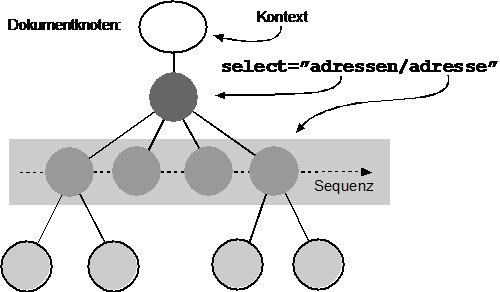
Figure: building a sequence and its order.
The result, d1-adressen-ergebnis.html, now looks as intended. Each address’s string value appears in its own <p> container on the result page.
To handle the address’s child elements individually, provide the corresponding templates.
Suppose each address should be formatted like this:
Peter Mustermann
Wagenstr. 5.a, 12345 Beispielshausen
The name should be bold on its own line. This is simple; just remember that an HTML break written as an LRE must follow XML conventions, so write <br/>.
<!-- Template-Regel für <name>: -->
<xsl:template match="name">
  <b><xsl:value-of select="."/></b><br/>
</xsl:template>
Code example: kap01/1.15.4/adressen.xsl (excerpt).
Remember that another template is needed for the postal address. Chapter A comparison: expression versus instruction presents two different approaches to building it in detail.
Copyright © Galileo Press, Bonn 2008
You may print the online version for your private use.
Otherwise, this chapter from “XSLT 2.0 & XPath 2.0 ― Das umfassende Handbuch” is subject to the same conditions as the bound edition. The work, including all its parts, is protected by copyright. All rights reserved, including reproduction, translation, microfilming, and storage and processing in electronic systems.
Galileo Press, Rheinwerkallee 4, 53227 Bonn