

XML technologies / DocBook / Generating FO (PDF) / Displaying tables of contents / Chapter table of contents at the text width
(Excerpt from "DocBook-XML: Media-neutral and platform-independent publishing" by Thomas Schraitle)
With only a few sections, unlike Continuous tables of contents in chapters the entries can be formatted as blocks, with page numbers appended to the titles. Use component.toc, the template from Step 4 and add the following template to your customization file:
<xsl:template match="d:chapter/d:sect1 | d:chapter/d:section" mode="chaptoc">
    <xsl:param name="toc-context" select="."/>
    <xsl:variable name="id">
        <xsl:call-template name="object.id"/>
    </xsl:variable>
    <fo:block space-before="0.75em">
        <fo:basic-link internal-destination="{$id}">
            <xsl:apply-templates select="." mode="titleabbrev.markup"/>
        </fo:basic-link>
        <fo:leader leader-length="1em" leader-pattern="space"/>
        <fo:basic-link internal-destination="{$id}">
            <fo:page-number-citation ref-id="{$id}" />
        </fo:basic-link>
    </fo:block>
</xsl:template>
Line 6: creates a block. Using space-before adds space before each entry, separating it from the previous one.
Line 10: the space between the title and page number.
The following figure shows what such a table of contents looks like:
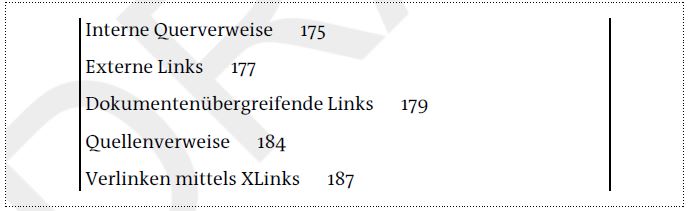
Figure: Table of contents with page numbers appended
Copyright © 2009 Millin Verlag
You may print the online version for your private use.
Otherwise, this chapter from "DocBook-XML: Medienneutrales und plattformunabhängiges Publizieren" is subject to the same provisions as the printed edition: the work, including all its parts, is protected by copyright. All rights are reserved, including reproduction, translation, microfilming, and storage and processing in electronic systems.
Millin Verlag, Siebengebirgsring 36, 53797 Lohmar, info(at)millin.de
back to top