

XML technologies / MathML / Presentation markup / Tables and matrices / The structure of tables
(Excerpt from "The MathML Handbook" by Pavi Sandhu)
In MathML, tables and matrices can be represented using the mtable, mtr, and mtd elements. These correspond roughly to the table, tr, and td elements used for tables in HTML. The mtable element represents an entire table, the mtr element represents a single row of the table, and each mtd element represents a single cell within a row.
In addition, MathML includes an mlabeledtr element that can be used in place of any mtr element to specify a labeled row. The first argument of the mlabeledtr element specifies a label, and each subsequent argument specifies a specific cell of the row.
Here is a simple example that shows the presentation markup for a 2 by 2 matrix:

<mrow>
  <mo>(</mo>
  <mtable>
    <mtr>
      <mtd><mn>1</mn></mtd>
      <mtd><mn>2</mn></mtd>
    </mtr>
    <mtr>
      <mtd><mn>3</mn></mtd>
      <mtd><mn>4</mn></mtd>
    </mtr>
  </mtable>
  <mo>)</mo>
</mrow>
The mtable element accepts a large collection of attributes for adjusting various properties of the rows and columns, such as their spacing and alignment. There are 18 attributes in all (see the following table).
For several of these attributes, the value can be a sequence of zero or more entries. In such cases, the first entry applies to the first row/column, the second entry to the second row/column, and so on. If there are fewer entries than rows/columns in the table, the last entry is repeated as many times as necessary. If there are more entries than rows/columns, the extra entries are ignored.
Table: Attributes of the mtable element.
Attribute | Values | Default |
|---|---|---|
| ( | |
| ( | |
| ( | |
| ( | |
|
|
|
| (number v-unit) + | |
| (number h-unit | namedspace) + | |
| ( | |
|
|
|
| | |
| ( | |
| (number h-unit | namedspace) (number v-unit | namedspace) | |
|
| |
| |
|
| number h-unit | |
| groupalignment-list-list | { |
| | |
The meaning of most of these attributes is evident from their name. For a detailed description of each attribute, see Presentation elements.
The mtr element takes the attributes rowalign, columnalign, and groupalign. The values are normally inherited from the surrounding mtable element. You can override the inherited value by setting the attribute explicitly.
The mlabeledtr element has the same attributes as the mtr element. The only difference is that the attributes of the mlabeledtr element apply to the label as well as the individual cells in the row. To apply an attribute only to a label, you must set the attribute in the <mtd> element that surrounds the label.
The mtd element also takes the rowalign, columnalign, and groupalign attributes. The values of these attributes are normally inherited from the surrounding mtr element. You can override the inherited value by setting the attribute explicitly. In addition, the mtd element takes two other attributes: rowspan and columnspan. These can be set to an integer and allow a cell in the table to occupy a specified number of rows or columns.
Here is an example of a simple table with several attributes specified explicitly:
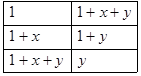
<mtable columnalign='left' rowlines='solid' columnlines='solid' frame='solid'>
  <mtr>
    <mtd>
      <mn>1</mn>
    </mtd>
    <mtd>
      <mn>1</mn><mo>+</mo><mi>x</mi>
      <mo>+</mo><mi>y</mi>
    </mtd>
  </mtr>
  <mtr>
    <mtd>
      <mn>1</mn><mo>+</mo><mi>x</mi>
    </mtd>
    <mtd>
      <mn>1</mn><mo>+</mo><mi>y</mi>
    </mtd>
  </mtr>
  <mtr>
    <mtd>
      <mn>1</mn><mo>+</mo><mi>x</mi>
      <mo>+</mo><mi>y</mi>
    </mtd>
    <mtd>
      <mi>y</mi>
    </mtd>
  </mtr>
</mtable>
Copyright © CHARLES RIVER MEDIA, INC., Massachusetts (USA) 2003
Printing of the online version is permitted exclusively for private use. Otherwise this chapter from the book "The MathML Handbook" is subject to the same provisions as those applicable for the hardcover edition: The work including all its components is protected by copyright. All rights reserved, including reproduction, translation, microfilming as well as storage and processing in electronic systems.
CHARLES RIVER MEDIA, INC., 20 Downer Avenue, Suite 3, Hingham, Massachusetts 02043, United States of America