

XML technologies / XSLT / XSLT 2.0 processors / Saxon 9 / Installation
(Excerpt from “XSLT 2.0 & XPath 2.0” by Frank Bongers)
The XSLT processor Saxon 9.x runs on either the Java Development Kit JDK 1.5 or J2SE 5.0, at least JDK 1.4, or Microsoft’s .NET Framework. Two installation archives are provided. Saxon has no built-in XML parser; it uses its host framework’s facilities.
Saxon and the JDK
Standalone operation of Saxon’s Java edition requires a correctly installed JDK.
Add Saxon’s JAR file to the class path. The B edition uses saxon9.jar; Saxon-SA uses saxon9sa.jar.
The exact entry added to ClassPath depends on the directory where the Zip archive was extracted.
Additional JARs depend on how DOM trees reach Saxon: DOM, JDOM, XOM and DOM4J are available. Add these files as appropriate:
saxon9-dom.jarfor DOMjdom.jarandsaxon9-jdom.jarfor JDOMxom-1.1.jarandsaxon9-xom.jarfor XOM, tested with XOM 1.1dom4j-1.6.1.jarandsaxon9-dom4j.jarfor DOM4J
Test the installation from the command line. On Windows, open a DOS window. Use this full invocation, always for the SA edition:
java net.sf.saxon.Transform -?
If no error appears, and option -? displays Saxon’s command-line syntax, installation is ready.
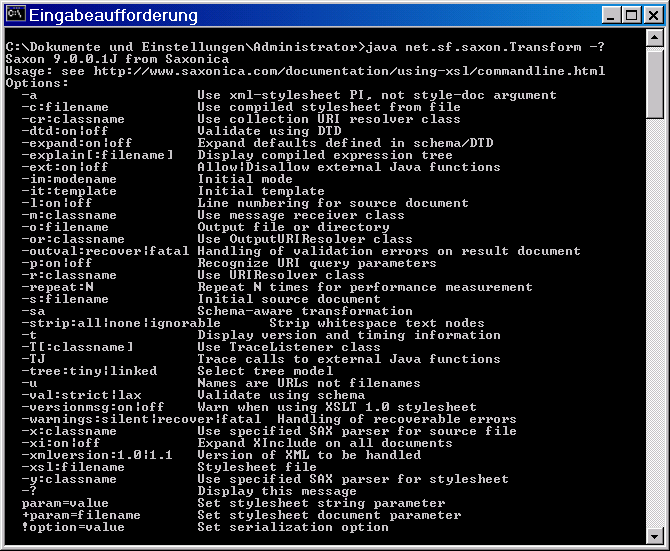
Figure: Invoking Saxon 9.0 with option -?
Java command-line invocation
The full Java invocation is:
java net.sf.saxon.Transform -s:quelldocument -xsl:stylesheet -o:zieldokument
The options -s, -xsl and -o are explained below. Replace italic placeholders with filenames.
Saxon-SA Java licence key
Saxon-SA’s Java licence, including trials, is a file named saxon-license.lic. A .NET licence does not work here. Put the key file in a directory listed in the class path. Add the directory, not the key file itself, to the class path.
Command-line Saxon-SA requires the full form java com.saxonica.Transform for the licence to be recognised. A shortened invocation such as java -jar saxon9.jar fails for Saxon-SA.
Saxon and .NET
A separate Saxon edition uses Microsoft .NET 1.1 or .NET 2.0. Mono, the Linux implementation of .NET, is currently not explicitly supported.
The .NET platform is downloadable from Microsoft.
Saxon for .NET differs only by a C# wrapper. The core remains Java, translated into MSIL, Microsoft Intermediate Language, for use as a .NET assembly. After installation, it is also callable from the command line.
Extract the .NET archive into any directory, such as c:\saxon. Use the .NET edition: its archives are named saxonb9-0-0-1n.zip for Basic and saxonsa9-0-0-1n.zip for schema-aware Saxon-SA, which also requires a licence. After extraction, subdirectory \bin contains the required dll and exe files.
Create an environment variable SAXON_HOME pointing to the installation through System Properties, tab “Erweitert”, shown below. For a single user, create a user variable in the upper panel with “Neu”; for multiple users, create a system variable in the lower panel with “Neu”.
Give it the installation path, here c:\saxon. Also add the path to Saxon’s \bin subdirectory to variable PATH, not to ClassPath. Here, enter c:\saxon\bin.
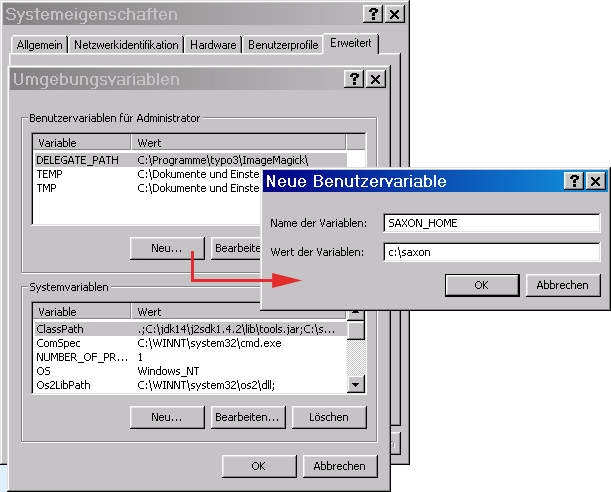
Figure: Creating a Saxon environment variable
.NET command-line invocation
The .NET invocation is:
Transform -s:quelldokument -xsl:stylesheet -o:zieldokument
Options -s, -xsl and -o are explained on the next page. Replace italic placeholders with filenames.
Saxon-SA .NET licence key
Saxon-SA’s .NET licence, including trials, is an XML file. Put it in subdirectory \bin of the installation. Only this xml key works with .NET, not the Java edition’s lic key.
Ensure environment variable SAXON_HOME is set as described above so the licence file can be loaded.
Accessing a server-side Saxon installation through PHP
On any server with a working JRE, Saxon can also be accessed through the open-source add-in XML_XSLT2Processor through PHP, allowing XSLT 2.0 transformations in PHP.
Copyright © Galileo Press, Bonn 2008
You may print the online version for your private use.
Otherwise, this chapter from “XSLT 2.0 & XPath 2.0 ― Das umfassende Handbuch” is subject to the same conditions as the bound edition. The work, including all its parts, is protected by copyright. All rights reserved, including reproduction, translation, microfilming, and storage and processing in electronic systems.
Galileo Press, Rheinwerkallee 4, 53227 Bonn