

XML technologies / ePUB / Open Publication Structure / Text structure and character formatting / Character formatting
(Excerpt from “E-Books mit ePUB ─ Von Word zum E-Book mit XML” by Dr. Victor Wang)
For character formatting, the common ground is limited to superscript (<sup>), subscript (<sub>), emphasis (<em>) and strong emphasis (<strong>) elements shared by XHTML and DTBook.
XHTML additionally permits classic, purely typographic bold (<b>), italic (<i>), small text (<small>) and large text (<big>). The example uses every character format permitted in XHTML.
<html xmlns="http://www.w3.org/1999/xhtml" xml:lang="de">
  <head/>
  <body>
    <div class="Dokument">
      <h1>Zeichenformate XHTML</h1>
      <p>a) <strong>em</strong> / <strong>strong</strong>: Eine Texthervorhebung sollte <em>immer</em> einen inhaltlichen Grund haben. Bitte <strong>niemals</strong> willkürliche Hervorhebungen benutzen, das versteht kein Leser.</p>
      <p>b) <strong>i</strong> / <strong>b</strong>: In XHTML sind darüber hinaus auch <i>kursiv</i> oder <b>fett</b> als rein typografische Zeichenformate zugelassen.</p>
      <p>c) <strong>small</strong> / <strong>large</strong>: Des Weiteren gibt es in XHTML auch Zeichenformate für Schriftgrößen: <code>small</code> dient der Strukturierung von <small>Kleinschrift</small>, <code>big</code> der von <big>Großschrift</big>.</p>
      <p>d) <strong>sup</strong> und <strong>sub</strong>: Hoch- und Tiefstellung kommt nicht nur in Formeln vor.</p>
      <p>Der bekannte Satz des Pythagoras lautet: x<sub>1</sub><sup>2</sup> + x<sub>2</sub><sup>2</sup> = x<sub>3</sub><sup>2</sup></p>
      <p>Dabei sind x<sub>1</sub> und x<sub>2</sub> die Katheten und x<sub>3</sub> die Hypotenuse in einem rechtwinkligen Dreieck.</p>
    </div>
  </body>
</html>
Code example: Character formatting in XHTML
Adobe Digital Editions and iBooks display the example as follows:
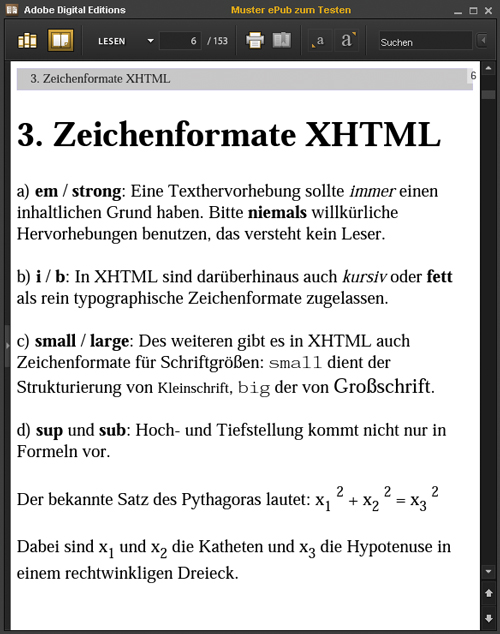
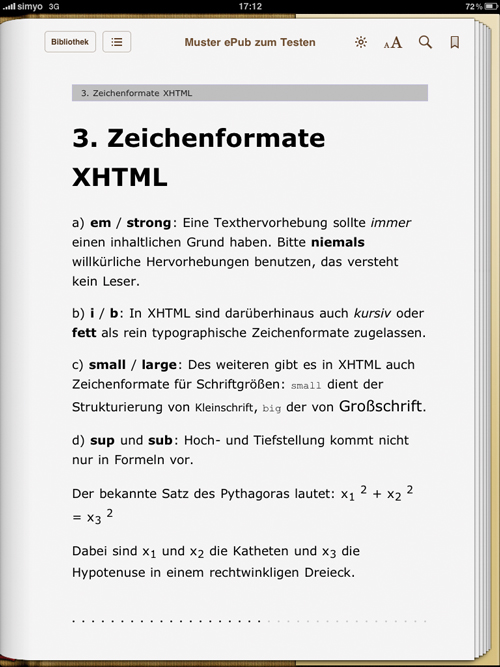
Figure: XHTML character formatting (Adobe Digital Editions and iBooks)
A note about the often-neglected elements <em> and <strong>: both are semantic elements whose appearance is determined by the stylesheet, reading software or browser. Thus, <em> may appear italic and <strong> bold. To ensure this explicitly, the cleanest approach, separating structure and layout, is to define it in the stylesheet. This also explains why DTBook omits the purely presentational elements <i> and <b>.
Copyright © mitp 2011
You may print the online version for your private use.
Otherwise, this chapter from “E-Books mit ePUB” is subject to the same terms as the printed edition: the work and all its parts are protected by copyright. All rights reserved, including reproduction, translation, microfilming, and storage and processing in electronic systems.
Verlagsgruppe Hüthig Jehle Rehm GmbH, Im Weiher 10, 69121 Heidelberg, kundenbetreuung(at)hjr-verlag.de
back to top