

XML technologies / XSL-FO / From XML to print in three steps
(Montero Pineda, Manuel: In drei Schritten zum Druck, in: technische kommunikation, Heft 3, 2018).
Transforming XML documents for printed output is routine in many technical documentation departments. The W3C standard XSL-FO is a useful tool for this task.
The abbreviation XSL-FO stands for “eXtensible Stylesheet Language – Formatting Objects”. This language generates print files. The starting point is usually XML files, converted to PDF through XSL-FO. The standard is published by the World Wide Web Consortium (W3C), placing it in the same language family as HTML, CSS and XSLT.
What are XSL-FO’s strengths?
XSL-FO is used whenever XML output must be fully automated. Its developers therefore prioritized international use: all writing directions and hyphenation for all languages are supported, including Arabic and Asian languages. Besides language support, further strengths include creating indexes and directories and using complex page sequences.
How does output work?
First, an XSLT processor generates an XML-FO file from an XML file and an XSL stylesheet. Conceptually it resembles an HTML file: rather than reading its source, you visualize it with a browser. After this step, the FO file contains all information needed for print output.
The print output program is called an XSL formatter and forms the second step in the XSL-FO workflow. It works much like a browser, but produces print output instead of a web view. Like a browser, it also reads graphics, usually stored separately.
The final step is print output. If PDF is required, a PDF generator is needed at this point. Every formatter includes one, but it can be replaced with another. Besides PDF, formats such as SVG or PostScript are possible. The following figure summarizes the process.
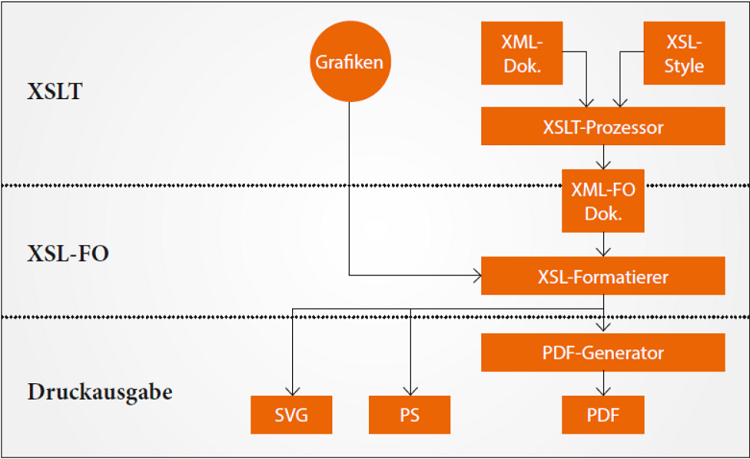
Figure: From the XML file to finished print output.
What does implementation look like?
The following example starts with a small XML file containing several poems and only a few elements, including Autor, Titel, Vorname, Nachname, Strophe and Vers. An excerpt of the XML file also appears under The transformation artist.
In the first step of the XSL-FO workflow, the XML file is processed together with an XSL-FO stylesheet. The following figure shows the stylesheet.
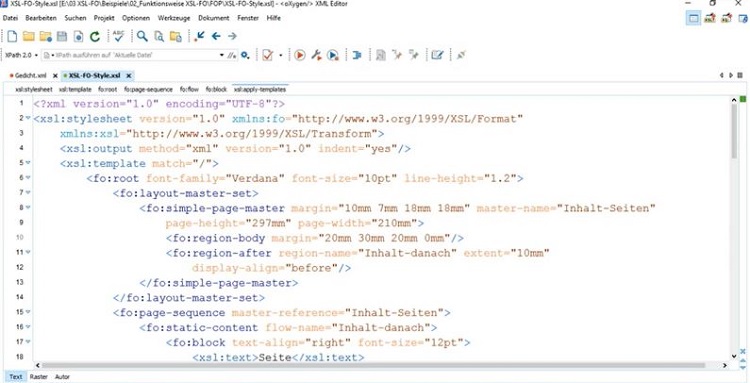
Figure: The stylesheet for our poem example.
Many commands begin with fo:. The FO formatter needs all these commands; they constitute the XSLFO standard itself. Besides the fo: commands, the stylesheet contains information required for print output, such as a DIN A4 page with height (page-height) of 297 millimeters and width (page-width) of 210 millimeters:
<fo:simple-page-master [...] page-height="297mm" page-width="210mm">
Besides the page definition, this example includes commands for displaying the poem’s elements. Autor, for example, should be a bold paragraph in font size 12, kept together with the next element:
<xsl:template match="Autor">
   <fo:block font-size="12pt" font-weight="bold" keep-with-next.within-page="always">
Titel should also appear as a bold paragraph, in font size 16, with a small space afterward:
<xsl:template match="Titel">
<fo:block font-size="16pt" fontweight="bold" space-after="10pt" keep-with-next.within-page="always">
Strophe is defined as a paragraph with four points of spacing:
<xsl:template match="Strophe">
   <fo:block space-after="4pt">
The poem should also have a larger space before the next poem:
<xsl:template match="Gedicht">
   <fo:block space-after="20pt">
Element Untertitel should use font size 12, bold and italic:
<xsl:template match="Untertitel">
   <fo:block font-size="12pt" font-weight="bold" font-style="italic">
How is the FO file created?
First, start the XSLT processor. It processes the XML file together with the XSL-FO stylesheet and generates an FO file. The FO file retains all commands specified in the stylesheet. For example, the following figure shows the title settings: font size 16, bold and 10pt spacing.
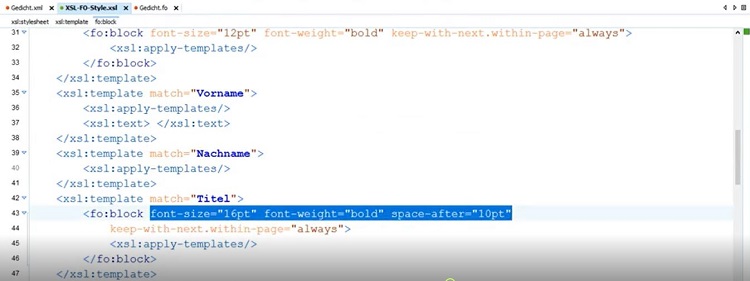
Figure: Settings for displaying Titel elements.
Browsing the file reveals that the layout information for every element has been retained. Normally the FO file is not displayed because it is needed only behind the scenes.
How is the output file generated?
The next step produces the PDF using the XSL-FO formatter. Here the open-source solution Apache FOP (Formatting Objects Processor) is used. A batch command starts the process. FOP reads the FO file and generates a PDF. The poems are now available as print output, as shown in the following figure.
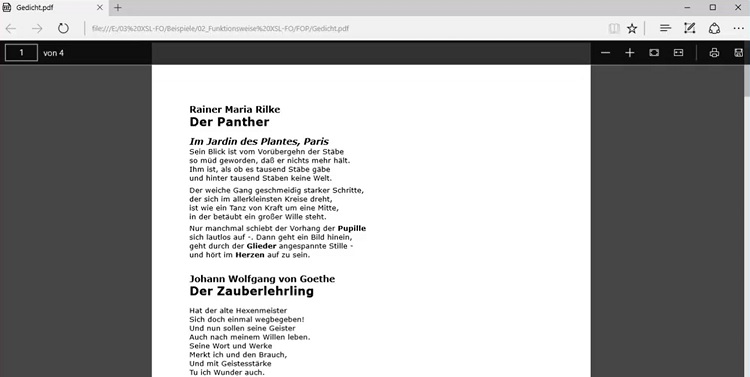
Figure: Poems output as PDF.
Page numbers and the specified appearance of the author, heading, subtitle, verses and stanzas have been generated.
Where is it used?
Technical documentation is a typical XSL-FO use case. Its internationalization offers many advantages here. Manuals are also particularly suitable because they are structured systematically, simplifying XSL-FO processing.
Publishers also use the standard, mostly for previews. Authors receive an advance version very close to the finished layout. However, complete typesetting of a publication with XSL-FO is rare.
Catalogs, usually technical ones, are another use case. Like manuals, they have systematic structures. Image-heavy catalogs with varied page layouts, such as fashion or travel catalogs, are less suitable.
What does the future hold?
The W3C published XSL-FO 1.0 in 2001 and version 1.1 in December 2006. The consortium has since stopped further development, so the standard is complete. CSS is XSL-FO’s official successor. It is not yet as mature, although that could change in the long term.
Copyright © 2018 tcworld GmbH
You may print the online version for your private use.
Otherwise, this article from the journal “technische kommunikation” (issue 3, 2018) is subject to the same conditions as the bound edition. The work, including all its parts, is protected by copyright. All rights reserved, including reproduction, translation, microfilming, and storage and processing in electronic systems.
tcworld GmbH, Rotebühlstraße 64, 70178 Stuttgart, info@tekom.de, www.tekom.de