

XML technologies / DocBook / Generating (X)HTML / Editing headers and footers / Adding custom entries
(Excerpt from "DocBook-XML: Media-neutral and platform-independent publishing" by Thomas Schraitle)
Additional areas may be needed around existing headers and footers, often for short legal notices or homepage links. The following parameters are available:
Table: User parameters for headers and footers
Parameters | Appears |
| before the default header |
| after the default header |
| before the default footer |
| after the default footer |
These parameters should be changed in a customization file. To add a custom header, write:
<xsl:template name="user.header.content">
<div class="userheadercontent">© 2003 Pinguin Tux AG</div>
<hr/>
</xsl:template>This code always inserts the text "© 2003 Pinguin Tux AG" after the default header. Using the class attribute, you can use CSS stylesheets (see Formatting (X)HTML with CSS) to change the appearance of the element div.
The following figure shows the order of user header and footer parameters on an (X)HTML page.
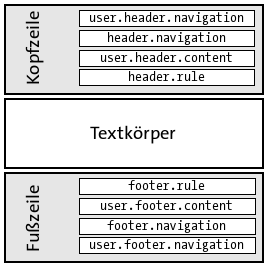
Figure: Order of user header and footer parameters on an (X)HTML page
The parameters header.navigation and footer.navigation are discussed in Editing headers and footers.
Control the horizontal rules in default headers and footers with the parameters header.rule and footer.rule. The value 1 (the default) draws the rule; the value 0 suppresses it.
Copyright © 2009 Millin Verlag
You may print the online version for your private use.
Otherwise, this chapter from "DocBook-XML: Medienneutrales und plattformunabhängiges Publizieren" is subject to the same provisions as the printed edition: the work, including all its parts, is protected by copyright. All rights are reserved, including reproduction, translation, microfilming, and storage and processing in electronic systems.
Millin Verlag, Siebengebirgsring 36, 53797 Lohmar, info(at)millin.de
back to top