

XML technologies / Regular expressions / .NET / Using regular expressions in .NET / The .NET object model: overview
(Excerpt from "Regular expressions" by Jeffrey E. F. Friedl)
Before examining details, let us consider the overall object structure of .NET’s regex package: its object model. This is a set of classes and objects implementing regular-expression functionality. The .NET regex package comprises seven closely interrelated classes. In practice, one generally needs only the three shown below. The figure illustrates applying the regex ˹\s+(\d+)˼ to the string ›May●16,●1998‹.
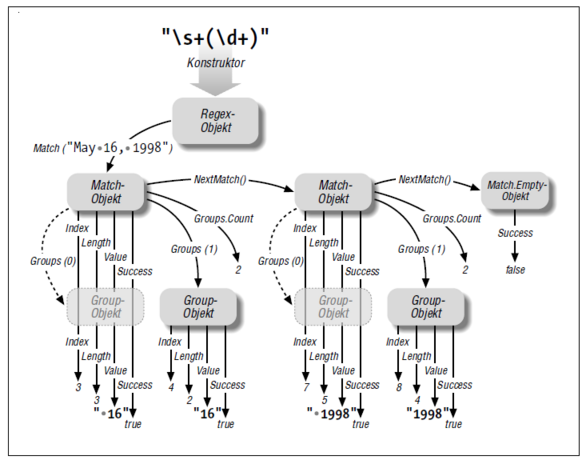
Figure: the .NET object model.
Regex objects
The first step is to create a regex object:
Dim R as Regex = New Regex("\s+(\d+)")We have now stored a regex object in R representing the regex ˹\s+(\d+)˼. A regex object can be applied to a string using its Match(Text) method, obtaining information about the first match:
Dim M as Match = R.Match("May 16, 1998")Match objects
The Match(...) method of the Regex object returns match information as another object, a Match object. Match objects have several properties, notably Success (a Boolean indicating whether a match was found) and Value (a copy of the matched text on success). We will encounter other properties later.
If a regex contains capturing groups, information about them is returned too. In the Perl examples in earlier chapters, the text from the first capturing group was returned in $1. .NET offers two alternatives. If only the captured text is needed, index the Groups property of the Match object; then Groups(1).Value is equivalent to $1 in Perl. (C# requires square brackets: Groups[1].Value.) Alternatively, use the Result method; see MatchObj.Result(String).
Group objects
The previous section’s Groups(1) actually used a Group object, and the .Value actually retrieved its Value property: the text captured by the parentheses. Each capturing group has such a Group object, plus another numbered 0 for the entire match.
MatchObj.Value and MatchObj.Groups(0).Value are therefore equivalent: both contain the entire matched text. The first form is shorter and arguably more appropriate, but the zeroth whole-match group still matters because it is included in MatchObj.Groups.Count, the number of groups in the Match object. When ˹\s+(\d+)˼ matches, the resulting MatchObj.Groups.Count is 2: the entire match and the $1 group.
Capture objects
There are also Capture objects (to capture). These are discussed under Capture objects.
All results are calculated during matching
Applying a regex to a string creates a Match object. All match data, including the match position and participating capturing groups, are calculated at this step and encapsulated in the Match object. Later, reading its properties or those of the corresponding Group objects, or calling their methods, simply retrieves values already calculated during matching.
German edition copyright © 2008 by O’Reilly Verlag GmbH & Co. KG
You may print the online version for private use.
Otherwise, this chapter from "Reguläre Ausdrücke" is subject to the same terms as the bound edition: the work and all its parts are protected by copyright. All rights reserved, including reproduction, translation, microfilming, storage and processing in electronic systems.
O’Reilly Verlag GmbH & Co. KG, Balthasarstr. 81, 50670 Köln