

XML technologies / DITA / Reusing content with maps and conref / conref
(Excerpt from “DITA – Der neue Standard für Technische Dokumentation” by Johannes Hentrich)
The mechanism conref lets you reference content in information structures for later reuse. The name of the attribute conref comes from content reference, meaning a reference to content.
The attribute conref references an ID belonging to one of the following information structures:
To use the mechanism conref, each element must be assigned a unique ID. The following example shows an ID for an element <ul>.
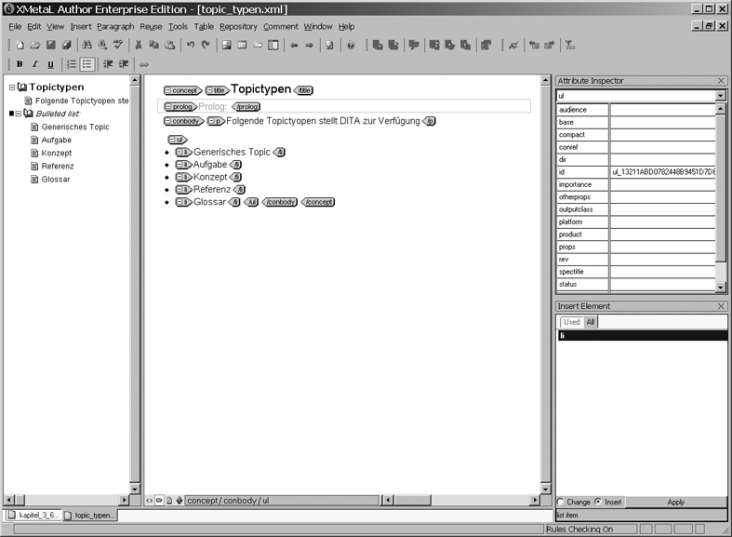
Figure: An ID assigned by XMetal Enterprise Edition to the <ul> element
To reference elements with an ID, for example in another topic, the attribute conref is used in the same way as the attribute href in HTML. The attribute conref simply creates a link to an element.
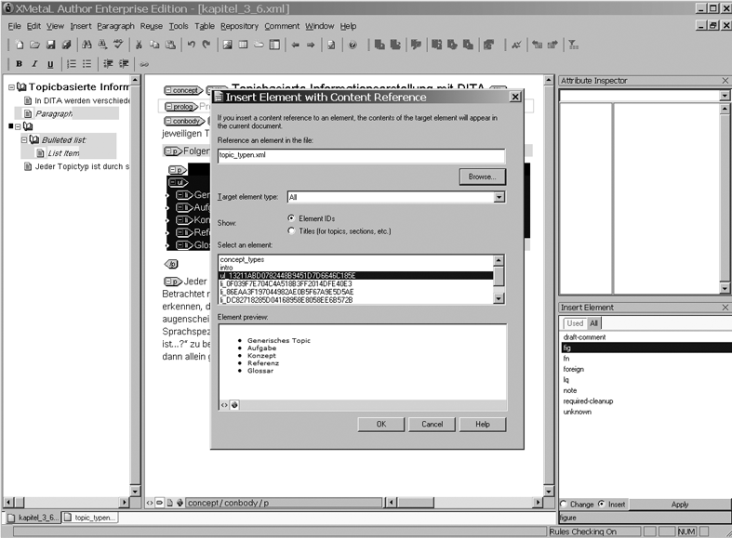
Figure: Defining a conref attribute in XMetal Enterprise Edition
For elements with an attribute conref containing a valid reference to an ID, the element’s content is ignored and replaced with the referenced element’s content.
<p conref="#Link_zur_ID">Der Inhalt des Elements, der ignoriert und ersetzt wird.</p>If an element has further attributes besides conref, those attributes and their values remain after content inclusion. This default behavior preserves all attributes regardless of the attributes present and set in the referenced element.
To force adoption of an attribute value from the referenced element, use the attribute value -dita-use-conref-target. The following example shows the effect of the attribute value -dita-use-conref-target.
Suppose an element <topichead> has an ID with the value h1_th:
<topichead id="h1_th" navtitle="Überschrift" toc="yes" print="yes"/>If another element <topichead> uses its attribute conref to reference the element <topichead> with the ID whose value is h1_th:
<topichead conref="#h1_th" navtitle="-dita-use-conreftarget" toc="no"/>then the attribute navititle takes its value from the referenced element <topichead>. The attribute toc with the value no is retained. The referenced element <topichead> also supplies the attribute print with its value yes. The result is therefore:
<topichead navtitle="Überschrift" toc="no" print="yes"/> The next three sections show how to set the values of an attribute conref in order to:
reference topics,
reference elements in topics,
and, in maps, reference elements
.
Referencing topics
The attribute conref allows whole topics to be included in existing topics.
There are three ways to reference a topic:
The topic is in the same DITA XML file:
conref="#topic_id" If the topic is in the same DITA XML file, put # before its ID.
The topic is the first topic in another DITA XML file:
conref="andere_datei.xml" If only a file or its path is specified, the first topic ID found is automatically used for the reference.
The topic is at any position in another DITA XML file:
conref="andere_datei.xml#topic_id" To reference a specific topic, and thus a specific topic ID within a DITA XML file, put # after the file name, followed by the appropriate topic ID.
Referencing elements in topics
Referencing elements within a topic is the most common practical use case.
There are two ways to reference an element within a topic:
The element is in the same DITA XML file:
conref="#topic_id/element_id" If the topic ID is in the same DITA XML file, put # before the topic ID, then a slash (/) followed by the element ID.
The element is in another DITA XML file:
conref="andere_datei.xml#topicid/elementid" First specify the file or its path, then # and the ID of the topic containing the element to reference. After the topic ID , add another slash (/) and the ID of the element.
Referencing elements in maps
There are two ways to reference an element within a map:
The element is in the same DITA map file:
conref="#element_id" If the element ID is in the same DITA map file, put # before the element ID.
The element is in another DITA map file:
conref="andere_map_datei.xml#elementid" First specify the DITA map file or its path, then # and the ID of the element to reference in the map.
Copyright © 2008 XLcontent Verlag
You may print the online version for your private use.
Otherwise, this chapter from “DITA - Der neue Standard für Technische Dokumentation” is subject to the same conditions as the bound edition. The work, including all its parts, is protected by copyright. All rights reserved, including reproduction, translation, microfilming, and storage and processing in electronic systems.
XLcontent Verlag, Pflegerstraße 40, 81247 München