

XML technologies / XSLT / Introduction to XSLT 2.0 / XSLT and XPath – getting started / First XSLT transformations / First use of XSLT instructions
(Excerpt from “XSLT 2.0 & XPath 2.0” by Frank Bongers, chapter 1.)
Extend the stylesheet to access the limited information in the source document: a string that should also be copied to the result. This requires extending the stylesheet compared with the previous example.
The HTML document, still our output format for now, should have this form:
<html>
  <head>
    <title>Ergebnisdokument</title>
  </head>
  <body>
    <h1>Die erste XSLT-Transformation</h1>
    <p>Das ist ein Testinhalt aus 'dummy.xml'.</p>
  </body>
</html>
The result will contain a <p> container with the text from source element <wurzelelement>. A suitable stylesheet could look like this:
<?xml version="1.0" encoding="ISO-8859-1"?>
<xsl:stylesheet version="2.0" xmlns:xsl="http://www.w3.org/1999/XSL/Transform">
  <xsl:template match="/">
    <html>
      <head>
        <title>Ergebnisdokument</title>
      </head>
      <body>
        <h1 align="center">Die zweite XSLT-Transformation</h1>
        <p align="center"><xsl:value-of select="wurzelelement"/></p>
      </body>
    </html>
  </xsl:template>
</xsl:stylesheet>
Inside the <p> container, highlighted in gray in the source, there is now a new XSLT instruction. This command makes the previously static stylesheet active and brings the source document into processing for the first time: <xsl:value-of select="wurzelelement" /> extracts the desired content from the XML document and inserts it into the result.
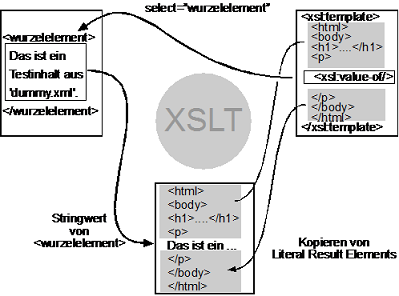
Figure: xsl:value-of retrieves information from the XML document.
Besides xsl:value-of, the stylesheet contains two other XSLT elements: xsl:stylesheet, the stylesheet document’s root, the XML prolog being irrelevant here, and xsl:template, one hierarchy level inside, containing the Literal Result Elements.
A preliminary rule: inside an XSLT stylesheet’s template elements, Literal Result Elements copied unchanged, such as these HTML elements, may be mixed with XSLT instructions.
Running this example in Kernow should produce the result in the next figure. Choose the source and stylesheet through the browse dialogs, then click Run to transform and display the result in the output window. Source content is shaded light gray in the figure.
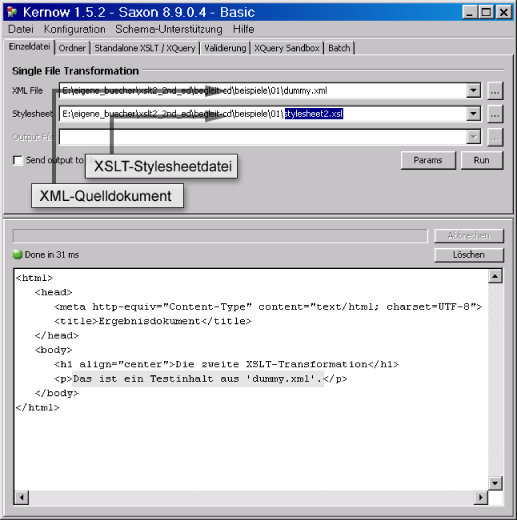
Figure: the second transformation in Kernow.
Even this simple example has other equivalent solutions: XSLT, like any programming language, offers different approaches to a problem.
Copyright © Galileo Press, Bonn 2008
You may print the online version for your private use.
Otherwise, this chapter from “XSLT 2.0 & XPath 2.0 ― Das umfassende Handbuch” is subject to the same conditions as the bound edition. The work, including all its parts, is protected by copyright. All rights reserved, including reproduction, translation, microfilming, and storage and processing in electronic systems.
Galileo Press, Rheinwerkallee 4, 53227 Bonn