

XML technologies / DITA / Topic-based information creation / Creating good topics effectively
(Excerpt from “DITA – Der neue Standard für Technische Dokumentation” by Johannes Hentrich)
The topic is DITA’s central information structure for capturing content. Technical writers wishing to work with DITA must therefore know how to create good topics: topics useful to documentation users.
The following questions repeatedly arise when creating topics:
What is the “right” topic size?
What information belongs in a topic besides its actual content?
What navigation options exist for topics?
How are topics accessed?
The following sections examine these questions in detail.
The amount of information in a topic
The rule that a topic should answer one question is easy to state but not always straightforward to apply. Questions can be hard to formulate, and the required scope of an answer is often not immediately clear. Advice such as “Remove all unnecessary information” or “Do not write what the user already knows” does little to establish what and how much content belongs in a topic. Answers often seem too extensive to fit into one topic at all.
Quantitative limits are often proposed for topic length, ranging from two printed pages per topic in the STOP structuring method (Sequentual Themtaic Organization of Proposals) to at most one screen in online help. Technical writers therefore often despair when an online topic exceeds one screen and users must scroll.
To keep topic length manageable, further information is often moved to additional linked topics. But “further information” must be defined case by case. If one topic does not provide everything needed to answer the user’s question, users end up frantically turning manual pages or clicking around online help. A short topic then helps them very little.
Numerical limits and topic-shortening strategies provide at most rough guidance. Only documentation users themselves can say whether the information is sufficient. The target audience must therefore test whether topics meet its information needs. Neither DITA nor any structuring method can prescribe topic size. Only once you know what information your audience needs can you decide the “right” size.
Metadata in a topic
Topics are independent information units whose content ideally has no contextual dependencies. Since the content lacks context information, topics risk being hard to identify in searches. What is absent from the “visible” content must appear on the “invisible” side, in metadata. Otherwise information is missing, which becomes painfully clear when one topic must be found among many.
If metadata does not identify the product version a topic belongs to, assembling documentation for a particular version becomes extremely difficult. The content alone may no longer make this possible.
Writers new to topics often underestimate metadata. They focus so much on removing unnecessary context that adding metadata seems optional rather than compulsory. They often believe they will find “their” topic when needed.
This fails in a writing team, possibly spread across locations. Metadata is essential so that writers other than the author can find a topic.
Metadata capture can be supported in several ways, for example:
An editorial guide specifying the metadata every topic must contain.
DTD customization making metadata elements required.
An external document or content management system, for example preventing new topics from being saved until the required metadata has been entered.
DITA supports extensive metadata. “Metadata” explains how to record topic metadata. “Metadata in maps” discusses the metadata available in maps.
Navigating with topics
Book navigation is simple: one page follows another. Pages are numbered, allowing direct access to a particular page when needed.
Topics have no such “natural” mechanism. As independent structures, they initially have no connections. Relationships must first be created by placing topics in a navigation structure.
Links connect topics. Technically, creating one is easy; choosing the right link type and position is much harder. The WWW provides daily examples of how nontrivial linking is.
Creating links involves three tasks:
decide which words to link,
decide where the link leads,
decide when a link is needed.
A simple rule governs link wording: use words indicating what content the linked topic contains. Wikipedia provides good examples.
Unfortunately, this rule is often broken. “Here” and “back” are familiar examples giving no clue about the destination’s content. A Google search for the exact German phrase “Klicken Sie hier” finds about 25 million German web pages, with more added every day.
“Back” has the same problem. It neither identifies the linked content nor, in most cases, actually leads to the last visited page. There is much room for improvement here too (Note from the data2type editors: We nevertheless stand by the << back and next >> links at the bottom of every page because they make navigation easier for readers).
Next, decide the destination. Links are not all alike. A link can lead:
to an anchor within a topic,
to a new topic,
to a popup displaying, for example, a definition,
to a file or multimedia object,
to a topic in another online help system.
Each type behaves differently, yet online help and websites rarely distinguish them visually. Users are often surprised when clicking. Rather than looking forward to the next link, they become reluctant to follow links.
A consistent linking policy is therefore recommended. Define how to mark links with unusual behavior, such as opening a PDF rather than a topic.
Finally, decide when to create links at all. With many topics available, the temptation is to link everything so all topics are connected “somehow”. But every link asks users to decide whether to follow it, distracting them from absorbing information.
In technical documentation, avoid links in descriptive text or instructions where possible. List links to other topics at the beginning or end of a topic, in a list or table. Establish a system for deciding which links belong, for example, at the end.
DITA provides normal links and related links (related links). Maps can contain relationship tables (relationship tables) defining relationships between topics. “Navigation in topics” explains how to create these links.
Accessing topics
Information access, including topic access, is still strongly shaped by book-world concepts. Sequential access remains foremost.
Writers still focus most on the table of contents as the sequential access method, in both print and online documentation. Users, however, use it at best for a rough overview of the subjects. In online help, expanding it often requires many clicks and is too laborious for finding specific information.
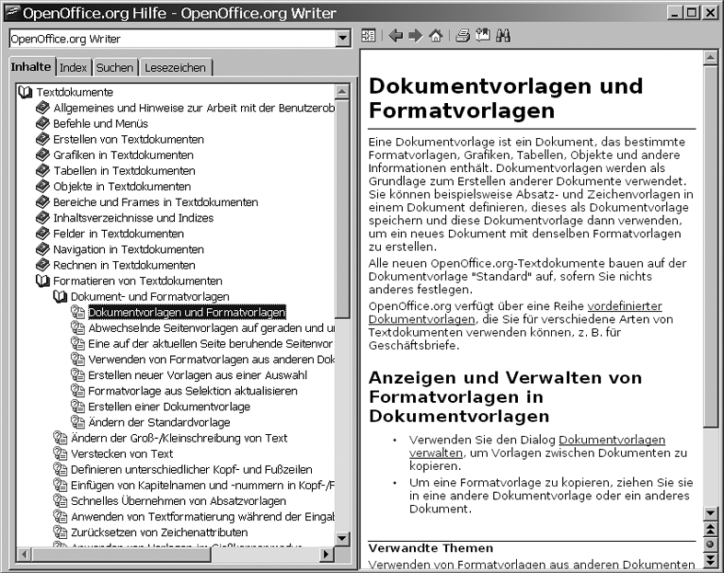
Figure: The OpenOffice online help table of contents.
Even the Internet, anything but a sequential medium, has done little to change website creators’ belief in sequential access. Web pages, which can be regarded as topics, are still designed as if users must visit them in a fixed order: first “Company”, then “Services”, then “References”. Such thinking remains common. Links such as “Back” reveal how deeply sequential thinking is rooted.
Sequential access is slow for finding specific information in both online and print documentation. Faster options are needed, including:
Index
Full-text search
The index is the most frequently used access mechanism in print documentation. It is therefore surprising that 800-page manuals still appear with only four pages of index.
A bookshop customer illustrates the index’s importance. To check whether a technical book has the desired content, the customer looks for a familiar term in the index, opens the indicated page and reads. If the text meets expectations, buying becomes more likely. Only after trusting the index does the customer consult the contents for an overview. Technical authors and writers should therefore give index quality great importance.
Index entries are central to topics in both print and online documentation. Since no table of contents may exist when a topic is created, other access mechanisms must be supported as fully as possible.
Index consistency is essential, especially when several writers create topics. Although this seems self-evident, editorial guides rarely define how to create an index in practice.
Teams must define exactly what to index and how, including when to create subentries or “see also” entries. Indexing determines both what users find and what they expect after their first use. In topic-based documents, each topic must effectively ensure its own discoverability. Index entries are indispensable.
DITA 1.0 had very limited index support. DITA 1.1 recognized its importance by adding the indexing domain with elements for index entries.
Full-text search has become the fastest way to find and access information online. It is available in PDF, Microsoft Help and web-based help systems. Search engines such as Google have demonstrated its effectiveness, and users now expect it to find the desired results.
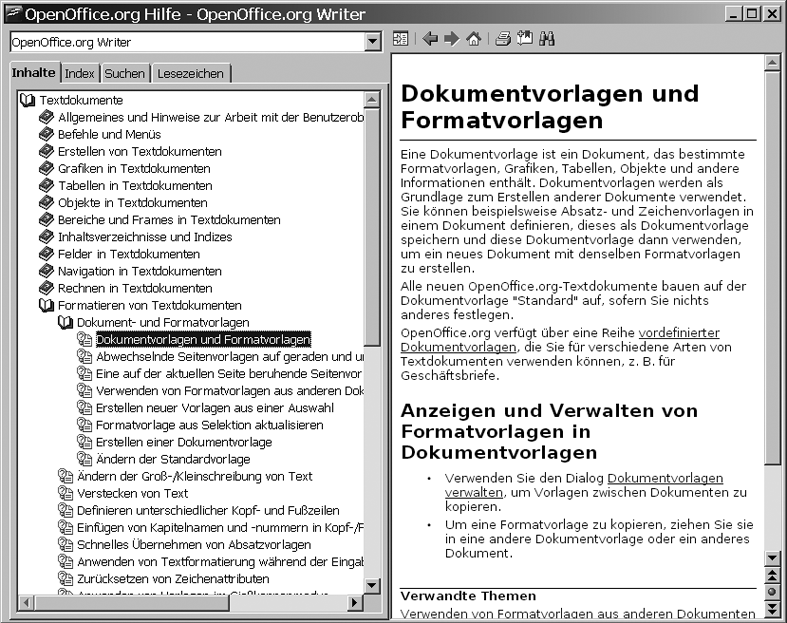
Figure: Full-text search in Microsoft Office Help.
Besides topic content, search-result quality depends chiefly on the relevance-ranking algorithm and the texts displayed in the results. Writers usually cannot access the algorithms, but can influence the displayed text. The two key elements are the topic title and short description. Internet search results likewise display page titles and short descriptions, though the latter usually describe the whole website.
A topic title should describe its content as precisely as possible as a heading. Search results use it as the link to the topic; the short description supplies the link preview text.
The navigation title also affects access. If the topic title is too long, a shorter navigation title can replace it in online help navigation.
Web pages often use the same title and navigation title. Closer study of search engine optimization—making pages and topics easier to find on the WWW—shows that an informative title matching the content is essential for a good search-result ranking.
DITA provides many elements to make topics more searchable and easier for users to find. A navigation title can be defined alongside the title, and other elements supply content for search results. See Titles and content information.
Copyright © 2008 XLcontent Verlag
You may print the online version for your private use.
Otherwise, this chapter from “DITA - Der neue Standard für Technische Dokumentation” is subject to the same conditions as the bound edition. The work, including all its parts, is protected by copyright. All rights reserved, including reproduction, translation, microfilming, and storage and processing in electronic systems.
XLcontent Verlag, Pflegerstraße 40, 81247 München