

XML technologies / XSLT / Introduction to XSLT 2.0 / XSLT and XPath – round two / Numbering, counting and summing / xsl:number
(Excerpt from “XSLT 2.0 & XPath 2.0” by Frank Bongers, chapter 2.)
XSLT provides instruction xsl:number with two roles: sequential numbering of the current item in a processed sequence, or formatting a number from optional attribute value for output using pattern attribute format.
Both actions may occur together or independently. The number supplied through attribute value may come from an XPath expression. Its result is converted to numbering if needed and emitted as text. We introduce some attributes here, but consult the reference for a full account of xsl:number.
Instruction xsl:number is always empty. Put it where numbering is wanted; the current node determines what gets counted.
Number the book list as follows:
<xsl:template match="buch">
  <p><xsl:number/><xsl:apply-templates/></p>
</xsl:template>
Code example: kap02/2.03.2/buchhandel-number1.xsl (excerpt).
Each title receives digits reflecting the book element’s position in document order:
3 Unter Korallen und Haien von Hass, Hans;
 Verlag: Ozean Verlag; Preis: 22.95 Euro
(ISBN liegt nicht vor.)
It counts preceding siblings of the current node, only those of the same kind, here <buch> elements. Different sibling types would be ignored, though none occur here.
The format attribute
Plain Latin digits are the default. For different numbering, use attribute format:
<xsl:number format="a "/>
This produces lowercase-letter numbering, unsuitable for this list. The limited alphabet yields amusing results at its end:
a Where Wizards Stay Up Late von Hafner, Katie; Lyon, Matthew;
 Verlag: Touchstone; Preis: 14.00 Dollar
 (ISBN: 3-899-77609-7)
...
z Der Steppenwolf von Hesse, Hermann;
 Verlag: Suhrkamp; Preis: 7.50 Euro
 (ISBN: 3-518-36675-0)
aa Siddhartha von Hesse, Hermann;
 Verlag: Suhrkamp; Preis: 11.80 Euro
 (ISBN: 3-518-36682-3)
Lowercase Roman numerals are more appropriate. Other literal characters may be included and pass through unchanged, here a dot:
<xsl:number format="i. "/>
The dot follows the number:
...
ii. Yet Another Hitchhiker's Guide to the Galaxy von Adams, Douglas;
Verlag: Spacetrotter Publishing; Preis: 17.00 Dollar
(ISBN: 3-899-77610-5)
iii. Unter Korallen und Haien von Hass, Hans;
 Verlag: Ozean Verlag; Preis: 22.95 Euro
 (ISBN liegt nicht vor.)
iv. Wunder der Tiefsee von Braun, Bert;
 Verlag: Ozean Verlag; Preis: 14.00 Euro
 (ISBN: 3-899-77608-5)
The values used earlier in attribute format also include a quietly inserted space, which is one of the literal characters. Without it, numbers might touch the title. Remember this when also using xsl:strip-space.
The format string is a numbering pattern with countless possibilities. One final example:
<xsl:number format="001.) "/>
This produces Latin digits with two leading zeros, a dot and a closing parenthesis:
007.) Ganz oben von Hansen, Carl;
Verlag: Berg Verlag; Preis: 20.95 Euro
(ISBN liegt nicht vor.)
...
023.) Another Hitchhiker's Guide to the Galaxy von Adams, Douglas;
Verlag: Spacetrotter Publishing; Preis: 15.00 Dollar
(ISBN liegt nicht vor.)
Further specialized attributes of xsl:number need no discussion here: lang, letter-value, grouping-separator, grouping-size. More interesting are attributes count and level. Sorting also involves attribute value.
The count attribute
Attribute count contains a pattern specifying nodes to count at each document level. Without attribute count, nodes of the current template node’s type are counted; in the earlier template rule (element <buch>).
The count pattern may contain predicates restricting xsl:number to matching siblings. To count only items with a specified attribute value:
First the list:
...
  <liste>
    <listenelement zaehlen="ja">Listenelement</listenelement>
    <listenelement zaehlen="nein">Nee, gilt nicht</listenelement>
    <listenelement zaehlen="ja">Listenelement</listenelement>
    ...
  </liste>
...
with this rule:
<xsl:template match="liste/listenelement">
  <div>
    <xsl:number count="listenelement[@zaehlen='ja']"/>
    <xsl:apply-templates/>
  </div>
</xsl:template>
produces:
...
<div>1 Listenelement</div>
<div>Nee, gilt nicht</div>
<div>2 Listenelement</div>
Beware: Only numeric tokens are suppressed, not literal characters. With
<xsl:number count="listenelement[@zaehlen='ja']" format="a) "/>
output would be:
...
<div>a) Listenelement</div>
<div>) Nee, gilt nicht</div>
<div>b) Listenelement</div>
Attribute count can surprisingly count ancestors as well as the current node.
To number chapter headings, count preceding <kapitel> containers, including the one directly enclosing the current <titel>:
Given this structure:
<buch>
  <kapitel><titel>Erstes Kapitel</titel> ...</kapitel>
  <kapitel><titel>Zweites Kapitel</titel> ...</kapitel>
  <kapitel><titel>Drittes Kapitel</titel> ...</kapitel>
  ...
</buch>
and template:
<xsl:template match="kapitel/titel">
  <h1>
    <xsl:number count="kapitel"/>
    <xsl:apply-templates/>
  </h1>
</xsl:template>
the result is:
...
  <h1>1 Erstes Kapitel</h1>
  ... bla ...
  <h1>2 Zweites Kapitel</h1>
  ... bla ...
Attribute count searches both preceding-sibling and ancestor-or-self axes. It first checks whether its count pattern matches the current node and counts its preceding siblings. Otherwise, it climbs ancestors until one matches, then counts that ancestor’s preceding siblings.
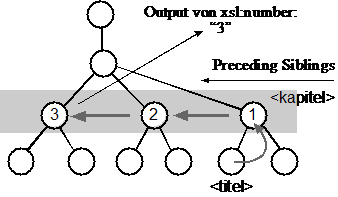
Figure: xsl:number counts <kapitel> on the preceding-sibling axis.
The level attribute
Optional attribute level controls numbering relative to the element’s source-tree position. With level="multiple", hierarchical numbers such as 2.1.5 or A. 1. a) are possible. The default is "single".
With level="single" or absent attribute level, the processor stops at the first ancestor matching pattern count and counts its preceding siblings. This assumes targets share a reliable hierarchy level, shown by the gray rectangle.
Images may occur at varying levels. Then search backward through the whole document without stopping at the first matching level.
Set attribute level to "any":
<xsl:template match="bild">
  <!-- Bild darstellen, wie auch immer -->
  <xsl:text>Abb. </xsl:text>
  <xsl:number level="any"/>
  <xsl:text>:</xsl:text>
  <!-- Bildunterschrift erzeugen -->
</xsl:template>
Since element <bild> is already current, no attribute count is needed. Setting level="any" counts all images anywhere before the current one.
For example:
Abb. 57: die gemeine Hauskatze
Setting attribute level to "multiple" allows complex numbering. With attributes count and format, arbitrary hierarchical numbering is possible.
Repeated section/chapter structures can number sections and their chapters simultaneously, using different symbols at each level:
<buchdokument>
  <!-- der erste Abschnitt -->
  <abschnitt>
    <kapitel>
      <ueberschrift>Von diesem...</ueberschrift>
      <absatz>...</absatz>
    </kapitel>
    <kapitel>
      <ueberschrift>Von jenem...</ueberschrift>
      <absatz>...</absatz>
    </kapitel>
    ...
  </abschnitt >
  <!-- der zweite Abschnitt -->
  <abschnitt>
    <kapitel>
      <ueberschrift>Von anderen Dingen</ueberschrift>
      <absatz>...</absatz>
    </kapitel>
    <kapitel>
      <ueberschrift>Von ganz anderen Dingen</ueberschrift>
      <absatz>...</absatz>
    </kapitel>
    ...
  </abschnitt>
  ...
</buchdokument>
Perform this while outputting a heading in rule match="ueberschrift":
<xsl:template match="ueberschrift">
  <h3><xsl:number level="multiple" count="abschnitt|kapitel" format="I a) "/><xsl:value-of select="."/></h3>
</xsl:template>
The current node is the chapter’s <ueberschrift> element. Walk up to its ancestor <abschnitt> and count that node and its preceding siblings. Headings in section two therefore receive II.
Likewise, count the preceding siblings of the parent <kapitel> element, which also matches instruction xsl:number’s count pattern. Attribute count uses operator “|” as OR, meaning count both <abschnitt> and <kapitel>. Chapters use lowercase a, b, c as attribute format specifies, followed by a closing parenthesis.
The result looks like:
...
  <h3>I a) Von diesem...</h3>
  <!-- Inhalt des Kapitels -->
  <h3>I b) Von jenem...</h3>
  ...
  <h3>II a) Von anderen Dingen</h3>
  ...
  <h3>II b) Von ganz anderen Dingen</h3>
  ...
Numbering follows document hierarchy from left to right. Attribute count only names counted elements; it does not assign a counter to each element in pattern format. Therefore name order in attribute count is irrelevant:
count="abschnitt|kapitel" equals count="kapitel|abschnitt"
The highest-level element always uses the first format token in format, and so on.
The from attribute
<xsl:number from="XPath-Pattern"/>
Attribute from defines the node from which counting starts toward descendants, useful for limiting counts to document sections. Normally xsl:number climbs ancestors until it finds a matching node.
With level set to "any", the entire document is searched and all matching nodes found. Restrict this through attribute from to prevent searching past the boundary.
If chapter content has <fussnote> containers at various levels, global document numbering uses level="any".
To restart at each chapter, instead of counting all earlier footnotes including earlier chapters, set attribute from to "kapitel":
<xsl:template match="fussnote">
  <xsl:number level="any" from="kapitel" format=".: "/>
  <xsl:value-of select="."/>
</xsl:template>
counts chapter-local footnotes and outputs their text:
1.: Die erste Fußnote dieses Kapitels
Copyright © Galileo Press, Bonn 2008
You may print the online version for your private use.
Otherwise, this chapter from “XSLT 2.0 & XPath 2.0 ― Das umfassende Handbuch” is subject to the same conditions as the bound edition. The work, including all its parts, is protected by copyright. All rights reserved, including reproduction, translation, microfilming, and storage and processing in electronic systems.
Galileo Press, Rheinwerkallee 4, 53227 Bonn