

XML technologies / XSLT / XSLT introduction / Conditions
When formulating conditions, two elements are available in XSLT. One of them is the <xsl:if> element and the other is the <xsl:choose> element.
<xsl:if>
With the <xsl:if> element, conditions can be determined. The element is equipped with the obligatory test attribute which requires as a value an examination of the patterns. In contrast to other programming languages, there is no connection between IF and ELSE in XSLT. Let us have a look at a small example.
The stylesheet:
<?xml version="1.0" encoding="UTF-8"?>
<xsl:stylesheet version="1.0" xmlns:xsl="http://www.w3.org/1999/XSL/Transform">
<xsl:output encoding="iso-8859-1" version="1.0"/>
    <xsl:template match="CollectionOfPoems">
        <html>
           <body>
             <xsl:apply-templates/>
           </body>
        </html>
    </xsl:template>
    <xsl:template match="Author">
        <br/>
        <h4>
            <xsl:apply-templates/>
        </h4>
    </xsl:template>
    <xsl:template match="FirstName">
            <xsl:apply-templates/>
            <xsl:text> </xsl:text>
    </xsl:template>
    <xsl:template match="LastName">
            <xsl:apply-templates/>
    </xsl:template>
    <xsl:template match="Title">
        <h2>
            <xsl:apply-templates/>
        </h2>
    </xsl:template>
    <xsl:template match="Strophe">
        <p>
            <xsl:apply-templates/>
        </p>
    </xsl:template>
    <xsl:template match="Verse">
            <xsl:apply-templates/>
        <br/>
    </xsl:template>
    <xsl:template match="Poem">
        <br/>
        <xsl:if test="@Language='el'">The poem is in Greek.</xsl:if>   (1)
        <xsl:if test="@Language='en'">The poem is in English.</xsl:if>
        <xsl:if test="@Language='de'">The poem is in German.</xsl:if>
           <xsl:apply-templates/>
    </xsl:template>
</xsl:stylesheet>
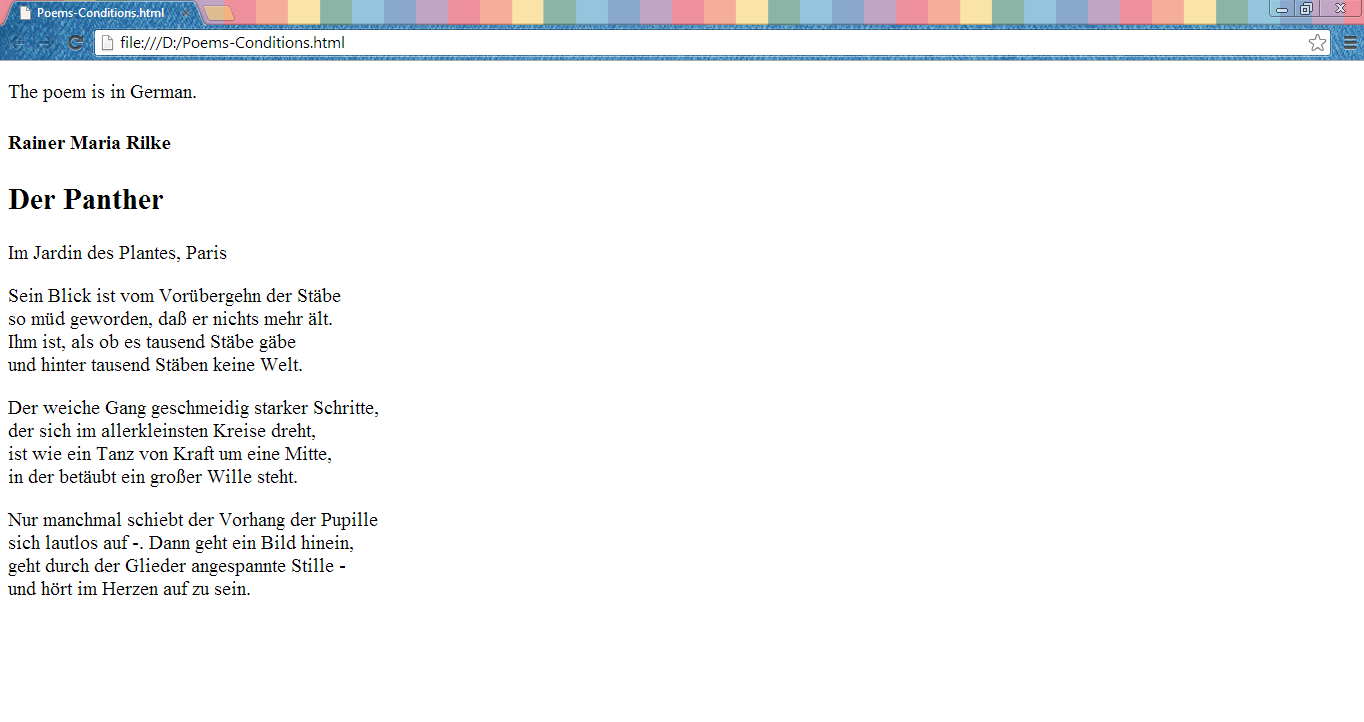
(1) As you can see, the content of the <xsl:if> element is executed if the pattern in the test attribute finds a match in the source document.
Browser view of the target document:
Exercise 4
Rewrite the stylesheet so that only Greek poems are displayed.
> > to the solution of exercise 4
<xsl:choose>
The <xsl:choose> element with its child elements <xsl:when> and <xsl:otherwise> corresponds to the "switch-case construct" in other programming languages.
With the help of this construct, various alternatives can be provided as well as a value, which is taken instead of alternatives being not applicable. The construct has to be introduced with the <xsl:choose> element. The element may contain any number of <xsl:when> child elements and exactly one <xsl:otherwise> element. The <xsl:when> elements as well as the <xsl:if> element have an obligatory test attribute. When its pattern matches, here also the content of the element is copied into the result tree. The main difference between the <xsl:if> element and the <xsl:choose>/<xsl:when> construct lies in the possibility of using the <xsl:otherwise> element, which takes action when none of the other <xsl:when> elements is applicable.
The stylesheet:
<?xml version="1.0" encoding="UTF-8"?>
<xsl:stylesheet version="1.0" xmlns:xsl="http://www.w3.org/1999/XSL/Transform">
  <xsl:output encoding="iso-8859-1" version="1.0"/>
    <xsl:template match="CollectionOfPoems">
        <html>
            <body>
                <xsl:apply-templates/>
            </body>
        </html>
    </xsl:template>
    <xsl:template match="Author">
           <br/>
           <h4>
               <xsl:apply-templates/>
          </h4>
    </xsl:template>
    <xsl:template match="FirstName">
              <xsl:apply-templates/>
              <xsl:text> </xsl:text>
    </xsl:template>
    <xsl:template match="LastName">
              <xsl:apply-templates/>
    </xsl:template>
    <xsl:template match="Title">
          <h2>
              <xsl:apply-templates/>
          </h2>
    </xsl:template>
    <xsl:template match="Strophe">
          <p>
              <xsl:apply-templates/>
          </p>
    </xsl:template>
    <xsl:template match="Verse">
              <xsl:apply-templates/>
              <br/>
    </xsl:template>
    <xsl:template match="Poem">
              <br/>
              <xsl:choose>                                                           (1)
                  <xsl:when test="@Language='el'">The poem is in Greek.</xsl:when>
                  <xsl:when test="@Language='en'">The poem is in English.</xsl:when> (2)
                  <xsl:otherwise>The poem is in German.</xsl:otherwise>              (3)
             </xsl:choose>
             <xsl:apply-templates/>
    </xsl:template>
</xsl:stylesheet>
(1) The <xsl:choose> element encloses the construct. The <xsl:when> and <xsl:otherwise> elements are only permitted as child elements of the <xsl:choose> element.
(2) The <xsl:when> element is executed if the pattern is applicable in the test attribute. In this case it is verified if the content of the current node – which means @Language – has the value „en“. If the value matches with the pattern, the text "The poem is in English." is outputted.
(3) The <xsl:otherwise> element is used if none of the <xsl:when> elements applies.
Copyright © dpunkt.verlag GmbH 2004
Printing of the online version is permitted exclusively for private use. Otherwise this chapter from the book "XSL-FO in der Praxis" ("XSL-FO in practice") is subject to the same provisions as those applicable for the hardcover edition: The work including all its components is protected by copyright. All rights reserved, including reproduction, translation, microfilming as well as storage and processing in electronic systems.
dpunkt.verlag GmbH, Ringstraße 19B, 69115 Heidelberg, fon 06221-14830, fax 06221-148399, hallo@dpunkt.de