

XML technologies / XSLT / XSLT introduction / Numbering
With the help of the <xsl:number> element, nodes can be assigned to sequences in the result tree. In this way, for example, chapters, sections or simple elements can be numbered. Also the numbering in different levels is possible and the formatting of the output can be determined. Consequently, a numbering with Arabic or Roman numbers or with letters can be generated with the format attribute.
In practice the element has three common attributes: count, level and format. The count attribute determines which nodes have to be counted, level determines the method of counting and format the display's format.
The stylesheet:
<?xml version="1.0" encoding="UTF-8"?>
<xsl:stylesheet version="1.0" xmlns:xsl="http://www.w3.org/1999/XSL/Transform">
   <xsl:output encoding="iso-8859-1" version="1.0"/>
   <xsl:template match="CollectionOfPoems">
      <html>
         <body>
            <xsl:apply-templates/>
         </body>
      </html>
   </xsl:template>
   <xsl:template match="Author">
      <br/>
      <h4>
          <xsl:apply-templates/>
      </h4>
   </xsl:template>
   <xsl:template match="FirstName">
      <xsl:apply-templates/>
      <xsl:text> </xsl:text>
   </xsl:template>
   <xsl:template match="LastName">
      <xsl:apply-templates/>
   </xsl:template>
   <xsl:template match="Title">
      <h2>
          <xsl:number format="I" level="any"/>             (1)
          <xsl:text> </xsl:text>                           (2)
          <xsl:apply-templates/>
      </h2>
   </xsl:template>
   <xsl:template match="Strophe">
      <p>
         <b>Strophe <xsl:number/></b>
         <br/>
         <xsl:apply-templates/>
      </p>
   </xsl:template>
   <xsl:template match="Verse">
      <b>Verse <xsl:number level="multiple" count="//Strophe | //Strophe/Verse" format="1.1"/></b> (3)
      <br/>
      <xsl:apply-templates/>
      <br/>
   </xsl:template>
   <xsl:template match="Poem">
      <br/>
      <xsl:apply-templates/>
   </xsl:template>
</xsl:stylesheet>
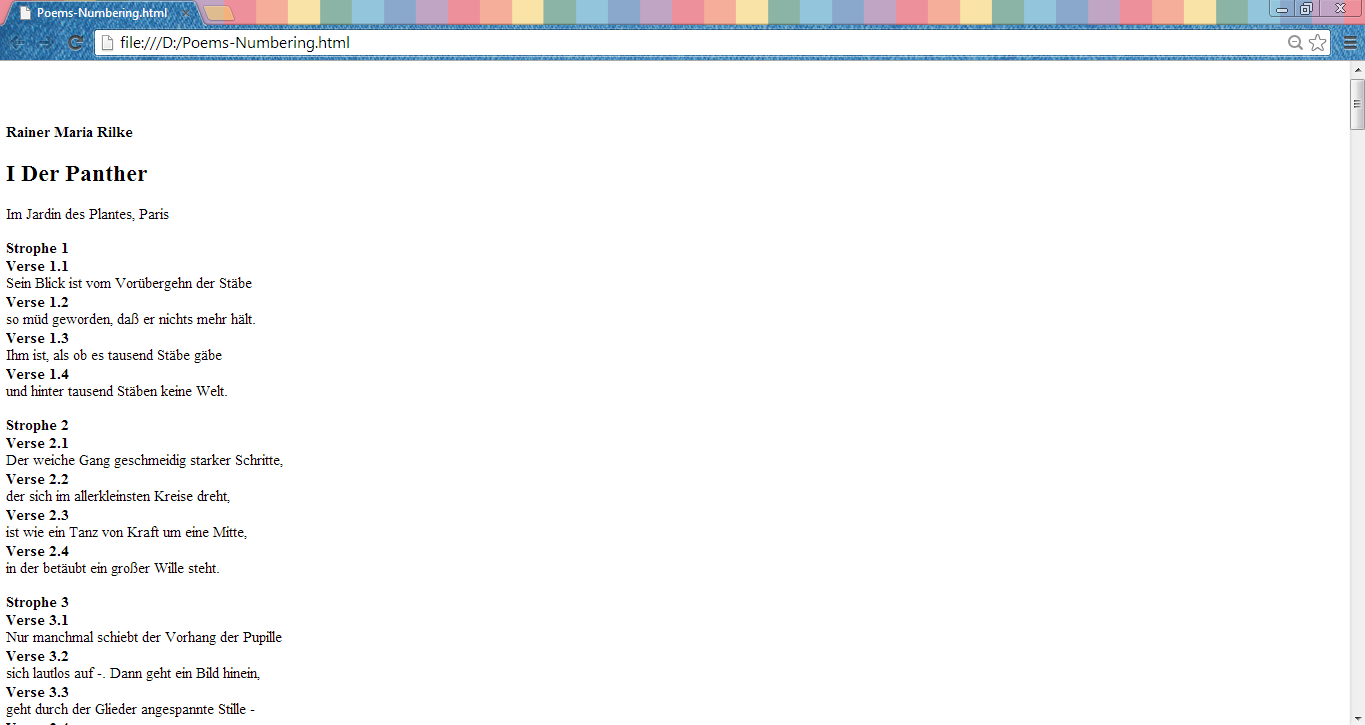
(1) In this template the <xsl:number> element is used in order to number the poems. In the default setting of the format attribute the numbering is effected in Arabic numbers. With the value I the counting is executed by using big Roman numerals.
All occurring Poem elements are counted in each level because the level attribute with the value any does not take into account the structure.
(2) The <xsl:text> element allows to copy text into the target document. At this point this is also possible without this element, but the element is often required in connection with XSL-FO because with it, for instance, space characters can be precisely controlled as a component of the text to be outputted.
(3) Here the <xsl:number> element is used with the three most important attributes. The level attribute indicates whether the counting is single or multiple, which means in this way (1., 1.1, 1.2, ...). The format attribute determines the formatting. Possible values are 1, a, A, i and I, which are combinable. Each level is separated with the help of a character. In this example the full stop character is used. Other separators are also possible. The count attribute determines on which level which elements are to be counted. As a separator for the levels the | character is used.
Browser view of the target document:
Exercise 6
a) Edit the example so that also the Roman numbering of the poem can be seen in the verses, as for example: Verse I.3.4.
b) Rewrite the stylesheet so that a continuous line count is displayed. The count shall include all displayed texts.
> > to the solutions of exercise 6
Copyright © dpunkt.verlag GmbH 2004
Printing of the online version is permitted exclusively for private use. Otherwise this chapter from the book "XSL-FO in der Praxis" ("XSL-FO in practice") is subject to the same provisions as those applicable for the hardcover edition: The work including all its components is protected by copyright. All rights reserved, including reproduction, translation, microfilming as well as storage and processing in electronic systems.
dpunkt.verlag GmbH, Ringstraße 19B, 69115 Heidelberg, fon 06221-14830, fax 06221-148399, hallo@dpunkt.de