Technologies XML / XSL-FO / Référence / Extensions XSL d’Antenna House Formatter / Propriétés / layer-settings
(Extrait de « XSL-FO ― Die Referenz » de Manuel Montero Pineda & Steffen Herkert, 2016, dpunkt.verlag)
A | B | C | D | E | F | G | H | I | J | K | L | M | N | O | P | Q | R | S | T | U | V | W | X | Y | Z
Catégorie Calques dans la sortie PDF
Définit les calques. V6.3[no-LT]
Valeur : | none | <layer-setting> [, <layer-setting>]* |
Valeur initiale : | none |
S’applique à : | élément racine |
Hérité : | no |
Pourcentages : | N/A |
Les valeurs ont les significations suivantes.
none | Aucune définition. | ||||||
<layer-setting> | <layer-setting> possède la syntaxe suivante :
Plusieurs calques peuvent être définis par des éléments séparés par des virgules. <layer-name>, le nom qui identifie le calque, est obligatoire ; les autres paramètres sont facultatifs. on|off définit l’état par défaut du calque, considéré comme on si le paramètre est omis. L’état on/off peut aussi être défini séparément pour view, print et export. locked verrouille le calque. lang définit la langue. |
Cette propriété n’est pas disponible dans AH Formatter V6.3 Lite.
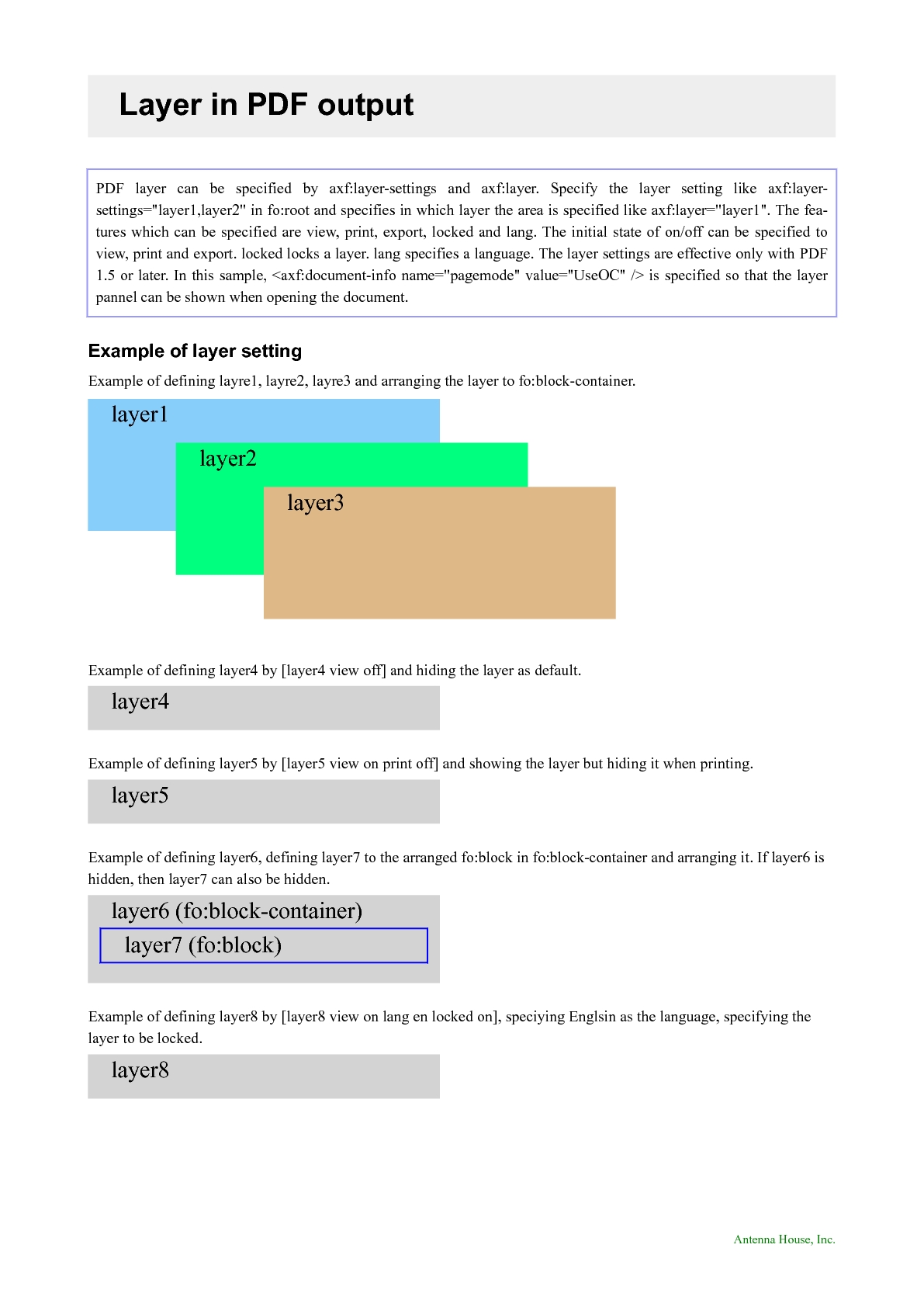
Exemple XSL-FO :
<fo:root xml:lang="en" axf:layer-settings="layer1,layer2,layer3,layer4 view
                        off,layer5 view on print off,layer6,layer7,layer8
                        view on lang en locked
                    on" xmlns:fo="http://www.w3.org/1999/XSL/Format" xmlns:cpfo="http://www.compart.net/xmlns/cpfo" xmlns:svg="http://www.w3.org/2000/svg" xmlns:axf="http://www.antennahouse.com/names/XSL/Extensions">
<axf:document-info name="document-title" value="Layer in PDF
                        output"/>
<axf:document-info name="author" value="Antenna House,
                        Inc."/>
<axf:document-info name="pagemode" value="UseOC"/>
<fo:layout-master-set>
<fo:simple-page-master page-height="297mm" page-width="210mm" margin-top="10mm" margin-left="20mm" margin-right="20mm" margin-bottom="10mm" master-name="PageMaster1">
<fo:region-after extent="7mm"/>
<fo:region-body margin-top="0mm" margin-left="0mm" margin-right="0mm" margin-bottom="10mm"/>
</fo:simple-page-master>
</fo:layout-master-set>
<fo:page-sequence master-reference="PageMaster1">
<fo:static-content flow-name="xsl-region-after">
<fo:block font-size="0.8em" text-align="right" color="green">
<fo:basic-link external-destination="http://www.antennahouse.com/">
Antenna House, Inc.
</fo:basic-link>
</fo:block>
</fo:static-content>
<fo:flow flow-name="xsl-region-body" font-family="serif" font-size="1em" line-height="1.4" axf:hyphenate-hyphenated-word="false" hyphenate="true">
<fo:block span="all" font-family="sans-serif" font-size="2em" font-weight="bold" line-height="2" space-before="1em" space-after="1em" space-before.conditionality="retain" space-after.conditionality="retain" background-color="#EEEEEE">
<fo:block start-indent="1em" end-indent="1em">
Layer in PDF output
</fo:block>
</fo:block>
<fo:block span="all" space-before="1em" space-after="1em" space-after.conditionality="retain" text-indent="0em" border="1pt solid
                    #9999FF" start-indent="0.5em" end-indent="0.5em" padding="0.5em" text-align="justify">
PDF
                layer can be specified by axf:layer-settings and axf:layer. Specify
                the layer setting like axf:layer-settings="layer1,layer2" in fo:root
                and specifies in which layer the area is specified like
                axf:layer="layer1". The features which can be specified are view,
                print, export, locked and lang. The initial state of on/off can be
                specified to view, print and export. locked locks a layer. lang
                specifies a language. The layer settings are effective only with PDF
                1.5 or later. In this sample, <axf:document-info name="pagemode"
                value="UseOC" /> is specified so that the layer pannel can be
                shown when opening the document.
</fo:block>
<fo:block space-before="1em" font-family="sans-serif" font-size="1.2em" font-weight="bold" text-indent="0em" line-height="2" keep-with-next.within-column="always">
Example of layer setting
</fo:block>
<fo:block>
Example of defining layre1, layre2, layre3 and arranging the layer
                to fo:block-container.
</fo:block>
<fo:block font-size="1.5em" space-after="11.5em" text-indent="1em">
<fo:block-container absolute-position="absolute" top="15mm" left="0mm" width="80mm" height="30mm" background-color="lightskyblue" axf:layer="layer1">
<fo:block>
layer1
</fo:block>
</fo:block-container>
<fo:block-container absolute-position="absolute" top="25mm" left="20mm" width="80mm" height="30mm" background-color="springgreen" axf:layer="layer2">
<fo:block>
layer2
</fo:block>
</fo:block-container>
<fo:block-container absolute-position="absolute" top="35mm" left="40mm" width="80mm" height="30mm" background-color="burlywood" axf:layer="layer3">
<fo:block>
layer3
</fo:block>
</fo:block-container>
</fo:block>
<fo:block>
Example of defining layer4 by [layer4 view off] and hiding the
                layer as default.
</fo:block>
<fo:block font-size="1.5em" space-before="0.2em" text-indent="1em">
<fo:block-container width="80mm" height="10mm" background-color="lightgrey" axf:layer="layer4">
<fo:block>
layer4
</fo:block>
</fo:block-container>
</fo:block>
<fo:block space-before="1.5em">
Example of defining layer5 by [layer5 view on print off] and
                showing the layer but hiding it when printing.
</fo:block>
<fo:block font-size="1.5em" space-before="0.2em" text-indent="1em">
<fo:block-container width="80mm" height="10mm" background-color="lightgrey" axf:layer="layer5">
<fo:block>
layer5
</fo:block>
</fo:block-container>
</fo:block>
<fo:block space-before="1.5em">
Example of defining layer6, defining layer7 to the arranged
                fo:block in fo:block-container and arranging it. If layer6 is
                hidden, then layer7 can also be hidden.
</fo:block>
<fo:block font-size="1.5em" space-before="0.2em" text-indent="1em">
<fo:block-container width="80mm" height="20mm" background-color="lightgrey" axf:layer="layer6">
<fo:block>
layer6 (fo:block-container)
</fo:block>
<fo:block axf:layer="layer7" border="thin solid
                    blue" margin-left="0.5em" margin-right="0.5em">
layer7 (fo:block)
</fo:block>
</fo:block-container>
</fo:block>
<fo:block space-before="1.5em">
Example of defining layer8 by [layer8 view on lang en locked on],
                speciying Englsin as the language, specifying the layer to be
                locked.
</fo:block>
<fo:block font-size="1.5em" space-before="0.2em" text-indent="1em">
<fo:block-container width="80mm" height="10mm" background-color="lightgrey" axf:layer="layer8">
<fo:block>
layer8
</fo:block>
</fo:block-container>
</fo:block>
</fo:flow>
</fo:page-sequence>
</fo:root>
Résultat :