Tecnologías XML / XSL-FO / Referencia / Extensiones XSL de Antenna House Formatter / Propiedades / punctuation-trim
(Extracto de «XSL-FO ― La Referencia» de Manuel Montero Pineda & Steffen Herkert, 2016, dpunkt.verlag)
A | B | C | D | E | F | G | H | I | J | K | L | M | N | O | P | Q | R | S | T | U | V | W | X | Y | Z
Categoría: reducción y puntuación colgante
Indica el tratamiento de la puntuación japonesa de anchura completa. [CSS3-Text] Interletraje de la puntuación de anchura completa: propiedad ‘punctuation-trim’
Valor: | none | [ [ start | start-except-first ] || [ end | allow-end | end-except-fullstop ] || adjacent ] | all | <string> | auto |
Valor inicial: | auto |
Se aplica a: | todos los objetos de formato de bloque y en línea |
Heredado: | yes |
Porcentajes: | N/A |
Los valores tienen los siguientes significados.
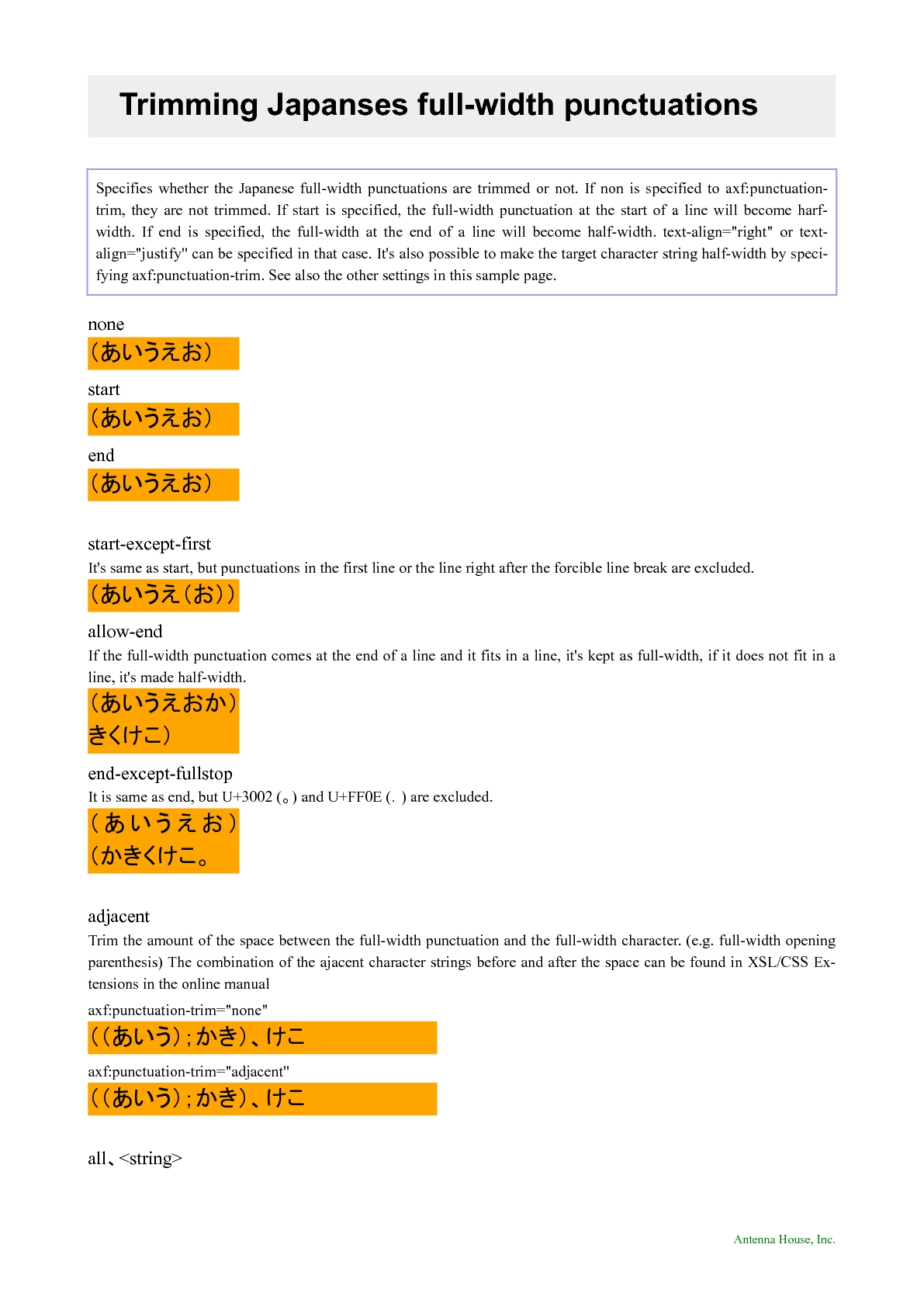
none | Los caracteres de puntuación no se reducen. | ||||||
start | Los caracteres de puntuación (paréntesis de apertura, etc.) al inicio de línea se reducen. | ||||||
start-except-first | Igual que start, excepto en la primera línea de un párrafo o en la situada justo después de un salto de línea forzado. | ||||||
end | Cuando se especifica text-align="right" o text-align="justify" (o text-align-last="justify") y aparecen signos de puntuación de anchura completa (paréntesis de cierre, etc.) al final de la frase, el carácter se trata obligatoriamente como de media anchura. | ||||||
allow-end | Cuando se especifica text-align="right" o text-align="justify" (o text-align-last="justify") y aparecen signos de puntuación de anchura completa (paréntesis de cierre, etc.) al final de la frase, conservan su anchura completa si el texto cabe en una línea; en caso contrario se tratan como de media anchura. | ||||||
end-except-fullstop |
Se comporta como el valor end, excepto para los dos caracteres siguientes.
| ||||||
adjacent |
Se reduce el espacio entre una puntuación de anchura completa y un carácter de anchura completa en japonés.
Los caracteres de puntuación de anchura completa se tratan como los paréntesis de cierre de anchura completa. El valor adjacent equivale a axf:kerning-mode="contextual" con XSL Formatter V4.
| ||||||
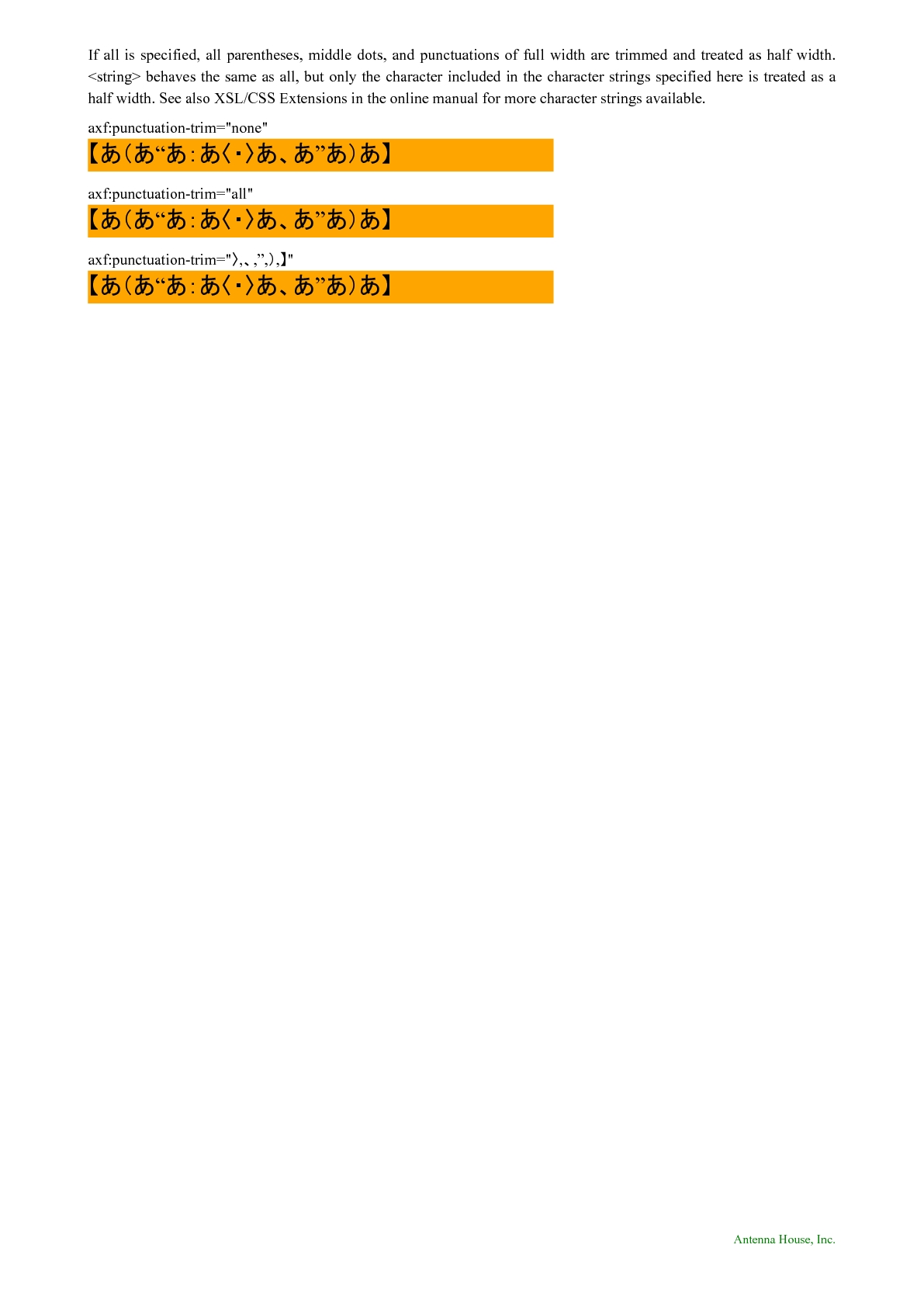
all | Reduce todos los paréntesis, puntos medios y signos de puntuación de anchura completa y los trata como de media anchura. | ||||||
<string> | Igual que "all", pero solo los caracteres incluidos en la cadena indicada se tratan como de media anchura. Se ignoran los caracteres distintos de paréntesis, puntos medios y signos de puntuación de anchura completa. | ||||||
auto | Depende de la configuración del sistema. Se interpreta como "none" o "start end adjacent" según punctuation-trim en el archivo de configuración de opciones. |
Los paréntesis de apertura de anchura completa procesados por axf:punctuation-trim son los siguientes:
U+2018 | LEFT SINGLE QUOTATION MARK | ‘ |
U+201C | LEFT DOUBLE QUOTATION MARK | “ |
U+3008 | LEFT ANGLE BRACKET | 〈 |
U+300A | LEFT DOUBLE ANGLE BRACKET | 《 |
U+300C | LEFT CORNER BRACKET | 「 |
U+300E | LEFT WHITE CORNER BRACKET | 『 |
U+3010 | LEFT BLACK LENTICULAR BRACKET | 【 |
U+3014 | LEFT TORTOISE SHELL BRACKET | 〔 |
U+3016 | LEFT WHITE LENTICULAR BRACKET | 〖 |
U+3018 | LEFT WHITE TORTOISE SHELL BRACKET | 〘 |
U+301A | LEFT WHITE SQUARE BRACKET | 〚 |
U+301D | REVERSED DOUBLE PRIME QUOTATION MARK | 〝 |
U+FF08 | FULLWIDTH LEFT PARENTHESIS | ( |
U+FF3B | FULLWIDTH LEFT SQUARE BRACKET | [ |
U+FF5B | FULLWIDTH LEFT CURLY BRACKET | { |
U+FF5F | FULLWIDTH LEFT WHITE PARENTHESIS |
Los paréntesis de cierre de anchura completa procesados por axf:punctuation-trim son los siguientes:
U+2019 | RIGHT SINGLE QUOTATION MARK | ’ |
U+201D | RIGHT DOUBLE QUOTATION MARK | ” |
U+3009 | RIGHT ANGLE BRACKET | 〉 |
U+300B | RIGHT DOUBLE ANGLE BRACKET | 》 |
U+300D | RIGHT CORNER BRACKET | 」 |
U+300F | RIGHT WHITE CORNER BRACKET | 』 |
U+3011 | RIGHT BLACK LENTICULAR BRACKET | 】 |
U+3015 | RIGHT TORTOISE SHELL BRACKET | 〕 |
U+3017 | RIGHT WHITE LENTICULAR BRACKET | 〗 |
U+3019 | RIGHT WHITE TORTOISE SHELL BRACKET | 〙 |
U+301B | RIGHT WHITE SQUARE BRACKET | 〛 |
U+301E | DOUBLE PRIME QUOTATION MARK | 〞 |
U+301F | LOW DOUBLE PRIME QUOTATION MARK | 〟 |
U+FF09 | FULLWIDTH RIGHT PARENTHESIS | ) |
U+FF3D | FULLWIDTH RIGHT SQUARE BRACKET | ] |
U+FF5D | FULLWIDTH RIGHT CURLY BRACKET | } |
U+FF60 | FULLWIDTH RIGHT WHITE PARENTHESIS |
Los signos de puntuación de anchura completa procesados por axf:punctuation-trim son los siguientes:
U+3001 | IDEOGRAPHIC COMMA | 、 |
U+3002 | IDEOGRAPHIC FULL STOP | 。 |
U+FF0C | FULLWIDTH COMMA | , |
U+FF0E | FULLWIDTH FULL STOP | . |
Los puntos medios de anchura completa procesados por axf:punctuation-trim son los siguientes:
U+30FB | KATAKANA MIDDLE DOT | ・ |
U+FF1A | FULLWIDTH COLON | : |
U+FF1B | FULLWIDTH SEMICOLON | ; |
ATENCIÓN: | Para reproducir el comportamiento de axf:punctuation-trim="both" en XSL Formatter V4, indique axf:punctuation-trim="start end" o axf:punctuation-trim="start allow-end" en AH Formatter V6.3. Si también utiliza esta extensión junto con axf:kerning-mode="contextual", indique axf:punctuation-trim="start end adjacent", etc., con AH Formatter V6.3. |
Ejemplo XSL-FO:
<fo:root xml:lang="en" xmlns:fo="http://www.w3.org/1999/XSL/Format" xmlns:cpfo="http://www.compart.net/xmlns/cpfo" xmlns:svg="http://www.w3.org/2000/svg" xmlns:axf="http://www.antennahouse.com/names/XSL/Extensions">
<axf:document-info name="document-title" value="Trimming Japanses full-width punctuations"/>
<axf:document-info name="author" value="Antenna House, Inc."/>
<fo:layout-master-set>
<fo:simple-page-master page-height="297mm" page-width="210mm" margin-top="10mm" margin-left="20mm" margin-right="20mm" margin-bottom="10mm" master-name="PageMaster1">
<fo:region-after extent="7mm"/>
<fo:region-body margin-top="0mm" margin-left="0mm" margin-right="0mm" margin-bottom="10mm"/>
</fo:simple-page-master>
</fo:layout-master-set>
<fo:page-sequence master-reference="PageMaster1">
<fo:static-content flow-name="xsl-region-after">
<fo:block font-size="0.8em" text-align="right" color="green">
<fo:basic-link external-destination="http://www.antennahouse.com/">
Antenna House, Inc.
</fo:basic-link>
</fo:block>
</fo:static-content>
<fo:flow flow-name="xsl-region-body" font-family="serif" font-size="1em" line-height="1.4" axf:hyphenate-hyphenated-word="false" hyphenate="true">
<fo:block span="all" font-family="sans-serif" font-size="2em" font-weight="bold" line-height="2" space-before="1em" space-after="1em" space-before.conditionality="retain" space-after.conditionality="retain" background-color="#EEEEEE">
<fo:block start-indent="1em" end-indent="1em">
Trimming Japanses full-width punctuations
</fo:block>
</fo:block>
<fo:block span="all" space-before="1em" space-after="1em" space-after.conditionality="retain" text-indent="0em" border="1pt solid #9999FF" start-indent="0.5em" end-indent="0.5em" padding="0.5em" text-align="justify">
Specifies whether the Japanese full-width punctuations are trimmed or not. If non is specified to axf:punctuation-trim, they are not trimmed. If start is specified, the full-width punctuation at the start of a line will become harf-width. If end is specified, the full-width at the end of a line will become half-width. text-align="right" or text-align="justify" can be specified in that case. It's also possible to make the target character string half-width by specifying axf:punctuation-trim. See also the other settings in this sample page.
</fo:block>
<fo:block text-align="justify">
<fo:block font-size="1.2em">
none
</fo:block>
<fo:block-container space-after="0.3em" font-size="1.5em" width="6.5em" axf:punctuation-trim="none">
<fo:block background="orange" xml:lang="ja">
(あいうえお)
</fo:block>
</fo:block-container>
<fo:block font-size="1.2em">
start
</fo:block>
<fo:block-container space-after="0.3em" font-size="1.5em" width="6.5em" axf:punctuation-trim="start">
<fo:block background="orange" xml:lang="ja">
(あいうえお)
</fo:block>
</fo:block-container>
<fo:block font-size="1.2em">
end
</fo:block>
<fo:block-container space-after="1.3em" font-size="1.5em" width="6.5em" axf:punctuation-trim="end">
<fo:block background="orange" xml:lang="ja">
(あいうえお)
</fo:block>
</fo:block-container>
<fo:block font-size="1.2em">
start-except-first
</fo:block>
<fo:block>
It's same as start, but punctuations in the first line or the line right after the forcible line break are excluded.
</fo:block>
<fo:block-container space-after="0.3em" font-size="1.5em" width="6.5em" axf:punctuation-trim="start-except-first">
<fo:block background="orange" xml:lang="ja">
(あいうえ(お))
</fo:block>
</fo:block-container>
<fo:block font-size="1.2em">
allow-end
</fo:block>
<fo:block>
If the full-width punctuation comes at the end of a line and it fits in a line, it's kept as full-width, if it does not fit in a line, it's made half-width.
</fo:block>
<fo:block-container space-after="0.3em" font-size="1.5em" width="6.5em" axf:punctuation-trim="allow-end">
<fo:block background="orange" xml:lang="ja">
(あいうえおか)きくけこ)
</fo:block>
</fo:block-container>
<fo:block font-size="1.2em">
end-except-fullstop
</fo:block>
<fo:block>
It is same as end, but U+3002 (。) and U+FF0E (.) are excluded.
</fo:block>
<fo:block-container space-after="1.3em" font-size="1.5em" width="6.5em" axf:punctuation-trim="end-except-fullstop">
<fo:block background="orange" xml:lang="ja">
(あいうえお)(かきくけこ。
</fo:block>
</fo:block-container>
<fo:block font-size="1.2em">
adjacent
</fo:block>
<fo:block space-after="0.3em">
Trim the amount of the space between the full-width punctuation and the full-width character. (e.g. full-width opening parenthesis) The combination of the ajacent character strings before and after the space can be found in XSL/CSS Extensions in the online manual
</fo:block>
<fo:block>
axf:punctuation-trim="none"
</fo:block>
<fo:block-container space-after="0.3em" font-size="1.5em" width="15em" axf:punctuation-trim="none">
<fo:block background="orange" xml:lang="ja">
((あいう);かき)、けこ
</fo:block>
</fo:block-container>
<fo:block>
axf:punctuation-trim="adjacent"
</fo:block>
<fo:block-container space-after="1.3em" font-size="1.5em" width="15em" axf:punctuation-trim="adjacent">
<fo:block background="orange" xml:lang="ja">
((あいう);かき)、けこ
</fo:block>
</fo:block-container>
<fo:block font-size="1.2em">
all、<string>
</fo:block>
<fo:block space-after="0.5em">
If all is specified, all parentheses, middle dots, and punctuations of full width are trimmed and treated as half width. <string> behaves the same as all, but only the character included in the character strings specified here is treated as a half width. See also XSL/CSS Extensions in the online manual for more character strings available.
</fo:block>
<fo:block>
axf:punctuation-trim="none"
</fo:block>
<fo:block-container space-after="0.5em" font-size="1.5em" width="20em" axf:punctuation-trim="none">
<fo:block background="orange" xml:lang="ja">
【あ(あ“あ:あ〈・〉あ、あ”あ)あ】
</fo:block>
</fo:block-container>
<fo:block>
axf:punctuation-trim="all"
</fo:block>
<fo:block-container space-after="0.5em" font-size="1.5em" width="20em" axf:punctuation-trim="all">
<fo:block background="orange" xml:lang="ja">
【あ(あ“あ:あ〈・〉あ、あ”あ)あ】
</fo:block>
</fo:block-container>
<fo:block>
axf:punctuation-trim="〉,、,”,),】"
</fo:block>
<fo:block-container space-after="1.5em" font-size="1.5em" width="20em" axf:punctuation-trim="〉,、,”,),】">
<fo:block background="orange" xml:lang="ja">
【あ(あ“あ:あ〈・〉あ、あ”あ)あ】
</fo:block>
</fo:block-container>
</fo:block>
</fo:flow>
</fo:page-sequence>
</fo:root>Salida:
page 2