Tecnologías XML / XSL-FO / Referencia / Extensiones XSL de Antenna House Formatter / Propiedades / field-button-icon-down
(Extracto de «XSL-FO ― Die Referenz» de Manuel Montero Pineda & Steffen Herkert, 2016, dpunkt.verlag)
A | B | C | D | E | F | G | H | I | J | K | L | M | N | O | P | Q | R | S | T | U | V | W | X | Y | Z
Categoría Acroform en la salida PDF
Especifica el icono mostrado al pulsar el botón. [no-LT]
Valor: | <uri-specification> |
Valor inicial: | cadena vacía |
Se aplica a: | axf:form-field |
Heredado: | no |
Porcentajes: | N/A |
Ejemplo XSL-FO:
<fo:root xml:lang="en" xmlns:fo="http://www.w3.org/1999/XSL/Format" xmlns:cpfo="http://www.compart.net/xmlns/cpfo" xmlns:svg="http://www.w3.org/2000/svg" xmlns:axf="http://www.antennahouse.com/names/XSL/Extensions">
<axf:document-info name="document-title" value="Form field"/>
<axf:document-info name="author" value="Antenna House, Inc."/>
<fo:layout-master-set>
<fo:simple-page-master page-height="297mm" page-width="210mm" margin-top="10mm" margin-left="20mm" margin-right="20mm" margin-bottom="10mm" master-name="PageMaster1">
<fo:region-after extent="7mm"/>
<fo:region-body margin-top="0mm" margin-left="0mm" margin-right="0mm" margin-bottom="10mm"/>
</fo:simple-page-master>
</fo:layout-master-set>
<fo:page-sequence master-reference="PageMaster1">
<fo:static-content flow-name="xsl-region-after">
<fo:block font-size="0.8em" text-align="right" color="green">
<fo:basic-link external-destination="http://www.antennahouse.com/">
Antenna House, Inc.
</fo:basic-link>
</fo:block>
</fo:static-content>
<fo:flow flow-name="xsl-region-body" font-family="serif" font-size="1em" line-height="1.4" axf:hyphenate-hyphenated-word="false" hyphenate="true">
<fo:block span="all" font-family="sans-serif" font-size="2em" font-weight="bold" line-height="2" space-before="1em" space-after="1em" space-before.conditionality="retain" space-after.conditionality="retain" background-color="#EEEEEE">
<fo:block start-indent="1em" end-indent="1em">
Form field
</fo:block>
</fo:block>
<fo:block span="all" space-before="1em" space-after="1em" space-after.conditionality="retain" text-indent="0em" border="1pt solid #9999FF" start-indent="0.5em" end-indent="0.5em" padding="0.5em" text-align="justify">

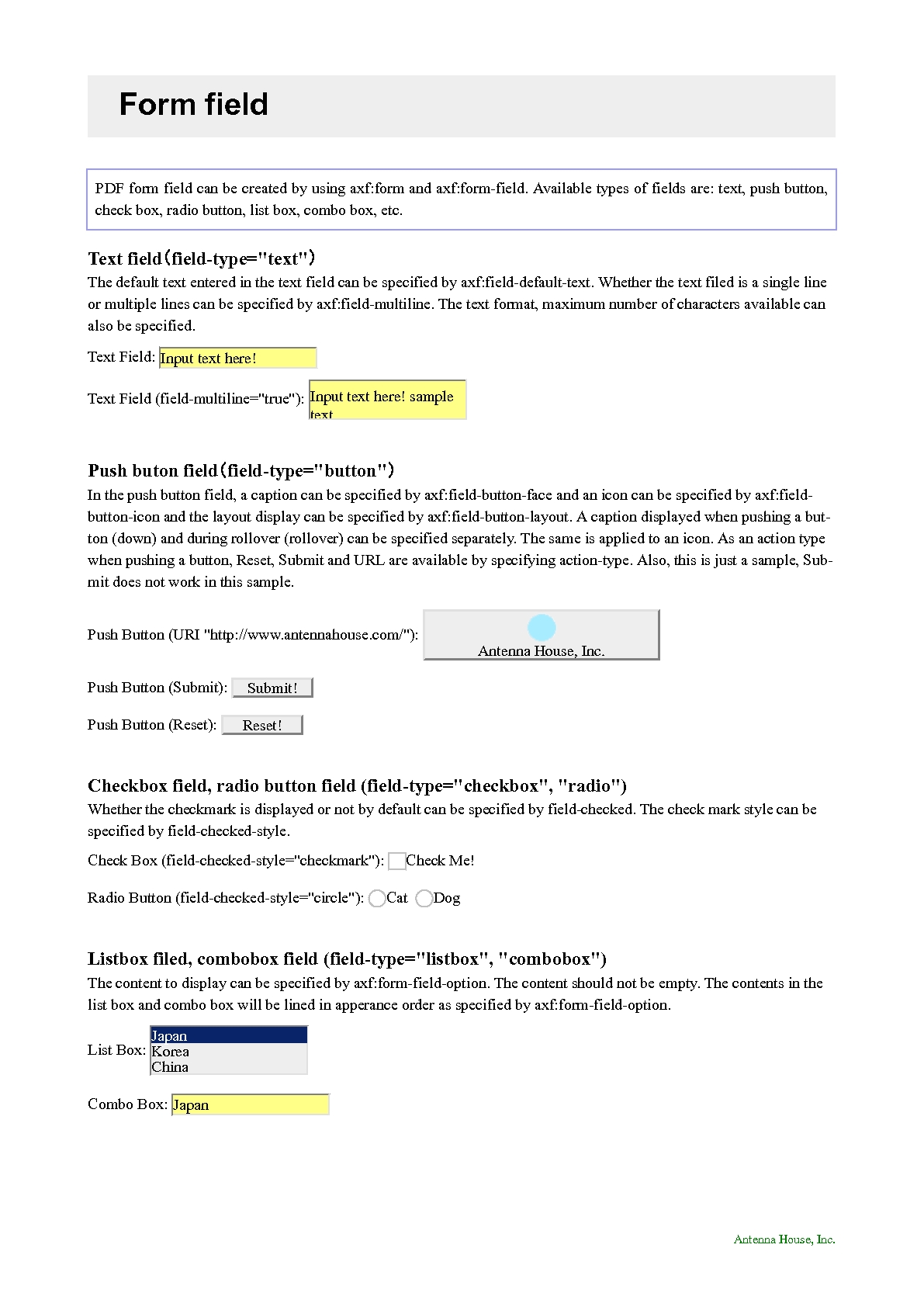
PDF form field can be created by using axf:form and axf:form-field. Available types of fields are: text, push button, check box, radio button, list box, combo box, etc.

</fo:block>
<axf:form external-destination="http://www.antenna.co.jp/form-test.cgi" field-submit-method="post" field-submit-coordinates="true">
<fo:block font-size="1.2em" font-weight="bold" space-before="1em">
Text field(field-type="text")
</fo:block>
<fo:block>

The default text entered in the text field can be specified by axf:field-default-text. Whether the text filed is a single line or multiple lines can be specified by axf:field-multiline. The text format, maximum number of characters available can also be specified.

</fo:block>
<fo:block space-before="0.5em">
 Text Field:
<axf:form-field field-type="text" field-name="InputText-1" field-default-text="Input text here!" field-multiline="false" field-scroll="true" field-maxlen="32" width="10em" height="1.2em" background-color="#ff8" border="1pt silver inset"/>
</fo:block>
<fo:block space-before="0.5em">
 Text Field (field-multiline="true"):
<axf:form-field field-type="text" field-name="InputText-2" field-default-text="Input text here! sample text" field-multiline="true" field-scroll="true" field-maxlen="100" width="10em" height="2.4em" background-color="#ff8" border="1pt silver inset"/>
</fo:block>
<fo:block font-size="1.2em" font-weight="bold" space-before="2em">
Push buton field(field-type="button")
</fo:block>
<fo:block>

In the push button field, a caption can be specified by axf:field-button-face and an icon can be specified by axf:field-button-icon and the layout display can be specified by axf:field-button-layout. A caption displayed when pushing a button (down) and during rollover (rollover) can be specified separately. The same is applied to an icon. As an action type when pushing a button, Reset, Submit and URL are available by specifying action-type. Also, this is just a sample, Submit does not work in this sample.
</fo:block>
<fo:block space-before="1em">
 Push Button (URI "http://www.antennahouse.com/"):
<axf:form-field field-type="button" field-name="URI Button" action-type="uri" external-destination="url('http://www.antennahouse.com/')" field-button-layout="caption-below-icon" field-button-face="Antenna House, Inc." field-button-face-down="Down" field-button-face-rollover="Rollover" field-button-icon="url(img/icon1.png)" field-button-icon-down="url(img/icon2.png)" field-button-icon-rollover="url(img/icon3.png)" width="15em" height="3em" background-color="#eee" border="2px silver outset"/>
</fo:block>
<fo:block space-before="1em">
 Push Button (Submit):
<axf:form-field field-type="button" field-name="SubmitButton" action-type="submit" field-button-layout="caption" field-button-face="Submit!" width="5em" background-color="#eee" border="2px silver outset"/>
</fo:block>
<fo:block space-before="1em">
 Push Button (Reset):
<axf:form-field field-type="button" field-name="ResetButton" action-type="reset" field-button-layout="caption" field-button-face="Reset!" field-button-face-down="Down" field-button-face-rollover="Rollover" width="5em" background-color="#eee" border="2px silver outset"/>
</fo:block>
<fo:block font-size="1.2em" font-weight="bold" space-before="2em">
Checkbox field, radio button field (field-type="checkbox", "radio")
</fo:block>
<fo:block>
Whether the checkmark is displayed or not by default can be specified by field-checked. The check mark style can be specified by field-checked-style.
</fo:block>
<fo:block space-before="0.5em">
 Check Box (field-checked-style="checkmark"):
<axf:form-field field-type="checkbox" field-name="CheckMe" field-checked="false" field-checked-style="checkmark" width="1em" border="1px solid silver"/>
 Check Me!
</fo:block>
<fo:block space-before="1em">
 Radio Button (field-checked-style="circle"):
<axf:form-field field-type="radio" field-name="Choice" field-value="Cat" field-checked="false" field-checked-style="circle" width="1em" border-radius="0.6em" border="1px solid silver"/>
 Cat
<axf:form-field field-type="radio" field-name="Choice" field-value="Dog" field-checked="false" field-checked-style="circle" width="1em" axf:border-radius="0.6em" border="1px solid silver"/>
 Dog
</fo:block>
<fo:block font-size="1.2em" font-weight="bold" space-before="2em">
Listbox filed, combobox field (field-type="listbox", "combobox")
</fo:block>
<fo:block>
The content to display can be specified by axf:form-field-option. The content should not be empty. The contents in the list box and combo box will be lined in apperance order as specified by axf:form-field-option.
</fo:block>
<fo:block space-before="0.5em">
 List Box:
<axf:form-field field-type="listbox" field-name="ListChoice" field-top-index="1" field-multiple="true" width="10em" height="3em" background-color="#eee" border="1pt silver inset">
<axf:form-field-option field-value="ja">
Japan
</axf:form-field-option>
<axf:form-field-option field-value="ko">
Korea
</axf:form-field-option>
<axf:form-field-option field-value="cn">
China
</axf:form-field-option>
<axf:form-field-option field-value="th">
Thailand
</axf:form-field-option>
</axf:form-field>
</fo:block>
<fo:block space-before="1em">
 Combo Box:
<axf:form-field field-type="combobox" field-name="ComboEditable" field-editable="true" field-top-index="1" width="10em" height="1.2em" background-color="#ff8" border="1pt silver inset">
<axf:form-field-option field-value="ja">
Japan
</axf:form-field-option>
<axf:form-field-option field-value="ko">
Korea
</axf:form-field-option>
<axf:form-field-option field-value="cn">
China
</axf:form-field-option>
<axf:form-field-option field-value="th">
Thailand
</axf:form-field-option>
</axf:form-field>
</fo:block>
</axf:form>
</fo:flow>
</fo:page-sequence>
</fo:root>Resultado: