

Tecnologías XML / CSS / Recetario CSS / Formularios / Ejemplo: formulario de registro
(Extracto de «CSS Kochbuch» de Christopher Schmitt)
En algunos formularios conviene colocar los elementos form en una tabla de dos columnas, para campos y rótulos. El ejemplo muestra el código; la figura muestra el formulario sin estilos.
Ejemplo: formulario con estilo.
<form action="registration.cfm" method="post">
<table cellspacing="0">
<tr class="header">
<th colspan="2">Informationen zum Benutzerkonto</th>
</tr>
<tr class="required">
<th scope="row">Login-Name*</th>
<td><input name="uname" type="text" size="12" maxlength="12" /></td>
</tr>
<tr class="required">
<th scope="row">Passwort*</th>
<td><input name="pword" type="text" size="12" maxlength="12" /></td>
</tr>
<tr class="required">
<th scope="row">Passwort bestätigen* </th>
<td><input name="pword2" type="text" size="12" maxlength="12" /></td>
</tr>
<tr class="required">
<th scope="row">E-Mail-Adresse*</th>
<td><input name="email" type="text" /></td>
</tr>
<tr class="required">
<th scope="row">E-Mail-Adresse bestätigen*</th>
<td><input type="text" name="email2" /></td>
</tr>
<tr class="header">
<th colspan="2">Informationen zur Person</th>
</tr>
<tr class="required">
<th scope="row">Vorname*</th>
<td><input name="fname" type="text" size="11" /></td>
</tr>
<tr class="required">
<th scope="row">Nachname*</th>
<td><input name="lname" type="text" size="11" /></td>
</tr>
<tr class="required">
<th scope="row">Adresse 1*</th>
<td><input name="address1" type="text" size="11" /></td>
</tr>
<tr>
<th scope="row">Adresse 2</th>
<td><input type="text" name="address2" /></td>
</tr>
<tr class="required">
<th scope="row">Stadt*</th>
<td><input type="text" name="city" /></td>
</tr>
<tr class="required">
<th scope="row">Bundesland*</th>
<td>
<select name="state">
<option selected="selected" disabled="disabled">Auswählen</option>
<option value="hamburg">Hamburg</option>
</select>
</td>
</tr>
<tr class="required">
<th scope="row">PLZ*</th>
<td><input name="zipcode" type="text" id="zipcode" size="5" maxlength="5" /></td>
</tr>
<tr class="required">
<th scope="row">Land*</th>
<td><input type="text" name="country" id="country" /></td>
</tr>
<tr class="required">
<th scope="row">Geschlecht*</th>
<td><input type="radio" name="sex" value="female" />Weiblich <input type="radio" name="sex" value="male" />Männlich</td>
</tr>
<tr class="header">
<th colspan="2">Weitere Informationen</th>
</tr>
<tr>
<th scope="row">Jahreseinkommen</th>
<td>
<select name="income" size="1" >
<option selected="selected" disabled="disabled">Auswählen</option>
<option value="notsay">Verrate ich nicht!</option>
</select>
</td>
</tr>
<tr>
<th scope="row">Interessen</th>
<td><input name="interests" type="checkbox" value="shopping-fashion" />Einkaufen/Mode <input name="interests" type="checkbox" value="sports" />Sport <input name="interests" type="checkbox" value="travel" />Reisen</td>
</tr>
<tr>
<th scope="row">Augenfarbe</th>
<td><input name="eye" type="checkbox" value="red" />Rot <input name="eye" type="checkbox" value="green" />Grün <input name="eye" type="checkbox" value="brown" />Braun <input name="eye" type="checkbox" value="blue" />Blau-Golden</td>
</tr>
</table>
<input type="submit" name="Submit" value="Abschicken" id="buttonSubmit" />
<input type="reset" name="Submit2" value="Formular löschen" id="buttonReset" />
</form>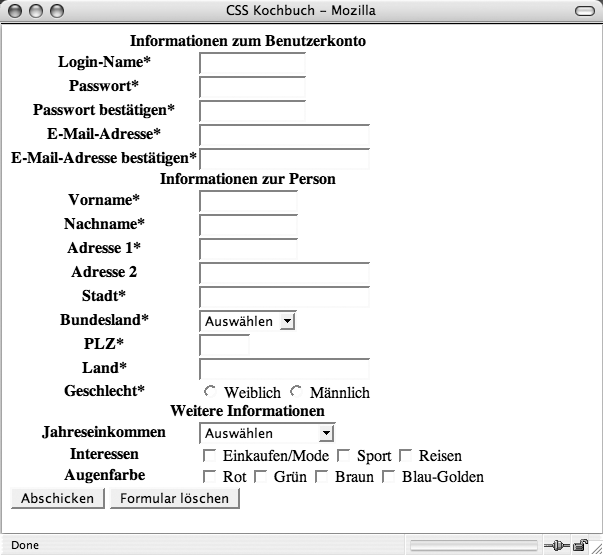
Figura: formulario y tabla sin estilos.
Primero dé estilo al elemento table en sí. La propiedad border-collapse controla los bordes entre celdas. Defina también color y bordes de la tabla (véase la figura):
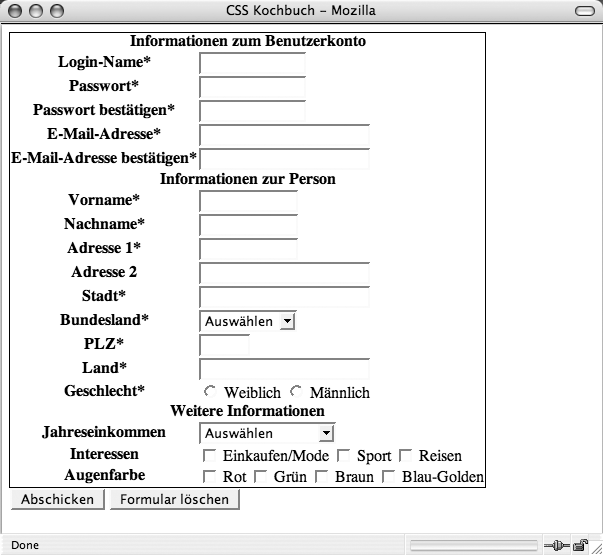
Figura: la tabla tiene borde.
table {
 border-collapse: collapse;
 color: black;
 border: 1px solid black;
}
Después dé estilo a las celdas de rótulos, aquí elementos th (véase la figura). Miden 200 píxeles, se alinean a la derecha y utilizan Verdana a 0,7 em:
th {
 width: 200px;
 text-align: right;
 vertical-align: top;
 border-top: 1px solid black;
 font-family: Verdana;
 font-size: 0.7em;
}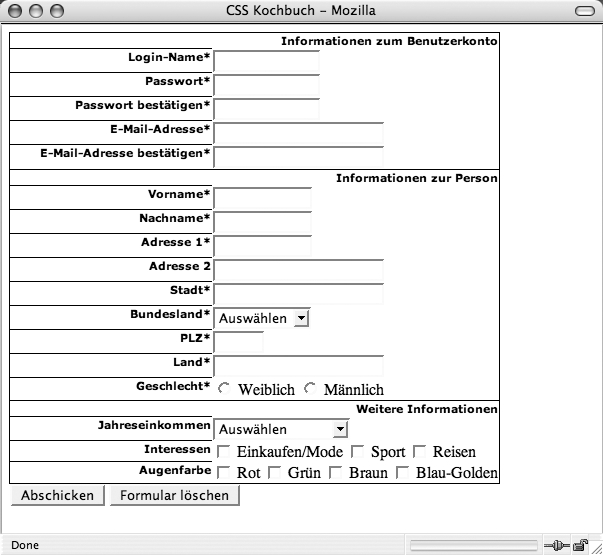
Figura: celdas de rótulos con estilo.
Añada relleno a las celdas de rótulos (véase la figura):
th {
 width: 200px;
 text-align: right;
 vertical-align: top;
 border-top: 1px solid black;
 font-family: Verdana;
 font-size: 0.7em;
 padding-right: 12px;
 padding-top: 0.75em;
 padding-bottom: 0.75em;
}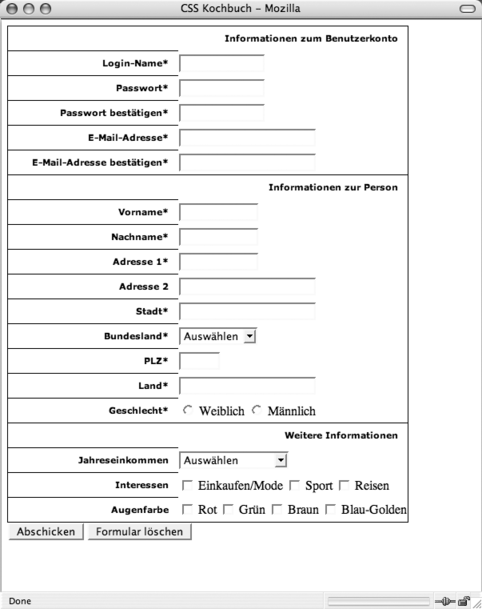
Figura: celdas de rótulos con relleno.
Dé estilo a las celdas derechas. Un fondo negro las distingue de la columna izquierda. Bordes izquierdos grises suavizan la transición al leer (véase la figura):
td {
 vertical-align: middle;
 background-color: black;
 border-bottom: 1px solid white;
 color: white;
 border-left: 4px solid gray;
 padding: 4px;
 font-family: Verdana;
 font-size: .7em;
}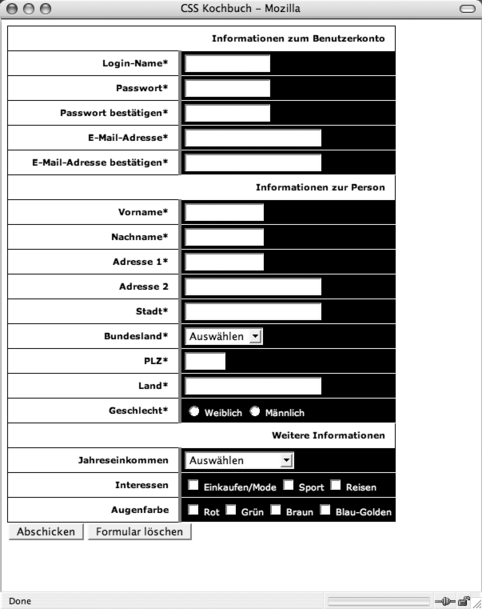
Figura: celdas derechas con estilo.
Algunos campos son obligatorios. Indíquelo con texto rojo en sus celdas (véase la figura):
.required {
 color: red;
}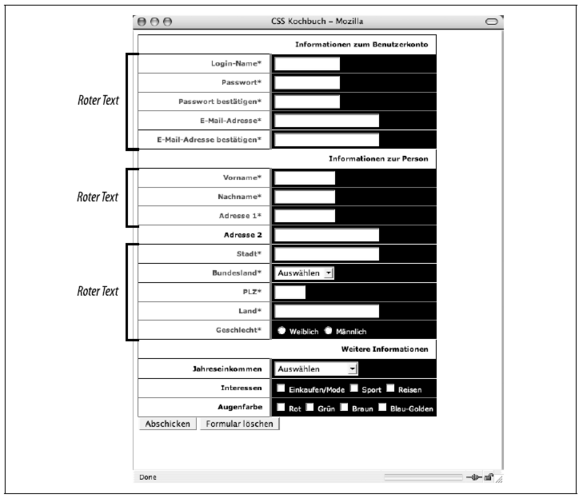
Figura: campos obligatorios en rojo.
Distinga los títulos de sección con mayúsculas y una fuente algo mayor (véase la figura):
.header th {
 text-align: left;
 text-transform: uppercase;
 font-size: .9em;
}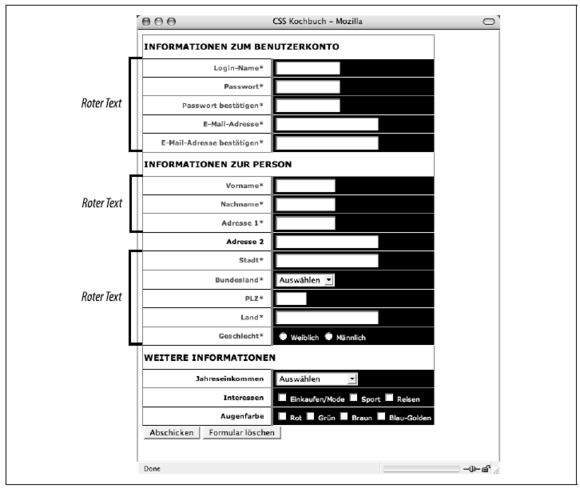
Figura: títulos de sección ajustados.
Mueva los títulos sobre la segunda columna. Calcule su posición, aquí mediante relleno izquierdo, sumando el ancho izquierdo (200 píxeles), su relleno derecho (12), el borde izquierdo de la columna derecha (4) y su relleno izquierdo (4):
.header th {
 text-align: left;
 text-transform: uppercase;
 font-size: .9em;
 padding-left: 220px;
}
Engrose los bordes superior e inferior para mejorar los títulos (véase la figura):
.header th {
 text-align: left;
 text-transform: uppercase;
 font-size: .9em;
 padding-left: 220px;
 border-bottom: 2px solid gray;
 border-top: 2px solid black;
}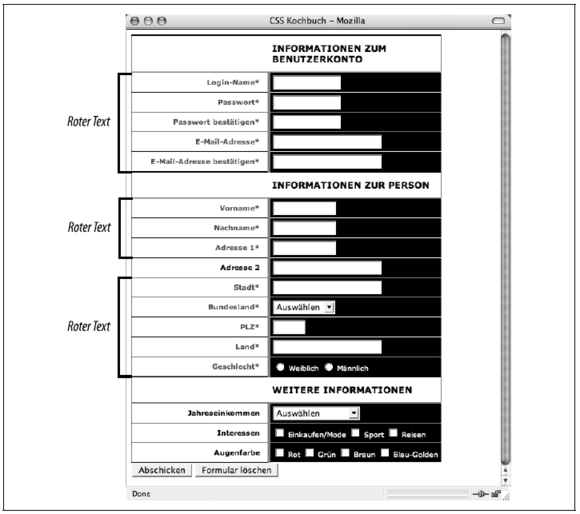
Figura: títulos con relleno.
Por último, mueva los botones de envío y restablecimiento a la derecha, como los títulos, bajo los campos, con un margen izquierdo de 220 píxeles (véase la figura):
#buttonSubmit {
 margin-left: 220px;
 margin-top: 4px;
}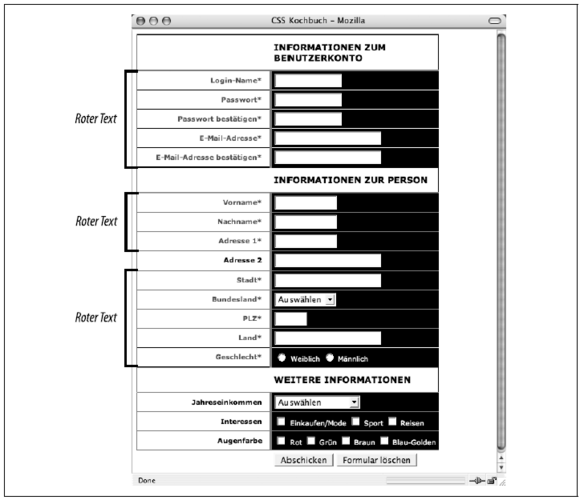
Figura: botones de envío y restablecimiento recolocados.
Copyright de la edición alemana © 2007 O’Reilly Verlag GmbH & Co. KG
Puede imprimir la versión en línea para uso privado.
Para cualquier otro uso, este capítulo del libro «CSS Kochbuch» está sujeto a las mismas condiciones que la edición encuadernada: la obra y todas sus partes están protegidas por derechos de autor. Todos los derechos reservados, incluidos reproducción, traducción, microfilmación, almacenamiento y procesamiento en sistemas electrónicos.
O’Reilly Verlag GmbH & Co. KG, Balthasarstr. 81, 50670 Köln
volver arriba