

XML-Technologien / MathML / Creating dynamic math web pages / webMathematica / Matrix operations
(Excerpt from "The MathML Handbook" by Pavi Sandhu)
The following example shows a slightly more complicated Web page that allows a user to do several different types of computations on a matrix. The page features a pull-down menu with a list of functions. The user enters a matrix in the text box using standard Mathematica syntax, and then chooses a particular function from the pull-down menu. Clicking the "Evaluate" button causes the result of the computation to be displayed in the Web page, as shown in the following figure.
Example: An HTML document for doing matrix calculations using webMathematica.
<html>
  <head><title>Matrix Operations</title></head>
  <body>
    <h1>Matrix Operations</h1>
    <form method="post">
      <p>Enter a matrix: <input type="text" name="matrix" align="left" size="24" value="<%Mathlet MSPValue[$$matrix, "{{1, 2}, {3, 4}}"] %>" /></p>
      <p>Choose an operation from the menu:
        <%Mathlet MSPSetDefault[$$fn, "Transpose"]; %>
        <select name="fn" size="1">
          <option value="Transpose" <%Mathlet If[$$fn=="Transpose", "selected"]%>> Transpose </option>
          <option value="Inverse" <%Mathlet If[$$fn=="Transpose", "selected"]%>> Transpose </option>
          <option value="Determinant" <%Mathlet If[$$fn=="Transpose", "selected"]%>> Transpose </option>
          <option value="Eigenvectors" <%Mathlet If[$$fn=="Transpose", "selected"]%>> Transpose </option>
          <option value="Eigenvectors" <%Mathlet If[$$fn=="Eigenvectors", selected"]%>> Eigenvectors </option>
        </select>
      </p>
      <p><input type="submit" name="Submit" value="Evaluate"> </p>
      <p><%Mathlet MSPBlock[$$ matrix, MSPFormat[Which[$$fn=="Inverse", Inverse[$$matrix],$$fn=="Transpose", Transpose[$$matrix],$$fn=="Determinant", Det[$$matrix],$$fn =="Eigenvalues", Eigenvalues[$$matrix],$$fn =="Eigenvectors", Eigenvectors[$$matrix],True, $$matrix], TraditionalForm]]%></p>
    </form>
  </body>
</html>
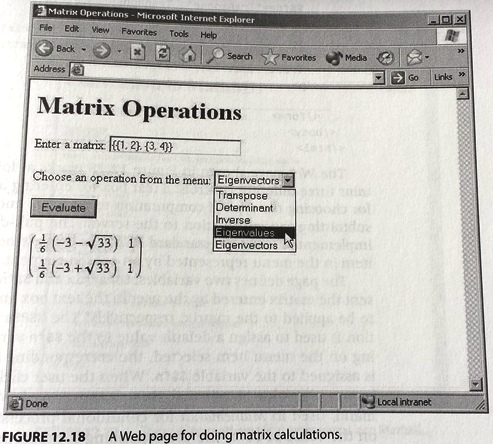
Figure: A Web page for doing matrix calculations.
The Web page shown in the figure above works as follows. It contains three different controls: a text box for entering input, a menu for choosing the type of computation to perform, and a button for submitting the information to the server. The pull-down menu is implemented using the standard HTML select element, with each item in the menu represented by an option element.
The page defines two variables, $$matrix and $$fn, which represent the matrix entered by the user in the text box and the function to be applied to the matrix, respectively. The MSPSetDefault function is used to assign a default value to the $$fn variable. Depending on the menu item selected, the corresponding function name is assigned to the variable $$fn. When the user clicks the "Evaluate" button, the value of $$fn and $$matrix are passed to the Which command, used in Mathematica for conditional processing. Depending on the value of $$fn, the corresponding computation is performed on $$matrix, and the result is displayed in the Web page using MSPFormat.
Copyright © CHARLES RIVER MEDIA, INC., Massachusetts (USA) 2003
Printing of the online version is permitted exclusively for private use. Otherwise this chapter from the book "The MathML Handbook" is subject to the same provisions as those applicable for the hardcover edition: The work including all its components is protected by copyright. All rights reserved, including reproduction, translation, microfilming as well as storage and processing in electronic systems.
CHARLES RIVER MEDIA, INC., 20 Downer Avenue, Suite 3, Hingham, Massachusetts 02043, United States of America