XML-Technologien / XSL-FO / Referenz / Antenna House Formatter XSL Extensions / Properties / border-top-right-radius
(Auszug aus "XSL-FO ― Die Referenz" von Manuel Montero Pineda & Steffen Herkert, 2016, dpunkt.verlag)
A | B | C | D | E | F | G | H | I | J | K | L | M | N | O | P | Q | R | S | T | U | V | W | X | Y | Z
Category Borders >> Rounding Border
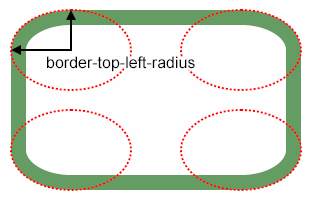
Specifies the radii of the rounded corners. [CSS3-Background] Curve Radii: the ‘border-radius’ properties
Value: | [<length>|<percentage>] [<length>|<percentage>]? |
Initial: | 0 |
Applies to: | all elements which can have borders |
Inherited: | no |
Percentages: | border box V6.3MR3 |
The first value is the horizontal radius (or vertical if the 'writing-mode' is vertical). If the second length is omitted it is equal to the first. If either length is less or equal 0, the corner is square, not rounded. For rounded table borders, when border-collapse="collapse" is specified, border-radius is effective only when specified to fo:table.
XSL-FO sample:
<fo:root xml:lang="en" xmlns:fo="http://www.w3.org/1999/XSL/Format" xmlns:cpfo="http://www.compart.net/xmlns/cpfo" xmlns:svg="http://www.w3.org/2000/svg" xmlns:axf="http://www.antennahouse.com/names/XSL/Extensions">
<axf:document-info name="document-title" value="Form field"/>
<axf:document-info name="author" value="Antenna House, Inc."/>
<fo:layout-master-set>
<fo:simple-page-master page-height="297mm" page-width="210mm" margin-top="10mm" margin-left="20mm" margin-right="20mm" margin-bottom="10mm" master-name="PageMaster1">
<fo:region-after extent="7mm"/>
<fo:region-body margin-top="0mm" margin-left="0mm" margin-right="0mm" margin-bottom="10mm"/>
</fo:simple-page-master>
</fo:layout-master-set>
<fo:page-sequence master-reference="PageMaster1">
<fo:static-content flow-name="xsl-region-after">
<fo:block font-size="0.8em" text-align="right" color="green">
<fo:basic-link external-destination="http://www.antennahouse.com/">
Antenna House, Inc.
</fo:basic-link>
</fo:block>
</fo:static-content>
<fo:flow flow-name="xsl-region-body" font-family="serif" font-size="1em" line-height="1.4" axf:hyphenate-hyphenated-word="false" hyphenate="true">
<fo:block span="all" font-family="sans-serif" font-size="2em" font-weight="bold" line-height="2" space-before="1em" space-after="1em" space-before.conditionality="retain" space-after.conditionality="retain" background-color="#EEEEEE">
<fo:block start-indent="1em" end-indent="1em">
Form field
</fo:block>
</fo:block>
<fo:block span="all" space-before="1em" space-after="1em" space-after.conditionality="retain" text-indent="0em" border="1pt solid #9999FF" start-indent="0.5em" end-indent="0.5em" padding="0.5em" text-align="justify">

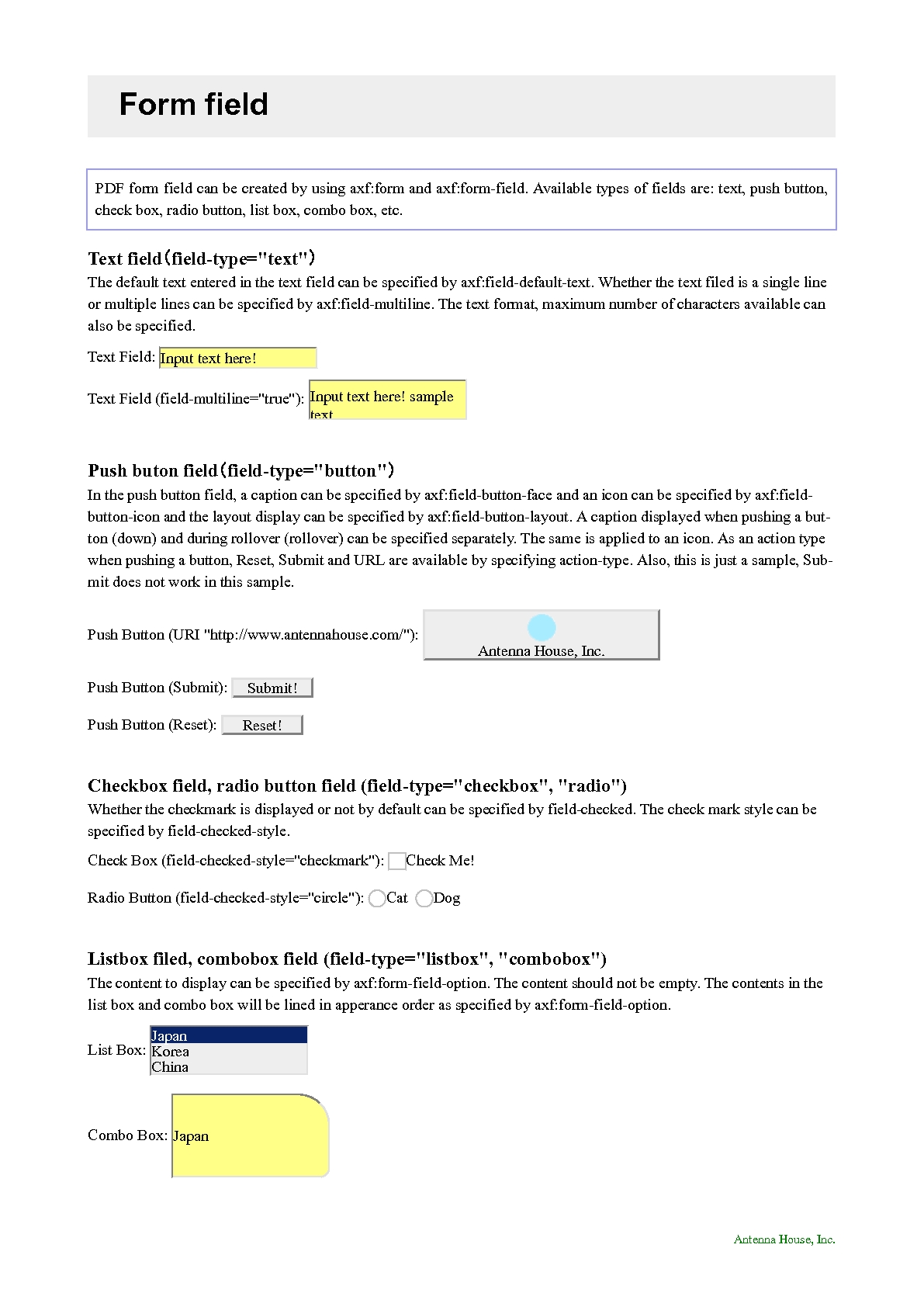
PDF form field can be created by using axf:form and axf:form-field. Available types of fields are: text, push button, check box, radio button, list box, combo box, etc.

</fo:block>
<axf:form external-destination="http://www.antenna.co.jp/form-test.cgi" field-submit-method="post" field-submit-coordinates="true">
<fo:block font-size="1.2em" font-weight="bold" space-before="1em">
Text field(field-type="text")
</fo:block>
<fo:block>

The default text entered in the text field can be specified by axf:field-default-text. Whether the text filed is a single line or multiple lines can be specified by axf:field-multiline. The text format, maximum number of characters available can also be specified.

</fo:block>
<fo:block space-before="0.5em">
 Text Field:
<axf:form-field field-type="text" field-name="InputText-1" field-default-text="Input text here!" field-multiline="false" field-scroll="true" field-maxlen="32" width="10em" height="1.2em" background-color="#ff8" border="1pt silver inset"/>
</fo:block>
<fo:block space-before="0.5em">
 Text Field (field-multiline="true"):
<axf:form-field field-type="text" field-name="InputText-2" field-default-text="Input text here! sample text" field-multiline="true" field-scroll="true" field-maxlen="100" width="10em" height="2.4em" background-color="#ff8" border="1pt silver inset"/>
</fo:block>
<fo:block font-size="1.2em" font-weight="bold" space-before="2em">
Push buton field(field-type="button")
</fo:block>
<fo:block>

In the push button field, a caption can be specified by axf:field-button-face and an icon can be specified by axf:field-button-icon and the layout display can be specified by axf:field-button-layout. A caption displayed when pushing a button (down) and during rollover (rollover) can be specified separately. The same is applied to an icon. As an action type when pushing a button, Reset, Submit and URL are available by specifying action-type. Also, this is just a sample, Submit does not work in this sample.
</fo:block>
<fo:block space-before="1em">
 Push Button (URI "http://www.antennahouse.com/"):
<axf:form-field field-type="button" field-name="URI Button" action-type="uri" external-destination="url('http://www.antennahouse.com/')" field-button-layout="caption-below-icon" field-button-face="Antenna House, Inc." field-button-face-down="Down" field-button-face-rollover="Rollover" field-button-icon="url(img/icon1.png)" field-button-icon-down="url(img/icon2.png)" field-button-icon-rollover="url(img/icon3.png)" width="15em" height="3em" background-color="#eee" border="2px silver outset"/>
</fo:block>
<fo:block space-before="1em">
 Push Button (Submit):
<axf:form-field field-type="button" field-name="SubmitButton" action-type="submit" field-button-layout="caption" field-button-face="Submit!" width="5em" background-color="#eee" border="2px silver outset"/>
</fo:block>
<fo:block space-before="1em">
 Push Button (Reset):
<axf:form-field field-type="button" field-name="ResetButton" action-type="reset" field-button-layout="caption" field-button-face="Reset!" field-button-face-down="Down" field-button-face-rollover="Rollover" width="5em" background-color="#eee" border="2px silver outset"/>
</fo:block>
<fo:block font-size="1.2em" font-weight="bold" space-before="2em">
Checkbox field, radio button field (field-type="checkbox", "radio")
</fo:block>
<fo:block>
Whether the checkmark is displayed or not by default can be specified by field-checked. The check mark style can be specified by field-checked-style.
</fo:block>
<fo:block space-before="0.5em">
 Check Box (field-checked-style="checkmark"):
<axf:form-field field-type="checkbox" field-name="CheckMe" field-checked="false" field-checked-style="checkmark" width="1em" border="1px solid silver"/>
 Check Me!
</fo:block>
<fo:block space-before="1em">
 Radio Button (field-checked-style="circle"):
<axf:form-field field-type="radio" field-name="Choice" field-value="Cat" field-checked="false" field-checked-style="circle" width="1em" border-radius="0.6em" border="1px solid silver"/>
 Cat
<axf:form-field field-type="radio" field-name="Choice" field-value="Dog" field-checked="false" field-checked-style="circle" width="1em" axf:border-radius="0.6em" border="1px solid silver"/>
 Dog
</fo:block>
<fo:block font-size="1.2em" font-weight="bold" space-before="2em">
Listbox filed, combobox field (field-type="listbox", "combobox")
</fo:block>
<fo:block>
The content to display can be specified by axf:form-field-option. The content should not be empty. The contents in the list box and combo box will be lined in apperance order as specified by axf:form-field-option.
</fo:block>
<fo:block space-before="0.5em">
 List Box:
<axf:form-field field-type="listbox" field-name="ListChoice" field-top-index="1" field-multiple="true" width="10em" height="3em" background-color="#eee" border="1pt silver inset">
<axf:form-field-option field-value="ja">
Japan
</axf:form-field-option>
<axf:form-field-option field-value="ko">
Korea
</axf:form-field-option>
<axf:form-field-option field-value="cn">
China
</axf:form-field-option>
<axf:form-field-option field-value="th">
Thailand
</axf:form-field-option>
</axf:form-field>
</fo:block>
<fo:block space-before="1em">
 Combo Box:
<axf:form-field field-type="combobox" field-name="ComboEditable" field-editable="true" field-top-index="1" axf:border-bottom-right-radius="0.6em" axf:border-top-right-radius="2em" width="10em" height="5.2em" background-color="#ff8" border="1pt silver inset">
<axf:form-field-option field-value="ja">
Japan
</axf:form-field-option>
<axf:form-field-option field-value="ko">
Korea
</axf:form-field-option>
<axf:form-field-option field-value="cn">
China
</axf:form-field-option>
<axf:form-field-option field-value="th">
Thailand
</axf:form-field-option>
</axf:form-field>
</fo:block>
</axf:form>
</fo:flow>
</fo:page-sequence>
</fo:root>Output: