XML-Technologien / XSL-FO / Referenz / Antenna House Formatter XSL Extensions / Properties / line-number-text-align
(Auszug aus "XSL-FO ― Die Referenz" von Manuel Montero Pineda & Steffen Herkert, 2016, dpunkt.verlag)
A | B | C | D | E | F | G | H | I | J | K | L | M | N | O | P | Q | R | S | T | U | V | W | X | Y | Z
Category Line Numbering
The axf:line-number-text-align specifies the alignment of line numbers in the line area. [no-LT]
Value: | auto | start | center | end | inside | outside | left | right |
Initial: | auto |
Applies to: | all block-level formatting objects which are descendants of fo:flow, fo:table-column V6.3 |
Inherited: | yes |
Percentages: | N/A |
Values have the following meanings.
start | Same as text-align. |
center | Same as text-align. |
end | Same as text-align. |
inside | Same as text-align. |
outside | Same as text-align. |
left | Same as text-align. |
right | Same as text-align. |
auto | When the position of the line numbers is in the start side, it is regarded as end. When the position of the line numbers is in the end side, it is regarded as start. The position of line numbers is specified by axf:line-number-position. |
When axf:line-number-width is not specified, It is always regarded as auto.
This property is not available with AH Formatter V6.3 Lite.
XSL-FO sample:
<fo:root xml:lang="en" xmlns:fo="http://www.w3.org/1999/XSL/Format" xmlns:cpfo="http://www.compart.net/xmlns/cpfo" xmlns:svg="http://www.w3.org/2000/svg" xmlns:axf="http://www.antennahouse.com/names/XSL/Extensions">
<axf:document-info name="document-title" value="Line number orientation"/>
<axf:document-info name="author" value="Antenna House, Inc."/>
<fo:layout-master-set>
<fo:simple-page-master page-height="150mm" page-width="210mm" margin-top="10mm" margin-left="20mm" margin-right="20mm" margin-bottom="10mm" master-name="PageMaster">
<fo:region-before extent="15mm"/>
<fo:region-after extent="15mm"/>
<fo:region-body margin-top="0mm" margin-left="0mm" margin-right="0mm" margin-bottom="0mm"/>
</fo:simple-page-master>
</fo:layout-master-set>
<fo:page-sequence axf:line-number-format="01" axf:line-number-initial="1" axf:line-number-interval="1" axf:line-number-orientation="90" writing-mode="from-page-master-region()" master-reference="PageMaster">
<fo:static-content flow-name="xsl-region-after">
<fo:block font-size="0.8em" text-align="right" color="green">
<fo:basic-link external-destination="http://www.antennahouse.com/">
Antenna House, Inc.
</fo:basic-link>
</fo:block>
</fo:static-content>
<fo:flow flow-name="xsl-region-body" font-family="serif" font-size="1em" line-height="1.4" axf:hyphenate-hyphenated-word="false" hyphenate="true">
<fo:block span="all" font-family="sans-serif" font-size="2em" font-weight="bold" line-height="2" space-before="1em" space-after="1em" space-before.conditionality="retain" space-after.conditionality="retain" background-color="#EEEEEE">
<fo:block start-indent="1em" end-indent="1em">
Line number orientation
</fo:block>
</fo:block>
<fo:block span="all" space-before="1em" space-after="1em" space-after.conditionality="retain" text-indent="0em" border="1pt solid #9999FF" start-indent="0.5em" end-indent="0.5em" padding="0.5em" text-align="justify">
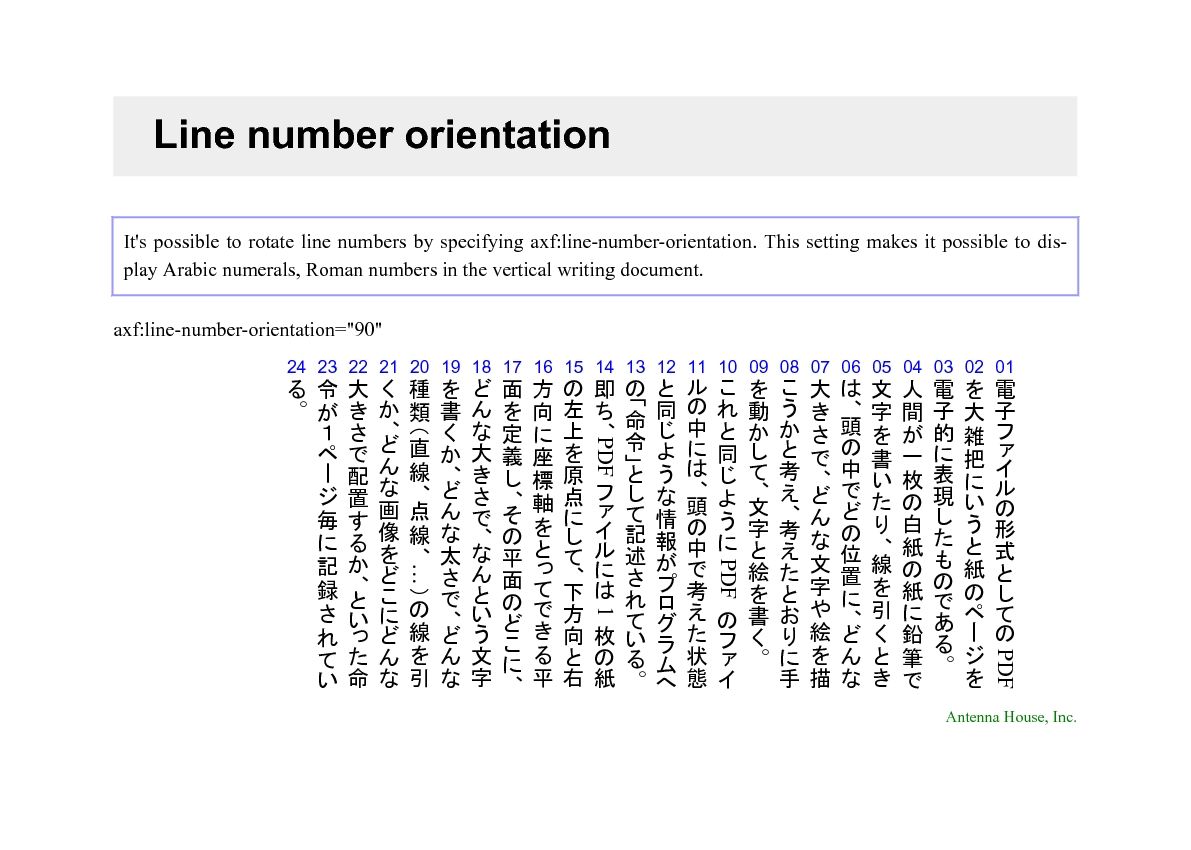
It's possible to rotate line numbers by specifying axf:line-number-orientation. This setting makes it possible to display Arabic numerals, Roman numbers in the vertical writing document.
</fo:block>
<fo:block>
axf:line-number-orientation="90"
</fo:block>
<fo:block-container space-before="1.5em" writing-mode="tb-rl" width="160mm" height="55mm" font-size="1.1em" text-align="justify" axf:line-number="show" axf:line-number-font-family="Arial" axf:line-number-font-size="0.8em" axf:line-number-font-style="normal" axf:line-number-font-weight="normal" axf:line-number-color="blue" axf:line-number-offset="3pt" axf:line-number-text-align="auto" axf:line-number-text-decoration="none" axf:line-number-width="20pt" xml:lang="ja">
<fo:block>
電子ファイルの形式としてのPDFを大雑把にいうと紙のページを電子的に表現したものである。
</fo:block>
<fo:block>
人間が一枚の白紙の紙に鉛筆で文字を書いたり、線を引くときは、頭の中でどの位置に、どんな大きさで、どんな文字や絵を描こうかと考え、考えたとおりに手を動かして、文字と絵を書く。
</fo:block>
<fo:block>
これと同じようにPDF のファイルの中には、頭の中で考えた状態と同じような情報がプログラムへの「命令」として記述されている。
</fo:block>
<fo:block>
即ち、PDFファイルには1 枚の紙の左上を原点にして、下方向と右方向に座標軸をとってできる平面を定義し、その平面のどこに、どんな大きさで、なんという文字を書くか、どんな太さで、どんな種類(直線、点線、…)の線を引くか、どんな画像をどこにどんな大きさで配置するか、といった命令が1ページ毎に記録されている。
</fo:block>
</fo:block-container>
</fo:flow>
</fo:page-sequence>
</fo:root>Output: