

XML-Technologien / MathML / Displaying MathML in web browsers / Add-on software / WebEQ
(Excerpt from "The MathML Handbook" by Pavi Sandhu)
WebEQ is a suite of Java-based software tools for authoring and displaying mathematical equations in a Web page. WebEQ consists of five components:
Editor: is a WYSIWYG tool for authoring equations using template-based palettes similar to those available in MathType.
Publisher: is a tool for processing an HTML document that contains mathematics so it can be directly placed on a Web server.
Equation Server: is a command-based version of Publisher to enable batch processing of documents; for example, using scripts on a server.
Viewer Control: is a Java applet for displaying mathematical notation in a Web browser. The equations must be enclosed in an
applettag in either MathML or WebTeX form. WebTeX is a markup language for mathematics whose syntax is very similar to that of LaTeX.Input Control: is a Java applet that enables a user to create and edit equations interactively by clicking buttons on a Web page. The equations can then be transmitted to a server for processing. For example, the Input Control can be used as part of a mathematical bulletin board. Students can graphically input equations that are then converted to images by the server and posted on a Web page.
WebEQ Input Control is primarily useful in setting up dynamic mathematical Web sites that allow users to interactively manipulate mathematical equations. The details of installing and using the Input Control are relatively complex, since it requires some knowledge of using JavaScript and Common Gateway Interface (CGI) programming on Web servers. A detailed discussion of the Input Control is deferred to Creating dynamic math web pages: WebEQ: Input Control, which specifically deals with dynamic mathematical features. A discussion of the Editor and Publisher is provided under Authoring and editing MathML: WebEQ, which deals with MathML authoring tools. In this section, we confine ourselves to discussing the features of the Viewer Control, since that is the component relevant for displaying equations.
WebEQ Viewer Control provides a way of displaying interactive MathML equations in a Web browser. For the equations to be displayed in a browser, the user must have access to a set of Viewer Control class files. These files can be either installed locally on the client machine or automatically downloaded from the server each time you view a Web page that contains an equation. For details of how to make the class files available on a Web server or to install them on a client machine, see the WebEQ product documentation.
Viewer Control applets
To be displayed by the Viewer Control, each equation must be enclosed in an applet tag. This tag is used in HTML to indicate an applet call and has the following important attributes:
codebase: specifies the location of the required WebEQ class files.code: specifies the applet to be run. For WebEQ Viewer Control applets, this attribute is always set to the value"webeq3.ViewerControl".widthandheight: specify the size of the window in which the applet is displayed.name: assigns to the applet a name that can be used to control it using a JavaScript or Java program.param: specifies additional properties of the applet. This attribute is always specified using the syntax:<param name="name" "value="value">.
The WebEQ Viewer Control recognizes a number of parameters that can be used to control specific aspects of how WebEQ should display the equation. Some of the important parameters are:
name=eq: specifies the equation to be displayed in the form of MathML or WebTeX markup.name=src: specifies the URL of file that contains the equation to be. This is an alternative to specifying the equation directly usingname=eq.name=parser: specifies the markup language used for representing the equation. The allowed values aremathmlandwebtex.
Several other input parameters control various aspects of the equation's appearance (such as its font size, color, alignment, or padding). However, you do not have to know the names of all the parameters since in most cases you will not be authoring Viewer Control applet tags by hand. You can instead create applet tags for any equation using either WebEQ Editor or Publisher. These applications allow you to specify the properties of an equation using menus or dialogs, and they automatically generate the applet tag for the equation with the appropriate parameter values included.
The following example shows a simple document that contains a Viewer Control applet tag.
Example: A sample document for displaying MathML using the WebEQ Viewer Control.
<html>
<head><title> MathML Example </title></head>
<body>
<p>Here is a simple equation.</p>
<applet codebase="../../classes" code="webeq3.ViewerControl" width="200" height="100">
<param name="size" value="12" />
<param name="eq" value="
<math xmlns='http://www.w3.org/1998/Math/MathML'>
<mrow>
<msup>
<mi>x</mi><mn>2</mn>
</msup>
<mo>-</mo>
<mrow>
<mn>2</mn>
<mo>⁢</mo>
<mi>x</mi>
</mrow>
<mo>+</mo>
<mn>1</mn>
</mrow>
</math>" />
</applet>
</body>
</html>
The following figure shows a typical document that contains WebEQ Viewer Control applets as displayed in IE.
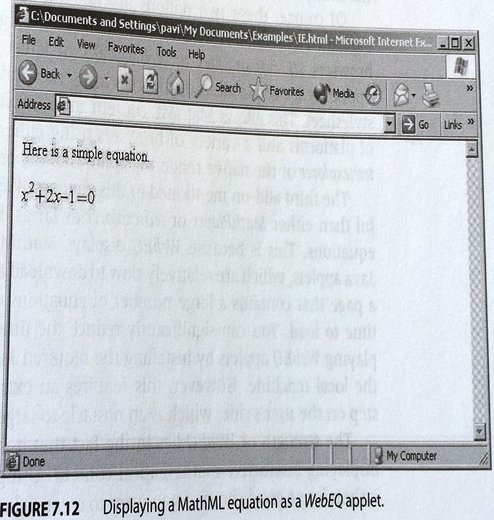
Figure: Displaying a MathML equation as a WebEQ applet.
Copyright © CHARLES RIVER MEDIA, INC., Massachusetts (USA) 2003
Printing of the online version is permitted exclusively for private use. Otherwise this chapter from the book "The MathML Handbook" is subject to the same provisions as those applicable for the hardcover edition: The work including all its components is protected by copyright. All rights reserved, including reproduction, translation, microfilming as well as storage and processing in electronic systems.
CHARLES RIVER MEDIA, INC., 20 Downer Avenue, Suite 3, Hingham, Massachusetts 02043, United States of America